Payconiq Merchant API Guide
The Payconiq Developer Guide serves as the primary technical reference document for merchants, partners and other stakeholders using the Integration APIs to accept Payments via the Payconiq platform.
Why Payconiq
Your customers do everything with their phone: look up prices, request routes to the store, compare articles. But paying with a telephone still sounds like music for the future. Just like when contactless payment was introduced a few years ago. The future is reality faster than you think. Thanks to Payconiq you can now let your customers experience the convenience of mobile payment. It is simple, fast and secure. Pay instore, online and your invoice with just your mobile phone.
This video provides more information about What Payconiq is.
For more information on the Payconiq privacy & cookies statement please click here.
Payconiq Product Overview
Payconiq offers the following products in the world of mobile payment.
Payconiq Instore
Payconiq can be directly integrated into your cash register system or pin terminal. You show a QR code in your store on a receipt, sticker (at the cash register), customer-facing screen or pin terminal. Your customer will then scan the QR code with the app on his phone. Just confirm and get paid.
Payconiq Online
Payconiq can be directly integrated into your webshop. To complete an online order, a unique QR code appears on the screen. Your customer scans it with the Payconiq-supported app and pays without having to leave your page. On mobile, it will create an app2app payment via a universal deep link.
Payconiq Invoice
Invoices paid via mobile phone are paid thrice as fast compared to normal payments and without the hassle of typing over the invoice data. Payconiq can be Payconiq can be directly integrated with your invoices and allows your customers to pay it with their mobile phone.
Latest Payconiq Version
- The current version of the Payconiq APIs is V3.
Getting Started
In order to get started, the following activities and necessary access will be arranged.
Merchant Onboarding
This is the process of setting up merchants on the Payconiq platform in order to interact with the API endpoints. As part of the onboarding process, you will receive a generated unique Merchant Identifier and an API key which will be used when interacting with the Payconiq endpoints. This will be shared via mail.
Environments
There are two environments where merchants and partners are exposed to. The External Environment (EXT) and the Production Environment (PROD).
External Environment
This is a pre-production environment where all tests and integration work are carried out. We recommend a sign off is granted on this environment before moving to the production environment. All tests performed with the test accounts never hit the production or real banking environment.
You can also email us at [email protected] to get external account access.
In case you don’t have an external account yet, please provide the following information to [email protected]:
- Company Name
- Contact First Name
- Contact Second Name
- Callback URL
- Type of Integration: Instore on display, Custom Online, app2app, POS etc. Please mention the Payconiq product for which you need a test merchant account here. Payconiq products available at: Payconiq-Developer Portal
Production Environment
This is the environment where real transactions take place. Once onboarded and transactions take place, please note that app user accounts will be debited, and merchant accounts will be credited.
Merchant Portal
Once the merchant has been onboarded, the merchant is able to view all transactions on the Payconiq merchant portal with the following URLs.
EXT Merchant Portal: https://portal.ext.payconiq.com/login
PROD Merchant Portal: https://portal.payconiq.com/login
Note: It might be that access to the merchant portal on EXT is blocked for security reasons. This is because Payconiq is not active in the country from which the merchant is requesting access. A VPN connection may be setup to be able to access the EXT merchant portal.
Payconiq Apps for Testing
Once integration is completed, you can test with the External build of Payconiq Test app (for hyperlink https://ext.payconiq.com/test-app-pwa/login)
The app can be accessed both via mobile and desktop with a camera. Testing steps:
Go to https://ext.payconiq.com/test-app-pwa/login and login using your payment profileID and API key that you received via email for EXT environment. Payment profile ID is also visible in your Merchant Portal account.
Give access to your camera.
Generate a QR code for the product you would like to test via Merchant Portal and scan it with the web test app. The amount should be between 0.01 EUR to 100 EUR.
After completing the payment, you can search for the paymentID in the Merchant Portal to verify a successful payment.
To test an unhappy scenario when the payment fails on the bank side, you can test with the amount above 100 EUR.
The Payconiq Brand Guide
Online Payments
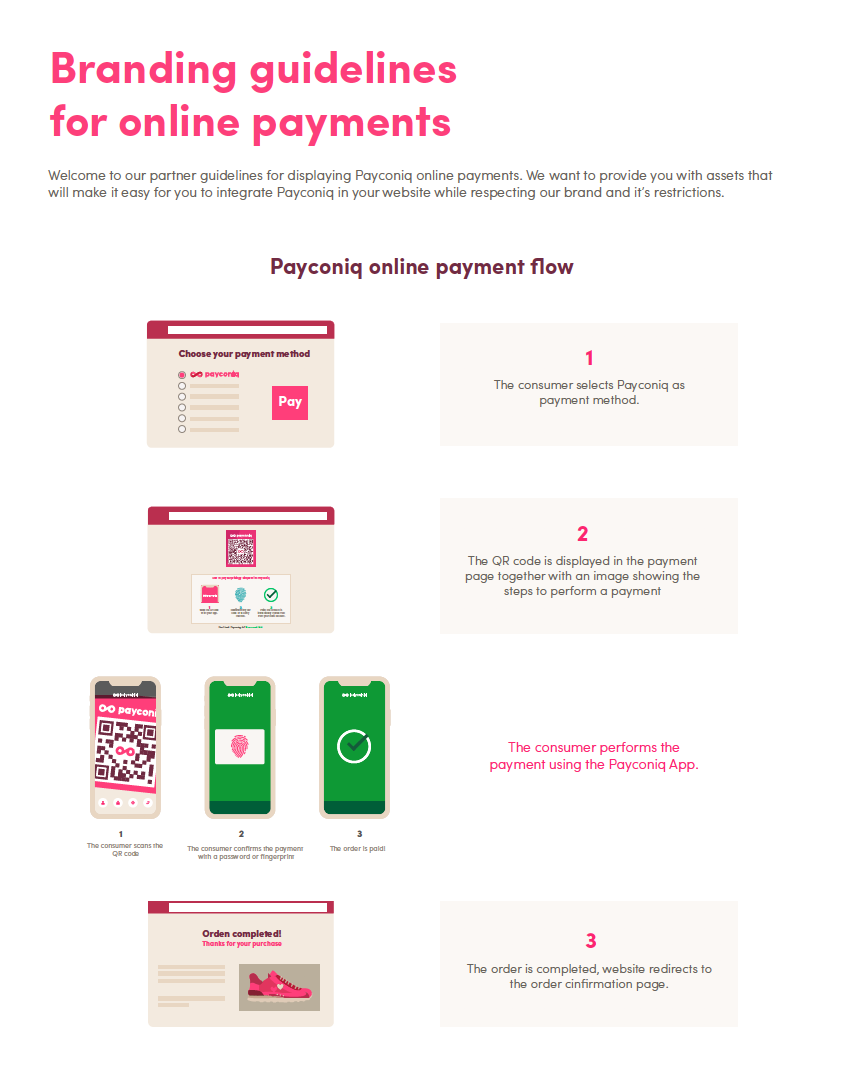
You can find Payconiq's Branding Guidelines for Online Payments here.
The Payconiq QR Code
The Payconiq QR code is branded with our mark. The branding gives trust and makes it easy for our users to see where they can pay with Payconiq. Instead of black we use our darkest shade of magenta for the QR-code to match our primary colour but still keeping the contrast.
The Payconiq QR code can be rendered in a web view container for quick scanning. A link is returned anytime a payment is created and can be easily rendered in a web view. This url makes use of Payconiq’s QR code generation service. By default, the Payconiq QR code is returned as a PNG with a small (S) size.
Sample Magenta & White Payconiq QR Code

Sample Black & White Payconiq QR Code

Payconiq QR Code Sizes and Scan Distances.
- Payconiq recommends the following Payconiq QR Code sizes and scanning distances when displaying the Payconiq QR Code.
- Take note of the scanning distance in order to use the correct Payconiq QR Code size.
| Recommend Size | Pixels | Scanning Distance |
|---|---|---|
| Small (S) | 180x180 pixels | 15 cm |
| Medium (M) | 250x250 pixels | 20 cm |
| Large (L) | 400x400 pixels | 30 cm |
| Extra Large (XL) | 800x800 pixels | 40 cm |
Payconiq QR Code Colours
- The Payconiq QR code comes in two flavours. Magenta and white or Black and white.
The Payconiq Frames
Payconiq provides a branding frame consisting of a magenta border and a Payconiq logo. The Payconiq QR code should be embedded in this frame and presented to the customer when scanning a Payconiq QR code on terminal and consumer facing displays.
The frames are in both PNG and SVG formats.
An example frame before QR code is overlaid for consumer scanning.

Below is an example of the final implementation of the Payconiq QR code and Payconiq frame there is a 10% border around the QR code (bottom and sides).

Below are the frame formats that are available.
| Description | Format |
|---|---|
| Frame - Small | PNG |
| Frame - Medium | PNG |
| Frame - Large | PNG |
| Frame - Extra Large | PNG |
| Frame - Small | SVG |
| Frame - Medium | SVG |
| Frame - Large | SVG |
| Frame - Extra Large | SVG |
The Payconiq Pay Button
There are two ways to display a Payconiq payment button on a payment/check-out page for an online payment.
1. Preferably, the complete logo.

Minimum height: 20 pixels (40 retina pixels)
Minimum width: 120 pixels (242 retina pixels)
Minimum height: 4 mm
| Description | Image Format |
|---|---|
| Payconiq Logo 363 x 60 pixels | PNG |
| Payconiq Logo 242 x 40 pixels | PNG |
| Payconiq Logo 182 x 30 pixels | PNG |
| Payconiq Logo 120 x 20 pixels | PNG |
| Payconiq Logo | SVG |
2. If you have limited space available for the payment button, you can show only the Payconiq mark. Make sure to add the word 'Payconiq' next to it then.
Below is an example of how it is used.

Minimum height: 14 pixels (40 retina pixels)
Minimum width: 31 pixels (242 retina pixels)
Minimum height: 3 mm
| Description | Image Format |
|---|---|
| Payconiq Mark 93 x 42 pixels | PNG |
| Payconiq Mark 62 x 28 pixels | PNG |
| Payconiq Mark 47 x 21 pixels | PNG |
| Payconiq Mark 31 x 14 pixels | PNG |
| Payconiq Mark | SVG |
You can request a white Payconiq logo for pages with backgrounds in dark colours via [email protected].
Note:
- If the resolution is lower than the screen resolution please use the SVG instead of the PNG to keep a sharp image.
- In case any of these sizes are not compatible with your setup please get in touch via [email protected] for further assistance.
Payouts
For all Payconiq payments that are made to our merchant, Payconiq ensures that that funds are credited to your bank account by means of a credit transfer. The credit transfer for payments to your account can be received in two ways.
Bulk Payouts - All payments to your merchant for a day are credited as one single line item on your bank account.
Individual Payouts - All payments to your merchant are credited as multiple line items on your bank account.
By default your merchant is configured to have Individual Payouts. If you would like to receive Bulk Payouts for payments to your merchant, please reach out to Buckaroo at [email protected].
Bulk Payouts and Remittance
Bulking of payments refers to the process of aggregating individual consumer payments in batches. In order to have your successful transactions bulked, the bulking service has to be enabled for your merchant. Bulking feature is provided through Buckaroo. Please send an email to [email protected] in order to have the feature enabled.
The bulking of transactions is based on your bank account and Merchant Id. With this method all payments are aggregated based on your bank account number (IBAN) and Merchant Id.
Bulking Notes
- Successful Transactions are bulked over the course of a day from 00:01:00 to 00:00:00 (CET) next day.
- After the transactions have been aggregated, there is a payout from Buckaroo to your bank account the working day after. For transactions done on Friday, Saturday and Sunday payout will be done from Buckaroo end but it depends on the merchant's bank if they do a payout towards merchant's account on Saturday and Sunday or not.
- Your account will be credited either two to three days after the transactions are bulked.
- The remittance information contains the date the payments were processed YYYYMMDD (8 char) + Payout end2end ID (24 char) + bulk ID (35 char) + PQ (2 char) + BulkRecon (9 char) + Merchant ID (24 char).
- Each item in the remittance information is separated by hyphens: “-”
- The bulk end to end identifier will also be in the End-to-end reference field of your bank statement.
- Reconciliation can be done via My.Buckaroo Portal.
Individual Payouts and Remittance
Buckaroo pays out all payments received to the IBAN specified during the onboarding process. These payouts are always via SEPA Credit transfers and are comprised of only consumer payments.
Remittance Information
A successful Payment results in a credit transfer from the consumer’s (payer) payment account (held with the consumer’s bank) to the Merchant's/Partner's payment bank account. There is 1 exemption to this:
If the Merchant/Partner makes use of the Buckaroo Bulking Service, then Buckaroo will credit Merchant's/Partner’s payment account via aggregated amounts in a batched fashion in an agreed timetable.
Bank Statement Description
When a Payment reaches the final status “SUCCEEDED”, the Buckaroo backend initiates a credit transfer from the consumer’s payment account to the Merchant's/Partner’s payment account or Payconiq's payment account. The remittance information provided with the credit transfer has a maximum length of 140 characters (as standardized by the European Payments Council / EPC). These 140 characters will be encoded per default as concatenated string values, separated by spaces, in accordance with the table below. Banks provide this remittance information in online banking environments and/or paper bank statements.
Sample Remittance Information


"Payconiq f60454fd52e429d71964745d Online Kassa            4zyeYIKOw54Ybc9yenL5                Mars Bars                          "
| Field Name | Description | Format |
|---|---|---|
Issuer |
The entity that facilitates Payconiq Payment | String [Max Length: 8] |
Delimiter |
Field separator | String: Space [Max Length: 1] |
Payment Identifier |
A unique identifier representing a Payconiq Payment Transaction | String: Space [Max Length: 24] |
Delimiter |
Field separator | String: Space [Max Length: 1] |
Merchant Name |
The name of the merchant where the Payconiq Payment Transaction takes place. Field is padded with spaces if the max length is not reached | String [Max Length: 23] |
Delimiter |
Field separator | String: Space [Max Length: 1] |
Reference |
A unique identifier referencing a Payconiq Payment Transaction in the Partner's system. Field is padded with spaces if the max length is not reached. | String [Max Length: 36] |
Delimiter |
Field separator | String: Space [Max Length: 1] |
Description |
A description linked to a Payconiq Payment Transaction. Field is padded with spaces if the max length is not reached. | String [Max Length: 46] |
An example of the remittance information entry is as follows for the sample values provided in the table above.
“Payconiq f60454fd52e429d71964745d Online Kassa 4zyeYIKOw54Ybc9yenL5 Mars Bars ”
Note: The above does not apply to the bulked Payconiq Payments.
Payment API Version 3 (V3)
The Payconiq API is organized around REST and uses HTTP response codes to indicate API errors. In addition, standard HTTP features such as header authentication and HTTP verbs which are understood by off the shelf HTTP clients across all the programming languages are also used. JSON bodies are used in requests and returned in relevant API responses, including errors.
Authentication
All requests to the Payconiq payment system are authenticated using API keys. API keys grant extensive access rights to the Payconiq payment system therefore ensure they are kept safe. Do not share your API keys in public areas such as online sites or client-side code. The API key is set in the header of the requests via HTTP Authorization header.
All requests are encrypted using TLS 1.2 or TLS 1.3.
All API requests must be made over Https. Any calls made over unencrypted Http will fail. Wrong API keys or API requests without an API keys will also fail.
To receive an API key, a formal request has to be raised with a Payconiq account manager who will ensure that the correct access is provided.
Merchant Callback
Each Merchant or Partner may define a specific asynchronous HTTPS confirm URL (callback URL) via which Payconiq will notify the status of a payment. This allows the merchant’s or partner’s backend to react to the payment and process the data (mark the payment in database, update the product count number, send an email to the consumer, etc). The callbacks are asynchronous. The callbacks are issued via HTTP POST requests and encrypted using TLS 1.2.
You may choose to receive the payment callbacks either via one-way or two-way(requires enablement on server side) TLS encryption.
TLS One-way TLS Encryption Support
In the TLS One-way encyrption, all callback requests will be encrypted where the Payconiq backend verifies the certificate of the merchant or partner anytime Payconiq sends a callback request. There is not requirement to exchange certificates beforehand and the callbacks should work out of the boc. Please contact [email protected] if you are having any issues.
TLS Two-way TLS Encryption Support (TLS-Mutual Authentication)
In the two-way TLS encryption support, the merchant or parter verifies the details of Payconiq before processing the details of the callback. This allows Payconiq and the merchant or partner to communicate with privacy and data integrity with an additional JWS security. Please reach out to [email protected] regarding necessary certificate details that need to be shared if this is required.
TLS-MA Certificate Rotation & Pinning
Payconiq reserves the right to rotate its certificate without informing the merchant or partner since each certificate has a validity period or may be compromised. In case the merchant or partner pins certificates, it must only pin the Payconiq certificate on the CN name. This will make rotation of the certificate seamless.
Callback Retry Policy
Payconiq guarantees sending a callback to the backend of a merchant or partner for 24 hours. In the event the merchant or parter does not respond correctly (Http 200 - OK) to the initial callback, Payconiq retries delivering the callback. After 24 hours, Payconiq stops trying to resend the callback.
Payconiq retries to send a callback for the following scenarios:
- Not responding in 15 seconds to the callback
- Responding with a Http 429 - Too Many Requests
- Responding with a Http 500 - Internal Server Error
- Responding with a Http 503 - Service Unavailable
- Responding with a Http 504 - Gateway Timeout
- Responding with a Http 509 - Bandwidth Limit Exceeded
Notes
- The status of a payment does not change.
- The content of callback does not change. The headers, body and target url remains as just as the first attempt.
- Responding with a Http 200 means that Payconiq stops sending the callback.
- After 24 hours Payconiq stops retrying the callback.
Callback Headers
The callback consists of headers of which some are informational and others used to verify the signature of the callback. The parameters in the header are made up of the following:
signature: eyJ0eXAiOiJKT1NFK0pTT04iLCJraWQiOiJ5ZXNPbmUiLCJhbGciOiJSUzI1NiIsImh0dHBzOi8vcGF5Y29uaXEuY29tL2lhdCI6IjIwMTktMDEtMTRUMTE6MTE6MTFaIiwiaHR0cHM6Ly9wYXljb25pcS5jb20vanRpIjoiR2l2ZU1lIiwiaHR0cHM6Ly9wYXljb25pcS5jb20vcGF0aCI6Ii90aGUvcm9hZC9sZXNzL3RyYXZlbGVkIiwiaHR0cHM6Ly9wYXljb25pcS5jb20vaXNzIjoiUGF5Y29uaXEiLCJjcml0IjpbImh0dHBzOi8vcGF5Y29uaXEuY29tL2lhdCIsImh0dHBzOi8vcGF5Y29uaXEuY29tL2p0aSIsImh0dHBzOi8vcGF5Y29uaXEuY29tL3BhdGgiLCJodHRwczovL3BheWNvbmlxLmNvbS9pc3MiXX0..LoBPG9T00c-0urv5FXrTWmumUJBTpTaqG5F0HciYHgi0Ck-bZrFxX8MLEgKbdv5YUMKKDnbLcFS0M4lNiGa17Qo8OOH4mCAjvuVEyoutHObd_TrZ4oUM0CX3uRNd88shemup9YPEMtRjmPZATXzStTBdQeRpq_f89bAqy2nCOxg_2BgqSnvC_R4JMA7I5SaRndvzbn80oeVHUEMkpmRFNnhRtVujeEUnfn3hBR_YIHh3vJKWArIYOV9eMkpDFb6nC_GoZoNGfPFunBUtOXU1y3gCDi6GOsa4eaDygNsBk-ZNj2v8cMRPBnHdw2oOaAjEs6K63An0bbkdKG7UzVojAw


content-type: application/json


user-agent: Payconiq Payments/v3

json

{
    "paymentId": "5ba37c3d0989e3000758b9d8",
    "transferAmount": 122,
    "tippingAmount": 0,
    "amount": 122,
    "totalAmount": 122,
    "description": "Sample description",
    "createdAt": "2019-11-26T15:26:19.363Z",
    "expireAt": "2019-11-26T15:29:19.363Z",
    "succeededAt": "2019-11-26T15:27:34.835Z",
    "status": "SUCCEEDED",
    "debtor": {
        "name": "John",
        "iban": "*************12636"
    },
    "currency": "EUR",
    "reference": "12346816AFV",
}
| Name | Description |
|---|---|
signature |
This represents a Payconiq digitally signed content using JSON data structures and base64url encoding which makes up the JSON Web Signature (JWS). |
user-agent |
The User-Agent request header contains a characteristic string that allows the network protocol peers to identify the application type, operating system, software vendor or software version of the requesting software user agent. |
content-type |
The Content-Type entity header is used to indicate the media type of the resource. |
Callback Body
The body of the callback is JSON formatted with fields indicating the status of the payment. The values in the body can be used to update the payment in the merchant’s system.
Once the signature has been verified, the values in the body can be used to update the payment in the merchant’s system.
The following parameters are included in the body of the callback request.
| Attribute | Description |
|---|---|
paymentId [String, required] Fixed length: 24 chars |
The unique Payconiq payment id. |
amount [Integer, required] Minimum: 1 Maximum: 999999 |
Payment amount in Euro cents. |
transferAmount [Integer, required] Minimum: 1 Maximum: 999999 |
The amount the consumer will be charged in Euro cents |
tippingAmount [Integer, required] Minimum: 1 Maximum: 999999 |
The amount added as a tip by the consumer in Euro cents (currently not supported). |
totalAmount [Integer, required] Minimum: 1 Maximum: 999999 |
The amount the consumer pays in total in Euro cents. |
currency [String, optional] |
Payment currency code in ISO 4217 format. Only Euros supported at the moment. |
description [String, optional] |
Custom description of the payment. This will be shown to the consumer when making payments and will be present on the bank statement of the merchant and consumer for reconciliation purposes. Only the first 35 characters are used for the remittance information. |
reference [String, optional] |
Merchant’s payment reference used to reference the Payconiq payment in the merchant’s system. |
createdAt [String, required] Format: YYYY-MM-ddTHH:mm:ss.SSSZ |
The creation date and time of the Payconiq payment. |
expireAt [String, required] Format: YYYY-MM-ddTHH:mm:ss.SSSZ |
The date and time when a Payconiq payment expires. |
succeededAt [String, optional] Format: YYYY-MM-ddTHH:mm:ss.SSSZ |
The date and time when a Payconiq payment succeeded. |
status [String::enum, required] Allowed values: PENDING, IDENTIFIED, AUTHORIZED, AUTHORIZATION_FAILED, SUCCEEDED, FAILED, CANCELLED, EXPIRED,PENDING_MERCHANT_ACKNOWLEDGEMENT. |
The status of the Payconiq Payment. |
debtor[JSON Object, required] |
The consumer account object that makes payments to the merchant |
debtor.name [String, optional] |
Debtor's first name. |
debtor.iban [String, optional] |
Debtor's IBAN masked. |
The main statuses that are most important to the implementation are as follows and have been described above. These are returned as the end state of a transaction.
- SUCCEEDED
- FAILED
- EXPIRED
- CANCELLED
- AUTHORIZATION_FAILED
Other status names that can also be returned when the transaction status is obtained are as follows.
- AUTHORIZED
- PENDING
- IDENTIFIED
The Callback Signature
To prove that Payconiq generated the callback to the merchant, the Payconiq API sends a detached JSON Web Signature(JWS) which includes the signed base64UrlEncoded header and request body. The signature is signed using a publicly hosted certificate. A JWS represents these logical values separated by dots(.):
- JOSE Header
- JWS Payload (Not included)
- JWS Signature
The signature will be generated as per following instructions:
jws = base64URLEncode(JOSE Header)..base64URLEncode(alg(base64URLEncode(JOSE Header).base64URLEncode(Request Body)))
Terminologies
| Name | Description |
|---|---|
| JSON Web Signature (JWS) | A data structure representing a digitally signed message. |
| JSON Object Signing and Encryption (JOSE) Header | JSON object containing the parameters describing the cryptographic operations and parameters employed. |
| JSON Web Key (JWK) | A JSON object that represents a cryptographic key. The members of the object represent properties of the key, including its value. |
| JSON Web Key Set (JWKS) | A JSON object that represents a set of JWKs. |
The JOSE Header setup by Payconiq consists of the following:
{
"typ": "jose+json",
"kid": "JWK kid",
"alg": "ES256",
"crit": ["https://payconiq.com/sub", "https://payconiq.com/iss", "https://payconiq.com/iat", "https://payconiq.com/jti", "https://payconiq.com/path"],
"https://payconiq.com/sub" : "{PaymentProfileId}",
"https://payconiq.com/iss" : "Payconiq",
"https://payconiq.com/iat" : "{Current creation date time in [ISODateTime format], expressed in UTC time format(YYYY-MM-DDThh:mm:ss.sssZ)},
"https://payconiq.com/jti" : "{Unique-request-identifier}",
"https://payconiq.com/path": "callback request path ex. https://www.merchantcallback.com/payconiqpayment"
}
JOSE Header Fields
| Header Parameter | Description |
|---|---|
| typ - Type | The "typ" (type) Header Parameter is used by JWS applications to declare the media type [IANA.MediaTypes] of this complete JWS. |
| kid - Key ID | The "kid" (key ID) Header Parameter is a hint indicating which key was used to secure the JWS |
| alg - Algorithm | The "alg" (algorithm) Header Parameter identifies the cryptographic algorithm used to secure the JWS. |
| crit - Critical | The "crit" (critical) Header Parameter indicates that extensions to this specification and/or [JWA] are being used that MUST be understood and processed. |
Verifying the Callback Signature
The merchant or Partner must verify the signature in order to obtain cryptographic proof regarding the integrity and authenticity of the message.
To verify the JWS, refer to the JWS documentation which provides extensive guidelines.
Alternatively, the following steps can be performed to verify the signature. If any of the listed steps fails, then the signature cannot be verified.
Notes
- Prior to verifying the signature, you can cache the full JWKS. This ensures that the JWKS is not always downloaded via the URL to verify the signature.
- To know which JWK to use in verifying the signature, retrieve the JWK whose key id matches with the key id in the JOSE Header of the signature.
- The JWKS can be downloaded and re-cached whenever the key id in the JOSE Header does not match what was previously cached.
- The ES256 signature algorithm is whitelisted. The algorithm of the JWK.
Steps
- This assumes that the JWKS has been cached.
- Extract the "kid" field from the JOSE Header of the signature.
- Compare the extracted "kid" with the cached "kid" in the JWKS. If there is a match, jump to step 3. If they do not match, jump to step 4.
Use the cached JWK to verify the signature using your preferred library (for java the standard is jose4j) making sure that:
->> The following critical headers are set: "https://payconiq.com/iat", "https://payconiq.com/jti", "https://payconiq.com/path", "https://payconiq.com/iss", "https://payconiq.com/sub".
Refresh the JWKS cached by downloading the latest JWKS.
- Extract the "kid" field from the JOSE Header of the signature to retrieve the corresponding JWK.
Used the cached JWK to verify the signature using your preferred library (for java the standard is jose4j) making sure that:
->> The following critical headers are set: "https://payconiq.com/iat", "https://payconiq.com/jti", "https://payconiq.com/path", "https://payconiq.com/iss", "https://payconiq.com/sub".
- This assumes that the public key certificate has not been cached.
- Extract the "kid" field from the JOSE Header of the signature.
- Download the JWK which matches the key id ("kid") field in the JOSE Header of the signature.
Use the downloaded JWK to verify the signature using your preferred library (for java the standard is jose4j) making sure that:
->> The following critical headers are set: "https://payconiq.com/iat", "https://payconiq.com/jti", "https://payconiq.com/path", "https://payconiq.com/iss", "https://payconiq.com/sub".
It is important to confirm that the signature is valid before processing the callback. This is to ensure that the payment data returned has not been tampered with and has been processed by Payconiq.
The Payconiq Certificates
The certificate is hosted in a JSON Web Key (JWK) format as a JSON Web Key Set (JWKS). They can be found using the following links:
EXT Path to JWK: https://ext.payconiq.com/certificates
PROD Path to JWK: https://payconiq.com/certificates
Rotating Payconiq Certificates
Payconiq reserves the right to rotate the certificates used to generate the callback signature. In view of this, Payconiq recommends programmatically fetching the JWKs and using the values to verify the signature.
Payconiq will follow and below guidelines with regards to hosting and rotating JWKs.
Rotating the JWK Payconiq will append a new JWK with a new kid to the existing JWKs for the first 24 hours. After the 24-hour period, the old JWK will be removed from the host site location.
Merchants and Partners should cache the JWKs for a period of 12 hours and use it to verify any signature sent by Payconiq. After 12 hours, the JWKs must be re-cached automatically. If there any changes made to the JWKs, the changes should come into effect.
Please contact devsupport if the signature verification continues to fail.
Status codes and Errors
The Payconiq API uses conventional HTTP response codes to indicate success or failure of an API request. In general, codes in the 2xx range indicate success, codes in the 4xx range indicate malformed client request (e.g., a required parameter was omitted, a charge failed, etc.) and codes in the 5xx range indicate an error with Payconiq servers. All errors should be handled programatically to prevent applications from breaking.
In the event of an error status code, an error object will be returned as part of the response when the API endpoint is called.
HTTP Codes used by Payconiq
Below are the list of codes Payconiq uses via HTTP responses.
| Status Code | Description |
|---|---|
200 - Ok |
Everything works as expected. |
201 - Created |
Payconiq has successfully fulfilled the request to create a payment. |
204 - No Content |
Payconiq has successfully fulfilled the request to cancel a payment. |
400 - Bad Request |
The request was unacceptable. This usually happens when there are missing parameters. |
401 - Unauthorized |
The API key provided is not valid. |
403 - Forbidden |
The user is not allowed to access the resource requested. |
404 - Not Found |
The requested resource does not exist. |
422 - Unprocessable Entity |
Payconiq cannot process the request due to restrictions. |
429 - Too Many Requests |
This error code is returned when there are too many requests to the Payconiq backend. |
500 - Internal Server Error |
Something went wrong on Payconiq’s end. (This is rare) |
503 - Service Unavailable |
Something went wrong on Payconiq’s end. (This is rare) |
Payment Statuses
Below is the list of statuses that are returned by the Payconiq API.
| Status Name | Status Description |
|---|---|
AUTHORIZED |
This is the status of a payment before it is set to SUCCEEDED. Payconiq internal checks for payment are successful. This occurs before the payment is sent to the bank for processing. |
AUTHORIZATION_FAILED |
This occurs when the bank fails to approve a payment due to validation reasons. These reasons include insufficient funds, limits exceeded, etc. |
CANCELLED |
A payment has been cancelled by a merchant or consumer. If a payment is cancelled, it cannot be scanned and paid. |
EXPIRED |
A payment has exceeded the allowable time to pay. If a payment has expired, it cannot be paid. |
FAILED |
Something has gone wrong while confirming a payment such as incorrect consumer or merchant data setup. |
IDENTIFIED |
A payment has been scanned by a Payconiq supported app and is pending confirmation or cancellation. |
PENDING |
A payment has been created and it has not been scanned. Consumers can scan QR code linked to this payment and confirm it. |
SUCCEEDED |
A payment has been authorized and processed successfully by Payconiq and the consumer's bank. This the final end state of a successful payment. |
PENDING_MERCHANT_ACKNOWLEDGEMENT |
A Payment has been has been confirmed by a consumer and is pending acknowledgment from the partner to either complete or void the payment. Note: This was only supported where Void was enabled for the partner, currently void flow is not supported by Payconiq. |
Errors
The Payconiq API uses conventional HTTP response codes in combination with a JSON body to indicate success or failure of an API request. The body of an error response will contain the following fields.
Error Response Definition
| Attribute | Comment/Format |
|---|---|
code - Text describing the error that has occurred. |
[String, required] UNAUTHORIZED, ACCESS_DENIED, PAYMENT_NOT_FOUND, TECHNICAL_ERROR, CALLER_NOT_ALLOWED_TO_CANCEL, PAYMENT_NOT_FOUND, PAYMENT_NOT_PENDING, PAYMENT_CONFLICT, BODY_MISSING, FIELD_REQUIRED, QR_NO_LONGER_IN_USE, UNABLE_TO_PAY_CREDITOR, TRY_AGAIN_LATER |
message - Text describing the error that has occurred. |
[String, required] |
traceId - The id that is assigned to a single request or job. |
[String, required] |
spanId - The id of work unit where the error occurred. |
[String, required] |
Handling Errors
The Payconiq API libraries send back error statuses for many reasons such as failed charge, invalid parameters, authentication errors, timeouts etcetera. We recommend writing code that gracefully handles all possible API errors.
Payconiq Instore (V3) - Display
Pay mobile by scanning the QR code on a customer facing screen and terminal.
Process Flow
Involved Parties:
- Payconiq-supported app – Payconiq consumer application.
- Merchant Frontend – POS terminal or Customer facing display.
- Merchant Backend – Backend of merchant that integrates and interacts with Payconiq.
- Payconiq Backend – Backend of Payconiq that provides integration and payment services.
Instore Process Flow
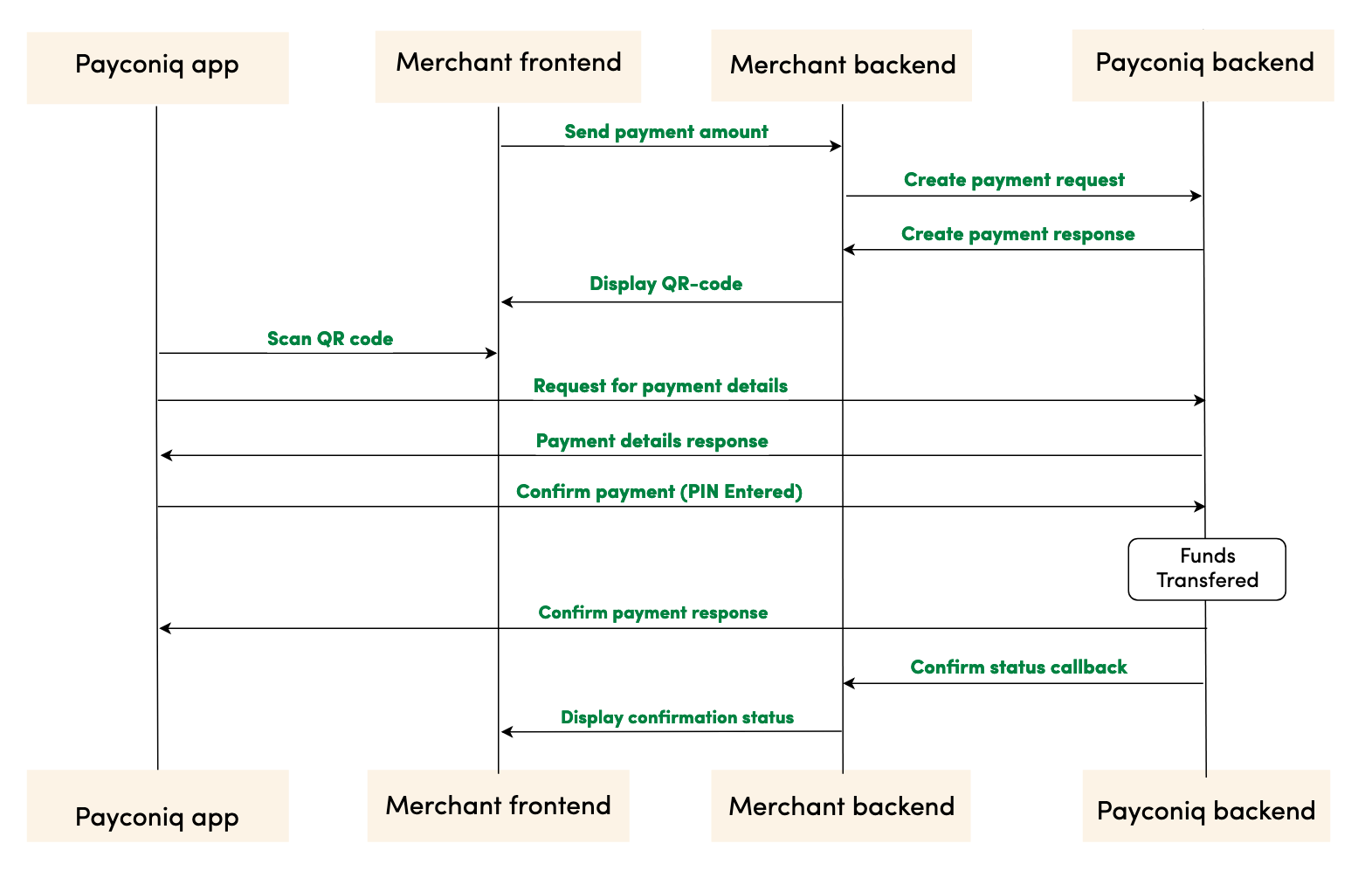
Step by step payment flow
- Merchant frontend sends payment creation details to Merchant’s backend. This will contain at least the payment amount.
- Merchant backend sends a REST request to the Payconiq backend to create a payment. The parameters passed in this request are the payment amount, payment currency, payment description and other parameters.
- Payconiq backend returns the created payment with the Payconiq payment id and other relevant details to the merchant’s backend – including the QR code.
- The merchant’s backend sends the Payconiq QR url to the merchant frontend to render the payment as a QR code.
- Payconiq-supported app scans the QR code in order to start the payment for the amount displayed. A request for payment details is sent to the Payconiq backend for the payment.
- Payconiq backend sends the payment details to the Payconiq-supported app which would contain the name of the merchant and the amount to pay.
- The consumer confirms the payment by entering his/her PIN, fingerprint or face id and a payment request is sent to the Payconiq Backend for authorization.
- A payment response with the details is sent back to the Payconiq-supported app indicating a success or failure of the payment.
- Payconiq backend sends a payment notification to the Merchant backend with the payment details to the callback url. The details of the notification will either contain success or failure details.
- The merchant frontend displays the confirmation status it receives from Payconiq.
- The consumer is notified of the payment status via the app.
NB: The order of consumer and merchant notification is not sequential. One may arrive before the other depending on internet and network connections.
Prerequisites
- API Key – This is used to secure the request between the merchant’s backend and Payconiq’s backend. Do not share your API keys in public areas such as online sites or client-side code.
- Merchant CallbackUrl (Optional) – This URL will be called by Payconiq’s backend servers in order to send the status of the payment to the merchant.
Please follow the below steps to successfully implement the Payconiq API in your payment terminal or customer facing display.
Create Payment
In order to begin a payment, you need to create a payment via the Payconiq through a POST request. A unique payment identifier is valid for two minutes (120 seconds) after which it expires. If a payment does not take place within these two minutes, a new payment has to be created.
Type: REST
HTTP Verb: POST
EXT URL Definition: https://api.ext.payconiq.com/v3/payments
PROD URL Definition: https://api.payconiq.com/v3/payments
Create Payment Request Header
| Attribute | Comment/ Format |
|---|---|
Authorization [String, required] |
Authorization field which contains the API Key. Bearer xxxxxxxx-xxxx-xxxx-xxxx-xxxxxxxxxxxx |
Content-type [String, required] application/json |
Content type of the data in the request body. |
Example Request:
curl -X POST
  https://api.ext.payconiq.com/v3/payments
  -H 'Authorization: Bearer xxxxxxxx-xxxx-xxxx-xxxx-xxxxxxxxxxxx'
  -H 'Cache-Control: no-cache'
  -H 'Content-Type: application/json'
  -d '{
         "amount" : "999999",
         "currency" : "EUR",
         "callbackUrl": "https://dummy.network/api/v1/orders/payconiq",
         "description": "Test payment 12345",
         "reference": "12345",
         "bulkId":"Bulk-1-200"
      }'
Create Payment Request Body
| Attribute | Description |
|---|---|
amount [Integer, required] Minimum: 1 Maximum: 999999 |
Payment amount in Euro cents. |
callbackUrl [URI, optional] |
A url to which the Merchant or Partner will be notified of a payment. Must be Https for production. |
currency [String, Optional] |
Payment currency code in ISO 4217 format. Only Euros supported at the moment. Value: EUR |
description[String, optional] Maximum Length: 140 chars |
Custom description of the payment. This will be shown to the consumer when making payments and will be present on the bank statement of the merchant and consumer for reconciliation purposes. Only the first 35 characters are used for the remittance information. |
reference [String, optional] Maximum Length: 36 chars |
External payment reference used to reference the Payconiq payment in the calling party's system. |
bulkId [String, optional] Maximum Length: 35 chars |
A field set to reference a bulk batch payment. |
Example Response:
HTTP/1.1 201 Created
{
    "paymentId": "5bdb1685b93d1c000bde96f2",
    "status": "PENDING",
    "createdAt": "2018-09-18T11:43:29.160Z",
    "expiresAt": "2018-09-18T11:43:29.160Z",
    "description": "Sample description",
    "reference": "987456264",
    "amount": 999999,
    "currency": "EUR",
    "creditor": {
        "profileId": "5b71369f5832fd22658e0ef4",
        "merchantId": "5b71369f5832fd09188e0915",
        "name": "Merchant Name",
        "iban": "NL47FRBK0293409698",
        "callbackUrl": "https://www.testcallback.com/payconiq/payment"
    },
    "_links": {
        "self": {
            "href": "https://api.ext.payconiq.com/v3/payments/5bdb1685b93d1c000bde96f2"
        },
        "deeplink": {
            "href": "https://payconiq.com/pay/2/5bdb1685b93d1c000bde96f2"
        },
        "qrcode": {
            "href": "https://portal.ext.payconiq.com/qrcode?c=https%3A%2F%2Fpayconiq.com%2Fpay%2F2%2F5bdb1685b93d1c000bde96f2"
        },
        "cancel": {
            "href": "https://api.ext.payconiq.com/v3/payments/5bdb1685b93d1c000bde96f2"
        }
    }
}
Create Payment Response
The following parameters are included in the header and body of the create payment response.
Response Header
| Attribute | Description |
|---|---|
Http Status Code [Integer] |
Status code of the HTTP POST response. 2xx – Indicates success 4xx – Indicates malformed client request 5xx – Indicates errors with Payconiq servers |
Content-type [String] application/json |
Content type of the data |
Response Body
| Attribute | Description |
|---|---|
paymentId [String, required] Fixed length: 24 chars |
The unique Payconiq payment id. |
status [String::enum, required] Allowed values: PENDING |
The status of the Payconiq Payment. |
createdAt [String, required] Format: YYYY-MM-ddTHH:mm:ss.SSSZ |
The creation date and time of the Payconiq payment. |
expiresAt [String, required] Format: YYYY-MM-ddTHH:mm:ss.SSSZ |
The date and time when a Payconiq payment expires. |
description [String, optional] |
Custom description of the payment. This will be shown to the consumer when making payments and will be present on the bank statement of the merchant and consumer for reconciliation purposes. Only the first 35 characters are used for the remmittance information. |
reference [String, optional] |
Merchant’s payment reference used to reference the Payconiq payment in the merchant’s system. |
amount [Integer, required] |
Payment amount in Euro cents. |
currency [String, optional] |
Payment currency code in ISO 4217 format. Only Euros supported at the moment. |
creditor [Object, required] |
The merchant account object set to receive the Payconiq payment from a consumer. |
creditor.profileId [String, required] |
The unique payment product identifier of the merchant. |
creditor.merchantId [String, required] |
The unique identifier of a merchant. |
creditor.name [String, required] |
The merchant’s company name that will be shown to the consumer. |
creditor.iban [String, required] |
The bank account of the merchant where payments will be sent to. |
creditor.callbackUrl [String, optional] |
A URL to which the Merchant or Partner will be notified of a payment. Must be https for production. |
_links [Object, optional] |
Links object which contain urls to be used by merchants to load the QR codes, perform App2App linking, cancel a payment and get the payment details. |
_links.self [Object, optional] |
Hypermedia GET URL used to fetch payment details |
_links.self.href [String :: URI, optional] |
URL String. |
_links.deeplink [Object, optional] |
Hypermedia GET URL used to perform App2App linking |
_links.deeplink.href [String :: URI, optional] |
URL String. |
_links.qrcode [Object, optional] |
Hypermedia GET URL used to fetch QR code for display and scanning purposes (PNG/SVG) |
_links.qrcode.href [String :: URI, optional] |
URL String. |
_links.cancel [Object, optional] |
Hypermedia DELETE URL used to cancel a payment. |
_links.cancel.href [String :: URI, optional] |
URL String. |
HTTP/1.1 400 Bad Request
{
    "traceId": "b2586833395d4750",
    "spanId": "c235e54376fab4b9",
    "code": "FIELD_IS_REQUIRED",
    "message": "Field 'amount' is mandatory"
}
Create Payments HTTP Status and Error Codes
Below are the status codes and descriptions returned as part of the API responses.
| Status Code | Error Codes |
|---|---|
400[Integer] |
BODY_MISSING: A JSON body needs to be provided. FIELD_IS_REQUIRED: A mandatory field is missing from the JSON request. FIELD_IS_INVALID: A field provided is not valid. Eg: The length of a field exceeds what is required. |
401 [Integer] |
UNAUTHORIZED: The user not have an API Key or API Key is incorrect. |
403 [Integer] |
ACCESS_DENIED: The API key could not be verified or the API key does not contain the required authority to access the resource requested. |
404 [Integer] |
MERCHANT_PROFILE_NOT_FOUND: The merchant profile for creating a payment does not exist. |
422 [Integer] |
UNABLE_TO_PAY_CREDITOR: This could be returned for multiple reasons in case something goes wrong. |
429 [Integer] |
Too Many Requests |
500 [Integer] |
TECHNICAL_ERROR: Technical error in the Payconiq payment service. |
503 [Integer] |
Service Unavailable |
The Payconiq QR Code
The QR Code can be displayed using the following method.
The Payconiq QR code can be rendered in a web view container for quick scanning. A parameter with name _links.qrcode.href returns a link that can be easily rendered in a web view. This url makes use of Payconiq’s QR code generation service. By default, the Payconiq QR code is returned as a PNG, small (S) size and magenta in color.
| Attribute | Description |
|---|---|
f [String :: Enum] Allowed Values: SVG, PNG |
Image format |
s [String :: Enum] Allowed Values: S, M, L, XL |
Image size of the QR code to generate. Small (S) = 180x180 Medium (M) = 250x250 Large (L) = 400x400 Extra Large (XL) = 800x800 The sizes only applies to PNG format. |
cl [String :: Enum] Allowed Values: magenta, black |
The colour of the QR code. Default is magenta. |
Sample formatted URL
Size: (L) Large
Image Format: PNG
Formatted Url: https://portal.payconiq.com/qrcode?c=https://payconiq.com/pay/1/5c1b589a296e9a3330aebbe0&s=L&f=PNG
Sample QR Code Image
Payconiq QR Code Sizes and Scan Distances.
- Payconiq recommends the following Payconiq QR Code sizes and scanning distances when displaying the Payconiq QR Code.
- Take note of the scanning distance in order to use the correct Payconiq QR Code size.
| Recommended Size | Pixels | Scanning Distance |
|---|---|---|
| Small (S) | 180x180 pixels | 15 cm |
| Medium (M) | 250x250 pixels | 20 cm |
| Large (L) | 400x400 pixels | 30 cm |
| Extra Large (XL) | 800x800 pixels | 40 cm |
Note:
- If the resolution is lower than the screen resolution please use the SVG instead of the PNG to keep a sharp image.
- In case any of these sizes are not compatible with your setup please get in touch via [email protected] for further assistance.
The Payconiq Callback
Payconiq calls the merchant’s callbackUrl endpoint to send the status of a payment. This is only informational towards the merchant or partner. There is no impact on a payment if it is not processed successfully by the merchant or partner.
The merchant backend must verify that the notification message originated from Payconiq and was not altered or corrupted during transmission by validating the signature.
Type: REST
HTTP Verb: POST
EXT URL Definition: {callbackUrl}
PROD URL Definition: {callbackUrl}
Callback Request Header
The following parameters are included in the header of the callback request.
signature: eyJ0eXAiOiJKT1NFK0pTT04iLCJraWQiOiJ5ZXNPbmUiLCJhbGciOiJSUzI1NiIsImh0dHBzOi8vcGF5Y29uaXEuY29tL2lhdCI6IjIwMTktMDEtMTRUMTE6MTE6MTFaIiwiaHR0cHM6Ly9wYXljb25pcS5jb20vanRpIjoiR2l2ZU1lIiwiaHR0cHM6Ly9wYXljb25pcS5jb20vcGF0aCI6Ii90aGUvcm9hZC9sZXNzL3RyYXZlbGVkIiwiaHR0cHM6Ly9wYXljb25pcS5jb20vaXNzIjoiUGF5Y29uaXEiLCJjcml0IjpbImh0dHBzOi8vcGF5Y29uaXEuY29tL2lhdCIsImh0dHBzOi8vcGF5Y29uaXEuY29tL2p0aSIsImh0dHBzOi8vcGF5Y29uaXEuY29tL3BhdGgiLCJodHRwczovL3BheWNvbmlxLmNvbS9pc3MiXX0..LoBPG9T00c-0urv5FXrTWmumUJBTpTaqG5F0HciYHgi0Ck-bZrFxX8MLEgKbdv5YUMKKDnbLcFS0M4lNiGa17Qo8OOH4mCAjvuVEyoutHObd_TrZ4oUM0CX3uRNd88shemup9YPEMtRjmPZATXzStTBdQeRpq_f89bAqy2nCOxg_2BgqSnvC_R4JMA7I5SaRndvzbn80oeVHUEMkpmRFNnhRtVujeEUnfn3hBR_YIHh3vJKWArIYOV9eMkpDFb6nC_GoZoNGfPFunBUtOXU1y3gCDi6GOsa4eaDygNsBk-ZNj2v8cMRPBnHdw2oOaAjEs6K63An0bbkdKG7UzVojAw


content-type: application/json


user-agent: Payconiq Payments/v3
| Attribute | Comment/ Format |
|---|---|
signature [String, required] |
This represents a Payconiq digitally signed content using JSON data structures and base64url encoding. The signature is made up of JSON Web Signature (JWS) and a JSON Object Signing and Encryption (JOSE) header. |
content-type [String, required] application/json |
The Content-Type entity header is used to indicate the media type of the resource. |
user-agent [String, required] |
The User-Agent request header contains a characteristic string that allows the network protocol peers to identify the application type, operating system, software vendor or software version of the requesting software user agent. |
{
    "paymentId": "5ba37c3d0989e3000758b9d8",
    "transferAmount": 122,
    "tippingAmount": 0,
    "amount": 122,
    "totalAmount": 122,
    "description": "Sample description",
    "createdAt": "2019-11-26T15:26:19.363Z",
    "expireAt": "2019-11-26T15:29:19.363Z",
    "succeededAt": "2019-11-26T15:27:34.835Z",
    "status": "SUCCEEDED",
    "debtor": {
        "name": "John",
        "iban": "*************12636"
    },
    "currency": "EUR",
    "reference": "12346816AFV"
}
Callback Request Body
The following parameters are included in the body of the callback request.
| Attribute | Description |
|---|---|
paymentId [String, required] Fixed length: 24 chars |
The unique Payconiq payment id. |
amount [Integer, required] Minimum: 1 Maximum: 999999 |
Payment amount in Euro cents. |
transferAmount [Integer, required] Minimum: 1 Maximum: 999999 |
The amount the consumer will be charged in Euro cents |
tippingAmount [Integer, required] Minimum: 1 Maximum: 999999 |
The amount added as a tip by the consumer in Euro cents (currently not supported). |
totalAmount [Integer, required] Minimum: 1 Maximum: 999999 |
The amount the consumer pays in total in Euro cents. |
currency [String, optional] |
Payment currency code in ISO 4217 format. Only Euros supported at the moment. |
description [String, optional] |
Custom description of the payment. This will be shown to the consumer when making payments and will be present on the bank statement of the merchant and consumer for reconciliation purposes. Only the first 35 characters are used for the remittance information. |
reference [String, optional] |
Merchant’s payment reference used to reference the Payconiq payment in the merchant’s system. |
createdAt [String, required] Format: YYYY-MM-ddTHH:mm:ss.SSSZ |
The creation date and time of the Payconiq payment. |
expireAt [String, required] Format: YYYY-MM-ddTHH:mm:ss.SSSZ |
The date and time when a Payconiq payment expires. |
succeededAt [String, optional] Format: YYYY-MM-ddTHH:mm:ss.SSSZ |
The date and time when a Payconiq payment succeeded. |
status [String::enum, required] Allowed values: PENDING, IDENTIFIED, AUTHORIZED, AUTHORIZATION_FAILED, SUCCEEDED, FAILED, CANCELLED, EXPIRED, PENDING_MERCHANT_ACKNOWLEDGEMENT. |
The status of the Payconiq Payment. |
debtor[JSON Object, required] |
The consumer account object that makes payments to the merchant |
debtor.name [String, optional] |
Debtor's first name. |
debtor.iban [String, optional] |
Debtor's IBAN masked. |
Callback Not Received or Signature Validation Fails
In the event where you don't receive the callback or the callback validation fails, you should Get the Transaction Details as described below. Getting the details of a payment is another sure way to know the status in order to complete the payment.
Get Payment Details
Payment details of an existing payment may be obtained. A unique payment id is passed from a payment creation request and Payconiq will return the corresponding payment information.
Note: It is recommended to implement this as a fallback option to obtaining the response via the callback URL.
Type: REST
HTTP Verb: GET
EXT URL Definition: https://api.ext.payconiq.com/v3/payments/{paymentId}
PROD URL Definition: https://api.payconiq.com/v3/payments/{paymentId}
Get Payment Details Header
The following parameters are included in the header of the request.
| Attribute | Comment/ Format |
|---|---|
Authorization [String, required] |
Authorization field which contains the API Key. Bearer xxxxxxxx-xxxx-xxxx-xxxx-xxxxxxxxxxxx |
Content-type [String, required] application/json |
Content type of the data in the request body. |
Example Request:
curl -X GET
  https://api.ext.payconiq.com/v3/payments/5b976d11dd172a0007c4429d
  -H 'Authorization: Bearer xxxxxxxx-xxxx-xxxx-xxxx-xxxxxxxxxxxx'
  -H 'Content-Type: application/json'
Get Payment Details Request Path
The following parameters are included in the path of a get payment details request.
| Attribute | Description |
|---|---|
paymentId [String, required] |
The unique Payconiq identifier of a payment as provided by the create payment service. |
Get Payment Details Response Header
The following parameters are included in the header of the get payment details response.
| Attribute | Description |
|---|---|
Http Status Code [Integer] |
Status code of the HTTP POST response. 2xx – Indicates success 4xx – Indicates malformed client request 5xx – Indicates errors with Payconiq servers |
Content-type [String] application/json |
Content type of the data |
Example Response
HTTP/1.1 200 OK
Content-Type: application/json
{
    "paymentId": "5bdaf066b93d1c000bde9683",
    "createdAt": "2019-11-26T15:26:19.363Z",
    "expireAt": "2019-11-26T15:29:19.363Z",
    "succeededAt": "2019-11-26T15:27:34.835Z",
    "currency": "EUR",
    "status": "SUCCEEDED",
    "creditor": {
        "profileId": "5b71369f5832fd22658e0ef4",
        "merchantId": "5b71369f5832fd09188e0915",
        "name": "Merchant Name",
        "iban": "NL47FRBK0293409698",
        "callbackUrl": "https://www.testcallback.com/payconiq/payment"
    },
    "debtor": {
        "name": "John",
        "iban": "*************12636"
    },
    "amount": 10,
    "transferAmount": 10,
    "tippingAmount": 0,
    "totalAmount": 10,
    "description": "Otto's Payment Test",
    "bulkId": "centraal station pos-2",
    "_links": {
        "self": {
            "href": "https://api.ext.payconiq.com/v3/payments/5bdaf066b93d1c000bde9683"
        },
        "deeplink": {
            "href": "https://payconiq.com/pay/2/5bdaf066b93d1c000bde9683"
        },
        "qrcode": {
            "href": "https://portal.ext.payconiq.com/qrcode?c=https%3A%2F%2Fpayconiq.com%2Fpay%2F2%2F5bdaf066b93d1c000bde9683"
        },
        "refund": {
            "href": "https://api.ext.payconiq.com/v3/payments/5bdaf066b93d1c000bde9683/debtor/refundIban"
        }
    }
}
Get Payment Details Response Body
The following parameters are included in the body of the get payment details response.
| Attribute | Description |
|---|---|
paymentId [String, required] Fixed length: 24 chars |
The unique Payconiq payment id. |
createdAt [String, required] Format: YYYY-MM-ddTHH:mm:ss.SSSZ |
The creation date and time of the Payconiq payment. |
expireAt [String, required] Format: YYYY-MM-ddTHH:mm:ss.SSSZ |
The date and time when a Payconiq payment expires. |
succeededAt [String, optional] Format: YYYY-MM-ddTHH:mm:ss.SSSZ |
The date and time when a Payconiq payment succeeded. |
currency [String, required] |
Payment currency code in ISO 4217 format. Only Euros supported at the moment. |
status [String::enum, required] Allowed values: PENDING, IDENTIFIED, CANCELLED, AUTHORIZED, AUTHORIZATION_FAILED, EXPIRED, FAILED, SUCCEEDED, PENDING_MERCHANT_ACKNOWLEDGEMENT |
The status of the Payconiq Payment. |
creditor [JSON Object, required] |
The merchant account object set to receive the Payconiq payment from a consumer. |
creditor.profileId [String, required] |
The unique payment product identifier of the merchant. |
creditor.merchantId [String, required] |
The unique identifier of a merchant. |
creditor.name [String, required] |
The merchant’s company name that will be shown to the consumer. |
creditor.iban [String, required] |
The bank account of the merchant where payments will be sent to. |
creditor.callbackUrl [String, optional] |
A URL to which the Merchant or Partner will be notified of a payment. Must be https for production. |
debtor[JSON Object, optional] |
The consumer account object that makes payments to the merchant |
debtor.name [String, optional] |
First name of Debtor. |
debtor.iban [String, optional] |
IBAN of Debtor masked. |
amount [Integer, required] |
Payment amount in Euro cents. |
transferAmount [Integer, required] Minimum: 1 Maximum: 999999 |
The amount the consumer will be charged in Euro cents |
tippingAmount [Integer, required] Minimum: 1 Maximum: 999999 |
The amount added as a tip by the consumer in Euro cents (currently not supported). |
totalAmount [Integer, required] Minimum: 1 Maximum: 999999 |
The amount the consumer pays in total in Euro cents. |
description [String, optional] |
Custom description of the payment. This will be shown to the consumer when making payments and will be present on the bank statement of the merchant and consumer for reconciliation purposes. Only the first 35 characters are used for the remittance information. |
message [String, optional] |
Custom message from the consumer. |
reference [String, optional] |
Merchant’s payment reference used to reference the Payconiq payment in the merchant’s system. |
bulkId [String, optional] Maximum Length: 35 chars |
A field set to reference a bulk batch payment. |
_links [Object, optional] |
Links object which contain urls to be used by merchants to load the QR codes, perform App2App linking, cancel a payment and get the payment details. |
_links.self [Object, optional] |
Hypermedia GET URL used to fetch payment details |
_links.self.href [String :: URI, optional] |
URL String. |
_links.deeplink [Object, optional] |
Hypermedia GET URL used to perform App2App linking |
_links.deeplink.href [String :: URI, optional] |
URL String. |
_links.qrcode [Object, optional] |
Hypermedia GET URL used to fetch QR code for display and scanning purposes (PNG/SVG) |
_links.qrcode.href [String :: URI, optional] |
URL String. |
_links.cancel [Object, optional] |
Hypermedia DELETE URL used to cancel a payment. |
_links.cancel.href [String :: URI, optional] |
URL String. |
_links.refund [Object, optional] |
Hypermedia GET Url used to fetch refund information for a payment. |
_links.refund.href [String :: URI, optional] |
URL String. |
HTTP/1.1 404 Not Found
{
    "traceId": "d7152b6b08caa620",
    "spanId": "556d68164b8e8ef6",
    "code": "PAYMENT_NOT_FOUND",
    "message": "Payment not found '5ba35a3d0989e3000758b9c2'"
}
Get Payment Details HTTP Status and Error Codes
Below are the status codes and descriptions returned as part of the API responses.
| Status Code | Error Codes |
|---|---|
401 [Integer] |
UNAUTHORIZED: The user not have an API Key or API Key is incorrect. |
403 [Integer] |
ACCESS_DENIED: The API key could not be verified or the API key does not contain the required authority to access the resource requested. |
404 [Integer] |
PAYMENT_NOT_FOUND: Payment could not be found for the corresponding payment id. |
429 [Integer] |
Too Many Requests |
500 [Integer] |
TECHNICAL_ERROR: Technical error in the Payconiq payment service. |
503 [Integer] |
Service Unavailable |
Get Payments List
This endpoint is use to retrieve a list of a Payconiq payments. The page and size parameters are used to specify how many records to return as well as filter the results for the total number of records returned per page. By default the latest 50 payments are returned per request and are sorted by creation date in descending order.
Type: REST
HTTP Verb: POST
EXT URL Definition: https://api.ext.payconiq.com/v3/payments/search?page={p}&size={s}
PROD URL Definition: https://api.payconiq.com/v3/payments/search?page={p}&size={s}
Get Payments List Request Header
| Attribute | Comment/ Format |
|---|---|
Authorization [String, required] |
Authorization field which contains the API Key. Bearer xxxxxxxx-xxxx-xxxx-xxxx-xxxxxxxxxxxx |
Content-type [String, required] application/json |
Content type of the data in the request body. |
Example Request:
curl -X POST
  'https://api.ext.payconiq.com/v3/payments/search?page=10&size=10'
  -H 'Authorization: Bearer xxxxxxxx-xxxx-xxxx-xxxx-xxxxxxxxxxxx'
  -H 'Cache-Control: no-cache'
  -H 'Content-Type: application/json'
  -d
  '{
      "from":"2018-08-01T00:10:10.000Z",
      "to":"2018-08-31T00:10:10.999Z",
      "paymentStatuses":["SUCCEEDED"],
      "reference":"1234568"
  }'
Get Payments List Request Path
| Attribute | Comment/ Format |
|---|---|
page [Integer, optional] |
Zero based page index in the list request. NB: The page defaults to 0 if not present in the request path. |
size [Integer, optional] |
The size of the page to be returned in the list. NB: The size defaults to 50 if not present in the request path. |
Get Payments List Request Body
| Attribute | Description |
|---|---|
from [String, required] Format: YYYY-MM-ddTHH:mm:ss.SSSZ |
The start date and time to filter the search results. Default: Current date and time minus one day. (Now - 1 day) |
to [String, optional] Format: YYYY-MM-ddTHH:mm:ss.SSSZ |
The end date and time to filter the search results.. Default: Current date and time. (Now) |
paymentStatuses [Array::String, Optional] |
An array of payment statuses to filter the search results on. |
reference [String, optional] Maximum Length: 36 chars |
External payment reference used to reference the Payconiq payment in the calling party's system. |
Get Payment List Response Header
The following parameters are included in the header of the get payment list response.
| Attribute | Description |
|---|---|
Http Status Code [Integer] |
Status code of the HTTP POST response. 2xx – Indicates success 4xx – Indicates malformed client request 5xx – Indicates errors with Payconiq servers |
Content-type [String] application/json |
Content type of the data |
HTTP/1.1 200 OK
{
    "size": 2,
    "totalPages": 7,
    "totalElements": 13,
    "number": 0,
    "details": [
        {
            "paymentId": "5bdaf066b93d1c000bde9683",
            "createdAt": "2019-11-26T15:26:19.363Z",
            "expireAt": "2019-11-26T15:29:19.363Z",
            "succeededAt": "2019-11-26T15:27:34.835Z",
            "currency": "EUR",
            "status": "SUCCEEDED",
            "creditor": {
                "profileId": "5b71369f5832fd22658e0ef4",
                "merchantId": "5b71369f5832fd09188e0915",
                "name": "Merchant Name",
                "iban": "NL47FRBK0293409698",
                "callbackUrl": "https://www.testcallback.com/payconiq/payment"
            },
            "debtor": {
                "name": "John",
                "iban": "*************12636"
            },
            "amount": 10,
            "transferAmount": 10,
            "tippingAmount": 0,
            "totalAmount": 10,
            "description": "Otto's Payment Test",
            "bulkId": "centraal station pos-2",
            "_links": {
                "self": {
                    "href": "https://api.ext.payconiq.com/v3/payments/5bdaf066b93d1c000bde9683"
                },
                "deeplink": {
                    "href": "https://payconiq.com/pay/2/5bdaf066b93d1c000bde9683"
                },
                "qrcode": {
                    "href": "https://portal.ext.payconiq.com/qrcode?c=https%3A%2F%2Fpayconiq.com%2Fpay%2F2%2F5bdaf066b93d1c000bde9683"
                },
                "refund": {
                    "href": "https://api.ext.payconiq.com/v3/payments/5bdaf066b93d1c000bde9683/debtor/refundIban"
                }
            }
        },
        {
            "paymentId": "5bdaf066b93d1c000bde9683",
            "createdAt": "2019-11-26T15:26:19.363Z",
            "expireAt": "2019-11-26T15:29:19.363Z",
            "succeededAt": "2019-11-26T15:27:34.835Z",
            "currency": "EUR",
            "status": "SUCCEEDED",
            "creditor": {
                "profileId": "5b71369f5832fd22658e0ef4",
                "merchantId": "5b71369f5832fd09188e0915",
                "name": "Merchant Name",
                "iban": "NL47FRBK0293409698",
                "callbackUrl": "https://www.testcallback.com/payconiq/payment"
            },
            "debtor": {
                "name": "John",
                "iban": "*************12636"
            },
            "amount": 10,
            "transferAmount": 10,
            "tippingAmount": 0,
            "totalAmount": 10,
            "description": "Otto's Payment Test",
            "bulkId": "centraal station pos-2",
            "_links": {
                "self": {
                    "href": "https://api.ext.payconiq.com/v3/payments/5bdaf066b93d1c000bde9683"
                },
                "deeplink": {
                    "href": "https://payconiq.com/pay/2/5bdaf066b93d1c000bde9683"
                },
                "qrcode": {
                    "href": "https://portal.ext.payconiq.com/qrcode?c=https%3A%2F%2Fpayconiq.com%2Fpay%2F2%2F5bdaf066b93d1c000bde9683"
                },
                "refund": {
                    "href": "https://api.ext.payconiq.com/v3/payments/5bdaf066b93d1c000bde9683/debtor/refundIban"
                }
            }
        }
    ]
}
Get Payments list Response Body
The following parameters are included in the body of the get payment details response.
| Attribute | Description |
|---|---|
size [Integer, required] |
The total size of elements returned in the current page. |
totalPages [Integer, required] |
Total number of pages that contain the list of results. |
totalElements [Integer, required] |
Total number of elements in the list requested. |
number [Integer, required] |
The current page number. |
details [JSON Object, required] |
An array of payment details returned for the search criteria. |
details.paymentId [String, required] Fixed length: 24 chars |
The unique Payconiq payment id. |
details.createdAt [String, required] Format: YYYY-MM-ddTHH:mm:ss.SSSZ |
The creation date and time of the Payconiq payment. |
details.expireAt [String, required] Format: YYYY-MM-ddTHH:mm:ss.SSSZ |
The date and time when a Payconiq payment expires. |
details.succeededAt [String, optional] Format: YYYY-MM-ddTHH:mm:ss.SSSZ |
The date and time when a Payconiq payment succeeded. |
details.currency [String, required] |
Payment currency code in ISO 4217 format. Only Euros supported at the moment. |
details.status [String::enum, required] Allowed values: PENDING, IDENTIFIED, CANCELLED, AUTHORIZED, AUTHORIZATION_FAILED, EXPIRED, FAILED, SUCCEEDED, PENDING_MERCHANT_ACKNOWLEDGEMENT |
The status of the Payconiq Payment. |
details.creditor [JSON Object, required] |
The merchant account object set to receive the Payconiq payment from a consumer. |
details.creditor.profileId [String, required] |
The unique payment product identifier of the merchant. |
details.creditor.merchantId [String, required] |
The unique identifier of a merchant. |
details.creditor.name [String, required] |
The merchant’s company name that will be shown to the consumer. |
details.creditor.iban [String, required] |
The bank account of the merchant where payments will be sent to. |
details.creditor.callbackUrl [String, optional] |
A URL to which the Merchant or Partner will be notified of a payment. Must be https for production. |
details.debtor[JSON Object, required] |
The consumer account object that makes payments to the merchant |
details.debtor.name [String, optional] |
First name of Debtor. |
details.debtor.iban [String, optional] |
IBAN of Debtor masked. |
details.amount [Integer, required] |
Payment amount in Euro cents. |
details.transferAmount [Integer, required] Minimum: 1 Maximum: 999999 |
The amount the consumer will be charged in Euro cents |
details.tippingAmount [Integer, required] Minimum: 1 Maximum: 999999 |
The amount added as a tip by the consumer in Euro cents (currently not supported). |
details.totalAmount [Integer, required] Minimum: 1 Maximum: 999999 |
The amount the consumer pays in total in Euro cents. |
details.description [String, optional] |
Custom description of the payment. This will be shown to the consumer when making payments and will be present on the bank statement of the merchant and consumer for reconciliation purposes. Only the first 35 characters are used for the remittance information. |
details.message [String, optional] |
Custom message from the consumer. |
details.reference [String, optional] |
Merchant’s payment reference used to reference the Payconiq payment in the merchant’s system. |
details.bulkId [String, optional] Maximum Length: 35 chars |
A field set to reference a bulk batch payment. |
details._links [Object, optional] |
Links object which contain urls to be used by merchants to load the QR codes, perform App2App linking, cancel a payment and get the payment details. |
details._links.self [Object, optional] |
Hypermedia GET URL used to fetch payment details |
details._links.self.href [String :: URI, optional] |
URL String. |
details._links.deeplink [Object, optional] |
Hypermedia GET URL used to perform App2App linking |
details._links.deeplink.href [String :: URI, optional] |
URL String. |
details._links.qrcode [Object, optional] |
Hypermedia GET URL used to fetch QR code for display and scanning purposes (PNG/SVG) |
details._links.qrcode.href [String :: URI, optional] |
URL String. |
details._links.cancel [Object, optional] |
Hypermedia DELETE URL used to cancel a payment. |
details._links.cancel.href [String :: URI, optional] |
URL String. |
details._links.refund [Object, optional] |
Hypermedia GET Url used to fetch refund information for a payment. |
details._links.refund.href [String :: URI, optional] |
URL String. |
HTTP/1.1 401 Unauthorized
{
    "traceId": "d7152b6b08caa620",
    "spanId": "556d68164b8e8ef6",
    "code": "UNAUTHORIZED",
    "message": "Payment not found '5ba35a3d0989e3000758b9c2'"
}
Get Payments List HTTP Status and Error Codes
| Status Code | Error Codes |
|---|---|
401 [Integer] |
UNAUTHORIZED: The user not have an API Key or API Key is incorrect. |
403 [Integer] |
ACCESS_DENIED: The API key could not be verified or the API key does not contain the required authority to access the resource requested. |
429 [Integer] |
Too Many Requests |
500 [Integer] |
TECHNICAL_ERROR: Technical error in the Payconiq payment service. |
503 [Integer] |
Service Unavailable |
Cancel Payment
This endpoint is used to cancel a created Payment. A payment can only be cancelled only if the status is either PENDING or IDENTIFIED. For some cases when payment is still in IDENTIFIED cancellation is not possible because a customer has already initiated payment confirmation. Once confirmation is complete, the payment will be moved to SUCCEEDED. Once cancelled, the status of the payment is set to CANCELLED.
Type: REST
HTTP Verb: DELETE
EXT URL Definition: https://api.ext.payconiq.com/v3/payments/{paymentId}
PROD URL Definition: https://api.payconiq.com/v3/payments/{paymentId}
Cancel Payment Request Header
| Attribute | Comment/ Format |
|---|---|
Authorization [String, required] |
Authorization field which contains the API Key. Bearer xxxxxxxx-xxxx-xxxx-xxxx-xxxxxxxxxxxx |
Example Request:

curl -X DELETE
  https://api.ext.payconiq.com/v3/payments/5ba35a3d0989e3000758b9c1
  -H 'Authorization: Bearer xxxxxxxx-xxxx-xxxx-xxxx-xxxxxxxxxxxx'
Cancel Payment Request Path
| Attribute | Comment/ Format |
|---|---|
paymentId [Integer, required] Fixed length: 24 chars |
The unique identifier of a payment as provided by the create payment service. |
Cancel Payment Request Body
There is no body in cancel payment request.
Cancel Payment Response Header
HTTP/1.1 204 No Content
The following parameters are included in the header of the cancel payment response.
| Attribute | Description |
|---|---|
Http Status Code [Integer] |
Status code of the HTTP POST response. 2xx – Indicates success 4xx – Indicates malformed client request 5xx – Indicates errors with Payconiq servers |
Content-type [String] application/json |
Content type of the data |
Cancel Payment Response Body
There is no body returned in the body of a cancel payment response.
HTTP/1.1 422 Unprocessable Entity
{
    "traceId": "8abc6e29041adb94",
    "spanId": "6ba82033652b5b41",
    "code": "PAYMENT_NOT_PENDING",
    "message": "Payment '5ba35d610989e3000758b9cc' is not allowed to be cancelled"
}
Cancel Payment HTTP Status and Error Codes
| Status Code | Error Codes |
|---|---|
401 [Integer] |
UNAUTHORIZED: The user not have an API Key or API Key is incorrect. |
403 [Integer] |
ACCESS_DENIED: The API key could not be verified or the API key does not contain the required authority to access the resource requested. CALLER_NOT_ALLOWED_TO_CANCEL: The merchant is not allowed to cancel this payment. |
404 [Integer] |
PAYMENT_NOT_FOUND: Payment could not be found for the corresponding payment id. |
422 [Integer] |
PAYMENT_NOT_PENDING: Payment is not in a pending or identify state. |
429 [Integer] |
Too Many Requests |
500 [Integer] |
TECHNICAL_ERROR: Technical error in the Payconiq payment service. |
503 [Integer] |
Service Unavailable |
Payconiq Instore (V3) - Static QR Sticker
Pay mobile by scanning the QR code on a sticker. The sticker is integrated with the register.
Process Flow
Involved Parties:
- Payconiq-supported app – Payconiq consumer application.
- Merchant Frontend – Point of Sale.
- Merchant Backend – Backend of merchant that integrates and interacts with Payconiq.
- Payconiq Backend – Backend of Payconiq that provides integration and payment services.
Instore Process Flow
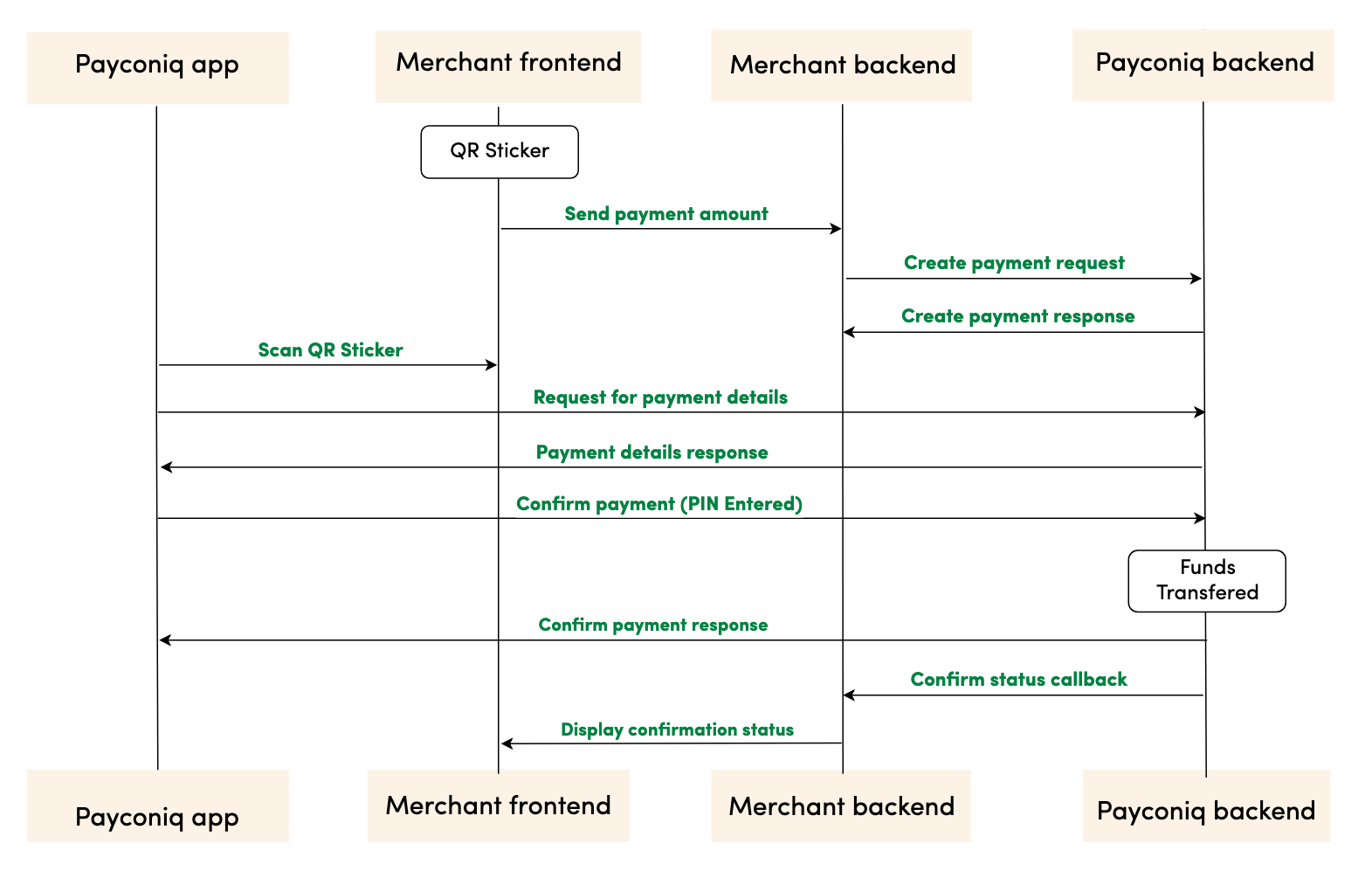
Step by step payment flow
- The Merchant displays the Payconiq QR sticker in a location close to the point of sale.
The Merchant creates a Payment by sending a REST request to the Payconiq backend. The request contains the specific POS identifier for which the payment is created.
Payconiq backend returns the created payment with the Payconiq payment id and other relevant details to the merchant’s backend.
- Payconiq-supported app scans the QR sticker to start the payment for the amount to be paid.
- A request for payment details is sent to the Payconiq backend for the payment. The POS ID on the QR is matched with POS ID at the Payconiq backend to fetch the details.
- Payconiq backend sends the payment details for the specific POS ID to the Payconiq-supported app which contains the name of the merchant and the amount to pay.
- The consumer confirms the payment by entering his/her PIN, fingerprint or face id and a payment request is sent to the Payconiq Backend for authorization.
- The consumer is notified of the payment status via the app.
- Payconiq backend sends a payment notification to the Merchant backend with the payment details to the callback url. The details of the notification will either contain success or failure details.
- The merchant frontend displays the confirmation status it receives from Payconiq.
NB: The order of consumer and merchant notification is not sequential. One may arrive before the other depending on internet and network connections.
Prerequisites
- API Key – This is used to secure the request between the merchant’s backend and Payconiq’s backend. Do not share your API keys in public areas such as online sites or client-side code.
- Merchant CallbackUrl (Optional) – This URL will be called by Payconiq’s backend servers in order to send the status of the payment to the merchant.
Please follow the below steps to successfully implement the Payconiq API in your payment terminal or customer facing display.
Creating The Payconiq Static QR Code
The Payconiq QR code can be created using the Payconiq QR generation service. The following instructions have to be followed in order to successfully create the QR. Once created, the QR code can be printed on a receipt or top-up medium.
QR Parameters
| Attribute | Description |
|---|---|
f [String :: Enum] Allowed Values: SVG, PNG |
Image format. If not provided, the default format is PNG. |
s [String :: Enum] Allowed Values: S, M, L, XL |
Image size of the QR code to generate. Small (S) = 180x180 Medium (M) = 250x250 Large (L) = 400x400 Extra Large (XL) = 800x800 The sizes only applies to PNG format. *If not provided, the default size is Small. |
c [String, required] |
The Payconiq UTF-8 URL encoded content. This is comprised of the location URL scheme. |
cl [String :: Enum] Allowed Values: magenta, black |
The colour of the QR code. Default is magenta. |
NB: The following link provides a tool to encode the URL as an example: https://www.urlencoder.org/
Generating the QR Code
| Activity | Comment |
|---|---|
| 1. Obtain the pre-requisite information needed to generate the Payconiq QR Code. | • Format of the Payconiq QR code. • Size of the Payconiq QR code. • Location URL scheme. • Payment profile id of the merchant. • POS id. |
| 2. Build the Payconiq service URL using the optional parameters which include: • Image format (PNG or SVG) • Image size (S, M, L, XL). This only applies to PNG. |
Sample format: https://portal.payconiq.com/qrcode?f={imageFormat}&s={ImageSize}&c= Example Output URL (PNG): https://portal.payconiq.com/qrcode?f=PNG&s=L&c=Sample URL (SVG) https://portal.payconiq.com/qrcode?f=SVG&c= |
| 3. UTF-8 encode the Payconiq URL payload parameter values using UTF-8 as the destination character set. This means encoding the following: • POS Id |
Payconiq unencoded URL payload parameters(POS ID) POS00001 Payconiq encoded POS ID: POS00001 |
| 4. Build the Payconiq URL payload using the following details. • Location URL scheme • Payment profile id of the merchant. • POS Id. |
Sample format:https://payconiq.com/l/1/{PaymentProfileId}/{POSId} Sample URL payload: https://payconiq.com/l/1/5bb37284e35e2b29e363df22/POS00001 |
| 5. UTF-8 encode the Payconiq URL Payload from step 4. | Payconiq URL Payload before Encoding:https://payconiq.com/l/1/5bb37284e35e2b29e363df22/POS00001 Payconiq URL Payload after Encoding: https%3A%2F%2Fpayconiq.com%2Fl%2F1%2F5bb37284e35e2b29e363df22%2FPOS00001 |
| 6. Build full URL by combining results from step 2 and step 5. Once completed, execute the resulting URL in a web view to obtain the Payconiq QR code. The Payconiq QR code can be saved a file and printed subsequently. |
Sample full URL:https://portal.payconiq.com/qrcode?f=PNG&s=XL&c=https%3A%2F%2Fpayconiq.com%2Fl%2F1%2F5bb37284e35e2b29e363df22%2FPOS00001 |
Sample formatted URL
Below is sample Payconiq QR code generated using the Payconiq QR Code generation service.
QR code properties:
Image Size: Large
Image Format: PNG
QR code parameters:
Payment Profile Id: 5c18cbd1296e9a26d3278518
Formatted Url: Sample Static QR Code
Sample QR Code Image

Create Payment
In order to begin a payment, you need to create a payment via the Payconiq through a POST request. A unique payment identifier is valid for two minutes (120 seconds) after which it expires. If a payment does not take place within these two minutes, a new payment has to be created.
Type: REST
HTTP Verb: POST
EXT URL Definition: https://api.ext.payconiq.com/v3/payments/pos
PROD URL Definition: https://api.payconiq.com/v3/payments/pos
Create Payment Request Header
| Attribute | Comment/ Format |
|---|---|
Authorization [String, required] |
Authorization field which contains the API Key. Bearer xxxxxxxx-xxxx-xxxx-xxxx-xxxxxxxxxxxx |
Content-type [String, required] application/json |
Content type of the data in the request body. |
Example Request:
curl -X POST
  https://api.ext.payconiq.com/v3/payments/pos
  -H 'Authorization: Bearer xxxxxxxx-xxxx-xxxx-xxxx-xxxxxxxxxxxx'
  -H 'Content-Type: application/json'
  -d '{
      "reference": "987456264",
      "amount": "999999",
      "currency": "EUR",
      "description": "Sample description",
      "callbackUrl": "https://www.testcallback.com/payconiq/payment",
      "bulkId": "centraal station pos-2",
      "posId": "POS00001",
      "shopName": "Bun Café",
      "shopId": "SHOP00001"
      }'
Create Payment Request Body
| Attribute | Description |
|---|---|
amount [Integer, required] Minimum: 1 Maximum: 999999 |
Payment amount in Euro cents. |
callbackUrl [URI, optional] |
A url to which the Merchant or Partner will be notified of a payment. Must be Https for production. |
currency [String, Optional] |
Payment currency code in ISO 4217 format. Only Euros supported at the moment. Value: EUR |
description[String, optional] Maximum Length: 140 chars |
Custom description of the payment. This will be shown to the consumer when making payments and will be present on the bank statement of the merchant and consumer for reconciliation purposes. Only the first 35 characters are used for the remittance information. |
reference [String, optional] Maximum Length: 36 chars |
External payment reference used to reference the Payconiq payment in the calling party's system. |
bulkId [String, optional] Maximum Length: 35 chars |
A field set to reference a bulk batch payment. |
posId [String, required] Maximum Length: 36 chars |
The external identifier for the point of sale where the Payment is taking place. |
shopId [String, optional] Maximum Length: 36 chars |
The identifier of the shop where the Payment is created. |
shopName [String, optional] Maximum Length: 36 chars |
The name of the shop where the Payment is created. This shop name is showed to the consumer when making Payments. Only the first 23 characters are used for the remittance information. |
Example Response:
HTTP/1.1 201 Created
{
    "paymentId": "5bdb1685b93d1c000bde96f2",
    "status": "PENDING",
    "createdAt": "2018-09-18T11:43:29.160Z",
    "expiresAt": "2018-09-18T11:45:29.160Z",
    "description": "Sample description",
    "reference": "987456264",
    "amount": 999999,
    "currency": "EUR",
    "creditor": {
        "profileId": "5b71369f5832fd22658e0ef4",
        "merchantId": "5b71369f5832fd09188e0915",
        "name": "Merchant Name",
        "iban": "NL47FRBK0293409698",
        "callbackUrl": "https://www.testcallback.com/payconiq/payment"
    },
    "_links": {
        "self": {
            "href": "https://api.ext.payconiq.com/v3/payments/5bdb1685b93d1c000bde96f2"
        },
        "deeplink": {
            "href": "https://payconiq.com/pay/2/5bdb1685b93d1c000bde96f2"
        },
        "qrcode": {
            "href": "https://portal.ext.payconiq.com/qrcode?c=https%3A%2F%2Fpayconiq.com%2Fpay%2F2%2F5bdb1685b93d1c000bde96f2"
        },
        "cancel": {
            "href": "https://api.ext.payconiq.com/v3/payments/5bdb1685b93d1c000bde96f2"
        }
    }
}
Create Payment Response
The following parameters are included in the header and body of the create payment response.
Response Header
| Attribute | Description |
|---|---|
Http Status Code [Integer] |
Status code of the HTTP POST response. 2xx – Indicates success 4xx – Indicates malformed client request 5xx – Indicates errors with Payconiq servers |
Content-type [String] application/json |
Content type of the data |
Response Body
| Attribute | Description |
|---|---|
paymentId [String, required] Fixed length: 24 chars |
The unique Payconiq payment id. |
status [String::enum, required] Allowed values: PENDING |
The status of the Payconiq Payment. |
createdAt [String, required] Format: YYYY-MM-ddTHH:mm:ss.SSSZ |
The creation date and time of the Payconiq payment. |
expiresAt [String, required] Format: YYYY-MM-ddTHH:mm:ss.SSSZ |
The date and time when a Payconiq payment expires. |
description [String, optional] |
Custom description of the payment. This will be shown to the consumer when making payments and will be present on the bank statement of the merchant and consumer for reconciliation purposes. Only the first 35 characters are used for the remmittance information. |
reference [String, optional] |
Merchant’s payment reference used to reference the Payconiq payment in the merchant’s system. |
amount [Integer, required] |
Payment amount in Euro cents. |
currency [String, optional] |
Payment currency code in ISO 4217 format. Only Euros supported at the moment. |
creditor [Object, required] |
The merchant account object set to receive the Payconiq payment from a consumer. |
creditor.profileId [String, required] |
The unique payment product identifier of the merchant. |
creditor.merchantId [String, required] |
The unique identifier of a merchant. |
creditor.name [String, required] |
The merchant’s company name that will be shown to the consumer. |
creditor.iban [String, required] |
The bank account of the merchant where payments will be sent to. |
creditor.callbackUrl [String, optional] |
A URL to which the Merchant or Partner will be notified of a payment. Must be https for production. |
_links [Object, optional] |
Links object which contain urls to be used by merchants to load the QR codes, perform App2App linking, cancel a payment and get the payment details. |
_links.self [Object, optional] |
Hypermedia GET URL used to fetch payment details |
_links.self.href [String :: URI, optional] |
URL String. |
_links.deeplink [Object, optional] |
Hypermedia GET URL used to perform App2App linking |
_links.deeplink.href [String :: URI, optional] |
URL String. |
_links.qrcode [Object, optional] |
Hypermedia GET URL used to fetch QR code for display and scanning purposes (PNG/SVG) |
_links.qrcode.href [String :: URI, optional] |
URL String. |
_links.cancel [Object, optional] |
Hypermedia DELETE URL used to cancel a payment. |
_links.cancel.href [String :: URI, optional] |
URL String. |
HTTP/1.1 400 Bad Request
{
    "traceId": "b2586833395d4750",
    "spanId": "c235e54376fab4b9",
    "code": "FIELD_IS_REQUIRED",
    "message": "Field 'amount' is mandatory"
}
Create Payments HTTP Status and Error Codes
Below are the status codes and descriptions returned as part of the API responses.
| Status Code | Error Codes |
|---|---|
400[Integer] |
BODY_MISSING: A JSON body needs to be provided. FIELD_IS_REQUIRED: A mandatory field is missing from the JSON request. FIELD_IS_INVALID: A field provided is not valid. Eg: The length of a field exceeds what is required. |
401 [Integer] |
UNAUTHORIZED: The user not have an API Key or API Key is incorrect. |
403 [Integer] |
ACCESS_DENIED: The API key could not be verified or the API key does not contain the required authority to access the resource requested. |
404 [Integer] |
MERCHANT_PROFILE_NOT_FOUND: The merchant profile for creating a payment does not exist. |
422 [Integer] |
UNABLE_TO_PAY_CREDITOR: This could be returned for multiple reasons in case something goes wrong. |
429 [Integer] |
Too Many Requests |
500 [Integer] |
TECHNICAL_ERROR: Technical error in the Payconiq payment service. |
503 [Integer] |
Service Unavailable |
The Payconiq Callback
Payconiq calls the merchant’s callbackUrl endpoint to send the status of a payment. This is only informational towards the merchant or partner. There is no impact on a payment if it is not processed successfully by the merchant or partner.
The merchant backend must verify that the notification message originated from Payconiq and was not altered or corrupted during transmission by validating the signature.
Type: REST
HTTP Verb: POST
EXT URL Definition: {callbackUrl}
PROD URL Definition: {callbackUrl}
Callback Request Header
The following parameters are included in the header of the callback request.
signature: eyJ0eXAiOiJKT1NFK0pTT04iLCJraWQiOiJ5ZXNPbmUiLCJhbGciOiJSUzI1NiIsImh0dHBzOi8vcGF5Y29uaXEuY29tL2lhdCI6IjIwMTktMDEtMTRUMTE6MTE6MTFaIiwiaHR0cHM6Ly9wYXljb25pcS5jb20vanRpIjoiR2l2ZU1lIiwiaHR0cHM6Ly9wYXljb25pcS5jb20vcGF0aCI6Ii90aGUvcm9hZC9sZXNzL3RyYXZlbGVkIiwiaHR0cHM6Ly9wYXljb25pcS5jb20vaXNzIjoiUGF5Y29uaXEiLCJjcml0IjpbImh0dHBzOi8vcGF5Y29uaXEuY29tL2lhdCIsImh0dHBzOi8vcGF5Y29uaXEuY29tL2p0aSIsImh0dHBzOi8vcGF5Y29uaXEuY29tL3BhdGgiLCJodHRwczovL3BheWNvbmlxLmNvbS9pc3MiXX0..LoBPG9T00c-0urv5FXrTWmumUJBTpTaqG5F0HciYHgi0Ck-bZrFxX8MLEgKbdv5YUMKKDnbLcFS0M4lNiGa17Qo8OOH4mCAjvuVEyoutHObd_TrZ4oUM0CX3uRNd88shemup9YPEMtRjmPZATXzStTBdQeRpq_f89bAqy2nCOxg_2BgqSnvC_R4JMA7I5SaRndvzbn80oeVHUEMkpmRFNnhRtVujeEUnfn3hBR_YIHh3vJKWArIYOV9eMkpDFb6nC_GoZoNGfPFunBUtOXU1y3gCDi6GOsa4eaDygNsBk-ZNj2v8cMRPBnHdw2oOaAjEs6K63An0bbkdKG7UzVojAw


content-type: application/json


user-agent: Payconiq Payments/v3
| Attribute | Comment/ Format |
|---|---|
signature [String, required] |
This represents a Payconiq digitally signed content using JSON data structures and base64url encoding. The signature is made up of JSON Web Signature (JWS) and a JSON Object Signing and Encryption (JOSE) header. |
content-type [String, required] application/json |
The Content-Type entity header is used to indicate the media type of the resource. |
user-agent [String, required] |
The User-Agent request header contains a characteristic string that allows the network protocol peers to identify the application type, operating system, software vendor or software version of the requesting software user agent. |
{
    "paymentId": "5ba37c3d0989e3000758b9d8",
    "transferAmount": 122,
    "tippingAmount": 0,
    "amount": 122,
    "totalAmount": 122,
    "description": "Sample description",
    "createdAt": "2019-11-26T15:26:19.363Z",
    "expireAt": "2019-11-26T15:29:19.363Z",
    "succeededAt": "2019-11-26T15:27:34.835Z",
    "status": "SUCCEEDED",
    "debtor": {
        "name": "John",
        "iban": "*************12636"
    },
    "currency": "EUR",
    "reference": "12346816AFV"
}
Callback Request Body
The following parameters are included in the body of the callback request.
| Attribute | Description |
|---|---|
paymentId [String, required] Fixed length: 24 chars |
The unique Payconiq payment id. |
amount [Integer, required] Minimum: 1 Maximum: 999999 |
Payment amount in Euro cents. |
transferAmount [Integer, required] Minimum: 1 Maximum: 999999 |
The amount the consumer will be charged in Euro cents |
tippingAmount [Integer, required] Minimum: 1 Maximum: 999999 |
The amount added as a tip by the consumer in Euro cents (currently not supported). |
totalAmount [Integer, required] Minimum: 1 Maximum: 999999 |
The amount the consumer pays in total in Euro cents. |
currency [String, optional] |
Payment currency code in ISO 4217 format. Only Euros supported at the moment. |
description [String, optional] |
Custom description of the payment. This will be shown to the consumer when making payments and will be present on the bank statement of the merchant and consumer for reconciliation purposes. Only the first 35 characters are used for the remittance information. |
reference [String, optional] |
Merchant’s payment reference used to reference the Payconiq payment in the merchant’s system. |
createdAt [String, required] Format: YYYY-MM-ddTHH:mm:ss.SSSZ |
The creation date and time of the Payconiq payment. |
expireAt [String, required] Format: YYYY-MM-ddTHH:mm:ss.SSSZ |
The date and time when a Payconiq payment expires. |
succeededAt [String, optional] Format: YYYY-MM-ddTHH:mm:ss.SSSZ |
The date and time when a Payconiq payment succeeded. |
status [String::enum, required] Allowed values: PENDING, IDENTIFIED, AUTHORIZED, AUTHORIZATION_FAILED, SUCCEEDED, FAILED, CANCELLED, EXPIRED. |
The status of the Payconiq Payment. |
debtor[JSON Object, required] |
The consumer account object that makes payments to the merchant |
debtor.name [String, optional] |
Debtor's first name. |
debtor.iban [String, optional] |
Debtor's IBAN masked. |
Callback Not Received or Signature Validation Fails
In the event where you don't receive the callback or the callback validation fails, you should Get the Transaction Details as described below. Getting the details of a payment is another sure way to know the status in order to complete the payment.
Get Payment Details
Payment details of an existing payment may be obtained. A unique payment id is passed from a payment creation request and Payconiq will return the corresponding payment information.
Note: It is recommended to implement this as a fallback option to obtaining the response via the callback URL.
Type: REST
HTTP Verb: GET
EXT URL Definition: https://api.ext.payconiq.com/v3/payments/{paymentId}
PROD URL Definition: https://api.payconiq.com/v3/payments/{paymentId}
Get Payment Details Header
The following parameters are included in the header of the request.
| Attribute | Comment/ Format |
|---|---|
Authorization [String, required] |
Authorization field which contains the API Key. Bearer xxxxxxxx-xxxx-xxxx-xxxx-xxxxxxxxxxxx |
Content-type [String, required] application/json |
Content type of the data in the request body. |
Example Request:
curl -X GET
  https://api.ext.payconiq.com/v3/payments/5b976d11dd172a0007c4429d
  -H 'Authorization: Bearer xxxxxxxx-xxxx-xxxx-xxxx-xxxxxxxxxxxx'
  -H 'Content-Type: application/json'
Get Payment Details Request Path
The following parameters are included in the path of a get payment details request.
| Attribute | Description |
|---|---|
paymentId [String, required] |
The unique Payconiq identifier of a payment as provided by the create payment service. |
Get Payment Details Response Header
The following parameters are included in the header of the get payment details response.
| Attribute | Description |
|---|---|
Http Status Code [Integer] |
Status code of the HTTP POST response. 2xx – Indicates success 4xx – Indicates malformed client request 5xx – Indicates errors with Payconiq servers |
Content-type [String] application/json |
Content type of the data |
Example Response
HTTP/1.1 200 OK
Content-Type: application/json
{
    "paymentId": "5bdaf066b93d1c000bde9683",
    "createdAt": "2019-11-26T15:26:19.363Z",
    "expireAt": "2019-11-26T15:29:19.363Z",
    "succeededAt": "2019-11-26T15:27:34.835Z",
    "currency": "EUR",
    "status": "SUCCEEDED",
    "creditor": {
        "profileId": "5b71369f5832fd22658e0ef4",
        "merchantId": "5b71369f5832fd09188e0915",
        "name": "Merchant Name",
        "iban": "NL47FRBK0293409698",
        "callbackUrl": "https://www.testcallback.com/payconiq/payment"
    },
    "debtor": {
        "name": "John",
        "iban": "*************12636"
    },
    "amount": 10,
    "transferAmount": 10,
    "tippingAmount": 0,
    "totalAmount": 10,
    "description": "Otto's Payment Test",
    "bulkId": "centraal station pos-2",
    "_links": {
        "self": {
            "href": "https://api.ext.payconiq.com/v3/payments/5bdaf066b93d1c000bde9683"
        },
        "deeplink": {
            "href": "https://payconiq.com/pay/2/5bdaf066b93d1c000bde9683"
        },
        "qrcode": {
            "href": "https://portal.ext.payconiq.com/qrcode?c=https%3A%2F%2Fpayconiq.com%2Fpay%2F2%2F5bdaf066b93d1c000bde9683"
        },
        "refund": {
            "href": "https://api.ext.payconiq.com/v3/payments/5bdaf066b93d1c000bde9683/debtor/refundIban"
        }
    }
}
Get Payment Details Response Body
The following parameters are included in the body of the get payment details response.
| Attribute | Description |
|---|---|
paymentId [String, required] Fixed length: 24 chars |
The unique Payconiq payment id. |
createdAt [String, required] Format: YYYY-MM-ddTHH:mm:ss.SSSZ |
The creation date and time of the Payconiq payment. |
expireAt [String, required] Format: YYYY-MM-ddTHH:mm:ss.SSSZ |
The date and time when a Payconiq payment expires. |
succeededAt [String, optional] Format: YYYY-MM-ddTHH:mm:ss.SSSZ |
The date and time when a Payconiq payment succeeded. |
currency [String, required] |
Payment currency code in ISO 4217 format. Only Euros supported at the moment. |
status [String::enum, required] Allowed values: PENDING, IDENTIFIED, CANCELLED, AUTHORIZED, AUTHORIZATION_FAILED, EXPIRED, FAILED, SUCCEEDED |
The status of the Payconiq Payment. |
creditor [JSON Object, required] |
The merchant account object set to receive the Payconiq payment from a consumer. |
creditor.profileId [String, required] |
The unique payment product identifier of the merchant. |
creditor.merchantId [String, required] |
The unique identifier of a merchant. |
creditor.name [String, required] |
The merchant’s company name that will be shown to the consumer. |
creditor.iban [String, required] |
The bank account of the merchant where payments will be sent to. |
creditor.callbackUrl [String, optional] |
A URL to which the Merchant or Partner will be notified of a payment. Must be https for production. |
debtor[JSON Object, optional] |
The consumer account object that makes payments to the merchant |
debtor.name [String, optional] |
First name of Debtor. |
debtor.iban [String, optional] |
IBAN of Debtor masked. |
amount [Integer, required] |
Payment amount in Euro cents. |
transferAmount [Integer, required] Minimum: 1 Maximum: 999999 |
The amount the consumer will be charged in Euro cents |
tippingAmount [Integer, required] Minimum: 1 Maximum: 999999 |
The amount added as a tip by the consumer in Euro cents (currently not supported). |
totalAmount [Integer, required] Minimum: 1 Maximum: 999999 |
The amount the consumer pays in total in Euro cents. |
description [String, optional] |
Custom description of the payment. This will be shown to the consumer when making payments and will be present on the bank statement of the merchant and consumer for reconciliation purposes. Only the first 35 characters are used for the remittance information. |
message [String, optional] |
Custom message from the consumer. |
reference [String, optional] |
Merchant’s payment reference used to reference the Payconiq payment in the merchant’s system. |
bulkId [String, optional] Maximum Length: 35 chars |
A field set to reference a bulk batch payment. |
_links [Object, optional] |
Links object which contain urls to be used by merchants to load the QR codes, perform App2App linking, cancel a payment and get the payment details. |
_links.self [Object, optional] |
Hypermedia GET URL used to fetch payment details |
_links.self.href [String :: URI, optional] |
URL String. |
_links.deeplink [Object, optional] |
Hypermedia GET URL used to perform App2App linking |
_links.deeplink.href [String :: URI, optional] |
URL String. |
_links.qrcode [Object, optional] |
Hypermedia GET URL used to fetch QR code for display and scanning purposes (PNG/SVG) |
_links.qrcode.href [String :: URI, optional] |
URL String. |
_links.cancel [Object, optional] |
Hypermedia DELETE URL used to cancel a payment. |
_links.cancel.href [String :: URI, optional] |
URL String. |
_links.refund [Object, optional] |
Hypermedia GET Url used to fetch refund information for a payment. |
_links.refund.href [String :: URI, optional] |
URL String. |
HTTP/1.1 404 Not Found
{
    "traceId": "d7152b6b08caa620",
    "spanId": "556d68164b8e8ef6",
    "code": "PAYMENT_NOT_FOUND",
    "message": "Payment not found '5ba35a3d0989e3000758b9c2'"
}
Get Payment Details HTTP Status and Error Codes
Below are the status codes and descriptions returned as part of the API responses.
| Status Code | Error Codes |
|---|---|
401 [Integer] |
UNAUTHORIZED: The user not have an API Key or API Key is incorrect. |
403 [Integer] |
ACCESS_DENIED: The API key could not be verified or the API key does not contain the required authority to access the resource requested. |
404 [Integer] |
PAYMENT_NOT_FOUND: Payment could not be found for the corresponding payment id. |
429 [Integer] |
Too Many Requests |
500 [Integer] |
TECHNICAL_ERROR: Technical error in the Payconiq payment service. |
503 [Integer] |
Service Unavailable |
Get Payments List
This endpoint is use to retrieve a list of a Payconiq payments. The page and size parameters are used to specify how many records to return as well as filter the results for the total number of records returned per page. By default the latest 50 payments are returned per request and are sorted by creation date in descending order.
Type: REST
HTTP Verb: POST
EXT URL Definition: https://api.ext.payconiq.com/v3/payments/search?page={p}&size={s}
PROD URL Definition: https://api.payconiq.com/v3/payments/search?page={p}&size={s}
Get Payments List Request Header
| Attribute | Comment/ Format |
|---|---|
Authorization [String, required] |
Authorization field which contains the API Key. Bearer xxxxxxxx-xxxx-xxxx-xxxx-xxxxxxxxxxxx |
Content-type [String, required] application/json |
Content type of the data in the request body. |
Example Request:
curl -X POST
  'https://api.ext.payconiq.com/v3/payments/search?page=10&size=10'
  -H 'Authorization: Bearer xxxxxxxx-xxxx-xxxx-xxxx-xxxxxxxxxxxx'
  -H 'Content-Type: application/json'
  -d
  '{
        "from":"2018-08-01T00:10:10.000Z",
        "to":"2018-08-31T00:10:10.999Z",
        "paymentStatuses":["SUCCEEDED"],
        "reference":"1234568"
  }'
Get Payments List Request Path
| Attribute | Comment/ Format |
|---|---|
page [Integer, optional] |
Zero based page index in the list request. NB: The page defaults to 0 if not present in the request path. |
size [Integer, optional] |
The size of the page to be returned in the list. NB: The size defaults to 50 if not present in the request path. |
Get Payments List Request Body
| Attribute | Description |
|---|---|
from [String, required] Format: YYYY-MM-ddTHH:mm:ss.SSSZ |
The start date and time to filter the search results. Default: Current date and time minus one day. (Now - 1 day) |
to [String, optional] Format: YYYY-MM-ddTHH:mm:ss.SSSZ |
The end date and time to filter the search results.. Default: Current date and time. (Now) |
paymentStatuses [Array::String, Optional] |
An array of payment statuses to filter the search results on. |
reference [String, optional] Maximum Length: 36 chars |
External payment reference used to reference the Payconiq payment in the calling party's system. |
Get Payment List Response Header
The following parameters are included in the header of the get payment list response.
| Attribute | Description |
|---|---|
Http Status Code [Integer] |
Status code of the HTTP POST response. 2xx – Indicates success 4xx – Indicates malformed client request 5xx – Indicates errors with Payconiq servers |
Content-type [String] application/json |
Content type of the data |
HTTP/1.1 200 OK
{
    "size": 2,
    "totalPages": 7,
    "totalElements": 13,
    "number": 0,
    "details": [
        {
            "paymentId": "5bdaf066b93d1c000bde9683",
            "createdAt": "2019-11-26T15:26:19.363Z",
            "expireAt": "2019-11-26T15:29:19.363Z",
            "succeededAt": "2019-11-26T15:27:34.835Z",
            "currency": "EUR",
            "status": "SUCCEEDED",
            "creditor": {
                "profileId": "5b71369f5832fd22658e0ef4",
                "merchantId": "5b71369f5832fd09188e0915",
                "name": "Merchant Name",
                "iban": "NL47FRBK0293409698",
                "callbackUrl": "https://www.testcallback.com/payconiq/payment"
            },
            "debtor": {
                "name": "John",
                "iban": "*************12636"
            },
            "amount": 10,
            "transferAmount": 10,
            "tippingAmount": 0,
            "totalAmount": 10,
            "description": "Otto's Payment Test",
            "bulkId": "centraal station pos-2",
            "_links": {
                "self": {
                    "href": "https://api.ext.payconiq.com/v3/payments/5bdaf066b93d1c000bde9683"
                },
                "deeplink": {
                    "href": "https://payconiq.com/pay/2/5bdaf066b93d1c000bde9683"
                },
                "qrcode": {
                    "href": "https://portal.ext.payconiq.com/qrcode?c=https%3A%2F%2Fpayconiq.com%2Fpay%2F2%2F5bdaf066b93d1c000bde9683"
                },
                "refund": {
                    "href": "https://api.ext.payconiq.com/v3/payments/5bdaf066b93d1c000bde9683/debtor/refundIban"
                }
            }
        },
        {
            "paymentId": "5bdaf066b93d1c000bde9683",
            "createdAt": "2019-11-26T15:26:19.363Z",
            "expireAt": "2019-11-26T15:29:19.363Z",
            "succeededAt": "2019-11-26T15:27:34.835Z",
            "currency": "EUR",
            "status": "SUCCEEDED",
            "creditor": {
                "profileId": "5b71369f5832fd22658e0ef4",
                "merchantId": "5b71369f5832fd09188e0915",
                "name": "Merchant Name",
                "iban": "NL47FRBK0293409698",
                "callbackUrl": "https://www.testcallback.com/payconiq/payment"
            },
            "debtor": {
                "name": "John",
                "iban": "*************12636"
            },
            "amount": 10,
            "transferAmount": 10,
            "tippingAmount": 0,
            "totalAmount": 10,
            "description": "Otto's Payment Test",
            "bulkId": "centraal station pos-2",
            "_links": {
                "self": {
                    "href": "https://api.ext.payconiq.com/v3/payments/5bdaf066b93d1c000bde9683"
                },
                "deeplink": {
                    "href": "https://payconiq.com/pay/2/5bdaf066b93d1c000bde9683"
                },
                "qrcode": {
                    "href": "https://portal.ext.payconiq.com/qrcode?c=https%3A%2F%2Fpayconiq.com%2Fpay%2F2%2F5bdaf066b93d1c000bde9683"
                },
                "refund": {
                    "href": "https://api.ext.payconiq.com/v3/payments/5bdaf066b93d1c000bde9683/debtor/refundIban"
                }
            }
        }
    ]
}
Get Payments list Response Body
The following parameters are included in the body of the get payment details response.
| Attribute | Description |
|---|---|
size [Integer, required] |
The total size of elements returned in the current page. |
totalPages [Integer, required] |
Total number of pages that contain the list of results. |
totalElements [Integer, required] |
Total number of elements in the list requested. |
number [Integer, required] |
The current page number. |
details [JSON Object, required] |
An array of payment details returned for the search criteria. |
details.paymentId [String, required] Fixed length: 24 chars |
The unique Payconiq payment id. |
details.createdAt [String, required] Format: YYYY-MM-ddTHH:mm:ss.SSSZ |
The creation date and time of the Payconiq payment. |
details.expireAt [String, required] Format: YYYY-MM-ddTHH:mm:ss.SSSZ |
The date and time when a Payconiq payment expires. |
details.succeededAt [String, optional] Format: YYYY-MM-ddTHH:mm:ss.SSSZ |
The date and time when a Payconiq payment succeeded. |
details.currency [String, required] |
Payment currency code in ISO 4217 format. Only Euros supported at the moment. |
details.status [String::enum, required] Allowed values: PENDING, IDENTIFIED, CANCELLED, AUTHORIZED, AUTHORIZATION_FAILED, EXPIRED, FAILED, SUCCEEDED |
The status of the Payconiq Payment. |
details.creditor [JSON Object, required] |
The merchant account object set to receive the Payconiq payment from a consumer. |
details.creditor.profileId [String, required] |
The unique payment product identifier of the merchant. |
details.creditor.merchantId [String, required] |
The unique identifier of a merchant. |
details.creditor.name [String, required] |
The merchant’s company name that will be shown to the consumer. |
details.creditor.iban [String, required] |
The bank account of the merchant where payments will be sent to. |
details.creditor.callbackUrl [String, optional] |
A URL to which the Merchant or Partner will be notified of a payment. Must be https for production. |
details.debtor[JSON Object, required] |
The consumer account object that makes payments to the merchant |
details.debtor.name [String, optional] |
First name of Debtor. |
details.debtor.iban [String, optional] |
IBAN of Debtor masked. |
details.amount [Integer, required] |
Payment amount in Euro cents. |
details.transferAmount [Integer, required] Minimum: 1 Maximum: 999999 |
The amount the consumer will be charged in Euro cents |
details.tippingAmount [Integer, required] Minimum: 1 Maximum: 999999 |
The amount added as a tip by the consumer in Euro cents (currently not supported). |
details.totalAmount [Integer, required] Minimum: 1 Maximum: 999999 |
The amount the consumer pays in total in Euro cents. |
details.description [String, optional] |
Custom description of the payment. This will be shown to the consumer when making payments and will be present on the bank statement of the merchant and consumer for reconciliation purposes. Only the first 35 characters are used for the remittance information. |
details.message [String, optional] |
Custom message from the consumer. |
details.reference [String, optional] |
Merchant’s payment reference used to reference the Payconiq payment in the merchant’s system. |
details.bulkId [String, optional] Maximum Length: 35 chars |
A field set to reference a bulk batch payment. |
details._links [Object, optional] |
Links object which contain urls to be used by merchants to load the QR codes, perform App2App linking, cancel a payment and get the payment details. |
details._links.self [Object, optional] |
Hypermedia GET URL used to fetch payment details |
details._links.self.href [String :: URI, optional] |
URL String. |
details._links.deeplink [Object, optional] |
Hypermedia GET URL used to perform App2App linking |
details._links.deeplink.href [String :: URI, optional] |
URL String. |
details._links.qrcode [Object, optional] |
Hypermedia GET URL used to fetch QR code for display and scanning purposes (PNG/SVG) |
details._links.qrcode.href [String :: URI, optional] |
URL String. |
details._links.cancel [Object, optional] |
Hypermedia DELETE URL used to cancel a payment. |
details._links.cancel.href [String :: URI, optional] |
URL String. |
details._links.refund [Object, optional] |
Hypermedia GET Url used to fetch refund information for a payment. |
details._links.refund.href [String :: URI, optional] |
URL String. |
HTTP/1.1 401 Unauthorized
{
    "traceId": "d7152b6b08caa620",
    "spanId": "556d68164b8e8ef6",
    "code": "UNAUTHORIZED",
    "message": "Payment not found '5ba35a3d0989e3000758b9c2'"
}
Get Payments List HTTP Status and Error Codes
| Status Code | Error Codes |
|---|---|
401 [Integer] |
UNAUTHORIZED: The user not have an API Key or API Key is incorrect. |
403 [Integer] |
ACCESS_DENIED: The API key could not be verified or the API key does not contain the required authority to access the resource requested. |
429 [Integer] |
Too Many Requests |
500 [Integer] |
TECHNICAL_ERROR: Technical error in the Payconiq payment service. |
503 [Integer] |
Service Unavailable |
Cancel Payment
This endpoint is used to cancel a created Payment. A payment can only be cancelled only if the status is either PENDING or IDENTIFIED. For some cases when payment is still in IDENTIFIED cancellation is not possible because a customer has already initiated payment confirmation. Once confirmation is complete, the payment will be moved to SUCCEEDED. Once cancelled, the status of the payment is set to CANCELLED.
Type: REST
HTTP Verb: DELETE
EXT URL Definition: https://api.ext.payconiq.com/v3/payments/{paymentId}
PROD URL Definition: https://api.payconiq.com/v3/payments/{paymentId}
Cancel Payment Request Header
| Attribute | Comment/ Format |
|---|---|
Authorization [String, required] |
Authorization field which contains the API Key. Bearer xxxxxxxx-xxxx-xxxx-xxxx-xxxxxxxxxxxx |
Example Request:

curl -X DELETE
  https://api.ext.payconiq.com/v3/payments/5ba35a3d0989e3000758b9c1
  -H 'Authorization: Bearer xxxxxxxx-xxxx-xxxx-xxxx-xxxxxxxxxxxx'
Cancel Payment Request Path
| Attribute | Comment/ Format |
|---|---|
paymentId [Integer, required] Fixed length: 24 chars |
The unique identifier of a payment as provided by the create payment service. |
Cancel Payment Request Body
There is no body in cancel payment request.
Cancel Payment Response Header
HTTP/1.1 204 No Content
The following parameters are included in the header of the cancel payment response.
| Attribute | Description |
|---|---|
Http Status Code [Integer] |
Status code of the HTTP POST response. 2xx – Indicates success 4xx – Indicates malformed client request 5xx – Indicates errors with Payconiq servers |
Content-type [String] application/json |
Content type of the data |
Cancel Payment Response Body
There is no body returned in the body of a cancel payment response.
HTTP/1.1 422 Unprocessable Entity
{
    "traceId": "8abc6e29041adb94",
    "spanId": "6ba82033652b5b41",
    "code": "PAYMENT_NOT_PENDING",
    "message": "Payment '5ba35d610989e3000758b9cc' is not allowed to be cancelled"
}
Cancel Payment HTTP Status and Error Codes
| Status Code | Error Codes |
|---|---|
401 [Integer] |
UNAUTHORIZED: The user not have an API Key or API Key is incorrect. |
403 [Integer] |
ACCESS_DENIED: The API key could not be verified or the API key does not contain the required authority to access the resource requested. CALLER_NOT_ALLOWED_TO_CANCEL: The merchant is not allowed to cancel this payment. |
404 [Integer] |
PAYMENT_NOT_FOUND: Payment could not be found for the corresponding payment id. |
422 [Integer] |
PAYMENT_NOT_PENDING: Payment is not in a pending or identify state. |
429 [Integer] |
Too Many Requests |
500 [Integer] |
TECHNICAL_ERROR: Technical error in the Payconiq payment service. |
503 [Integer] |
Service Unavailable |
Payconiq Instore (V3) - Receipt
Pay mobile by scanning the QR code on a receipt.
Process Flow
Involved Parties:
- Payconiq Supported App – Payconiq consumer application.
- Merchant Frontend – Receipt.
- Merchant Backend – Backend of merchant that integrates and interacts with Payconiq.
- Payconiq Backend – Backend of Payconiq that provides integration and payment services.
Instore Receipt
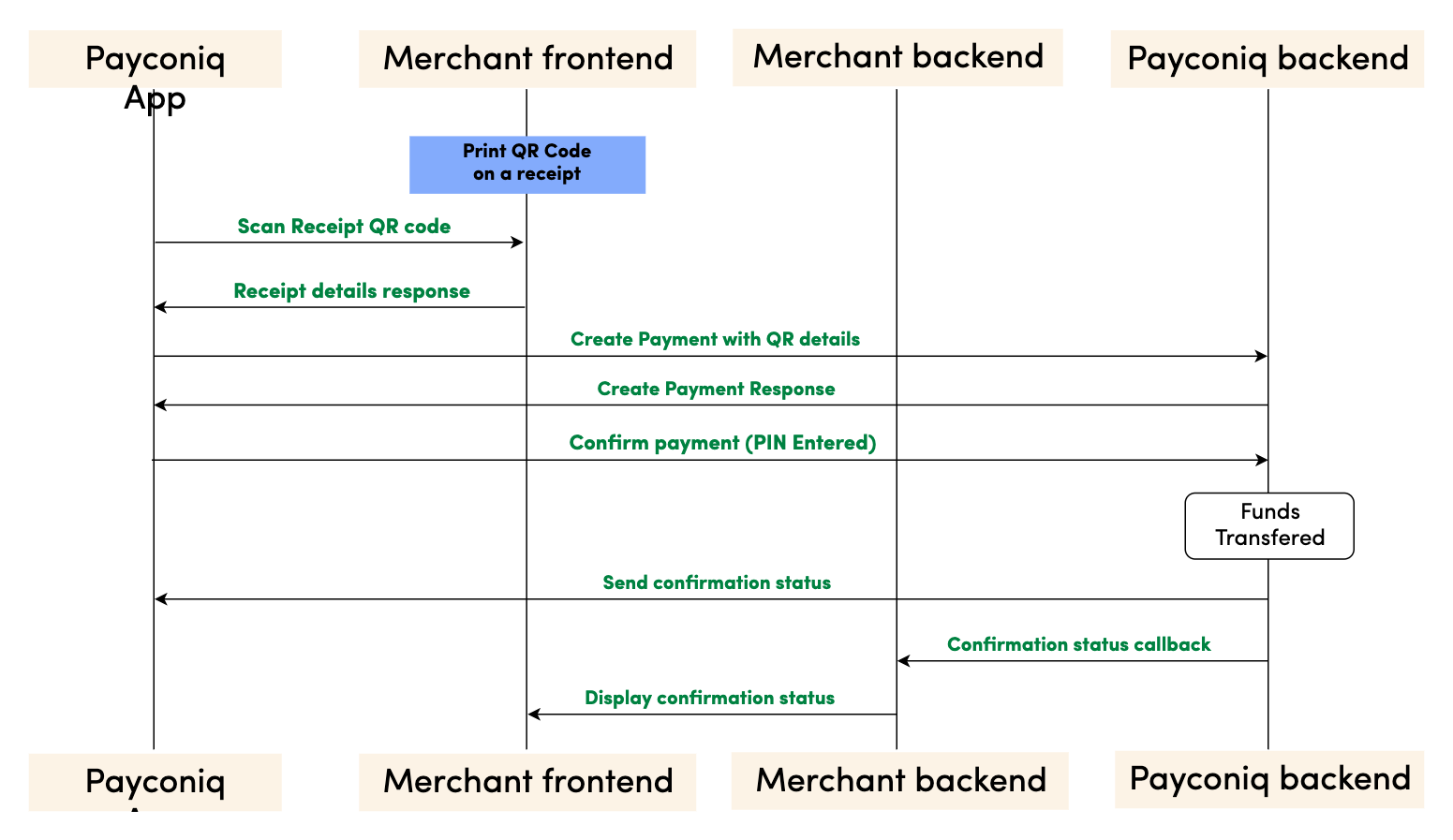
Step by step payment flow
- Merchant creates a QR code using the Payconiq QR URL schema. The URL will contain parameters which include an amount, description and a reference id.
- Merchant prints the Payconiq QR code on the receipt medium and presents it to the consumer for scanning.
- The consumer scans the Payconiq QR code using a Payconiq supported app which reads the details of the QR code and presents it for confirmation. The details would contain the amount to pay, the creditor name and a description.
- The consumer confirms the payment with his fingerprint, face ID or by entering his/her pin. A confirm payment request is sent to the Payconiq backend for authorization.
- Payconiq initiates a callback notification request to the merchant’s backend with the status of the payment via a callback url. The details of the notification will contain a payment id and status among other fields.
- The merchant backend acknowledges the callback notification by responding appropriately.
- The merchant frontend is notified of the status of the payment medium is credited with a designated value.
- A payment response with the details is sent back to the Payconiq Supported App indicating a success or failure of the payment.
NB: The order of consumer and merchant notification is not sequential. One may arrive before the other depending on internet and network connections.
Prerequisites
- Merchant CallbackUrl – This URL will be called by Payconiq’s backend servers in order to send the status of the payment to the merchant.
- Product Profile Id - This is a unique identifier of the payment product used by a merchant.
- Payconiq URL Scheme - The Payconiq template QR URL scheme.
- API Key (Optional) – This is used to secure the request between the merchant’s backend and Payconiq’s backend. Do not share your API keys in public areas such as online sites or client-side code.
Creating The Payconiq QR Code
The Payconiq QR code can be created using the Payconiq QR generation service. The following instructions have to be followed in order to successfully create the QR. Once created, the QR code can be printed on a receipt medium.
QR Parameters
| Attribute | Description |
|---|---|
f [String :: Enum] Allowed Values: SVG, PNG |
Image format. If not provided, the default format is PNG. |
s [String :: Enum] Allowed Values: S, M, L, XL |
Image size of the QR code to generate. Small (S) = 180x180 Medium (M) = 250x250 Large (L) = 400x400 Extra Large (XL) = 800x800 The sizes only applies to PNG format. *If not provided, the default size is Small. |
cl [String :: Enum] Allowed Values: magenta, black |
The colour of the QR code. Default is magenta. |
c [String, required] |
The Payconiq UTF-8 URL encoded content. This is comprised of the template URL scheme. |
c.D [String, optional] Maximum Length: 35 chars |
UTF-8 URL encoded description of the payment |
c.A [String, optional] Minimum: 1 Maximum: 999999 |
UTF-8 URL encoded amount of the QR code in Euro cents. |
c.R [String, optional] Maximum Length: 35 chars |
UTF-8 URL encoded reference of the QR code. |
NB: The following link provides a tool to encode the URL as an example: https://www.urlencoder.org/
Generating the QR Code
| Activity | Comment |
|---|---|
| 1. Obtain the pre-requisite information needed to generate the Payconiq QR Code. | • Format of the Payconiq QR code. • Size of the Payconiq QR code. • Template URL scheme. • Product profile id of the merchant. • Amount of the Payconiq QR code. • Description of the Payconiq QR code. • Reference of the Payconiq QR code. |
| 2. Build the Payconiq service URL using the optional parameters which include: • Image format (PNG or SVG) • Image size (S, M, L, XL). This only applies to PNG. |
Sample format: https://portal.payconiq.com/qrcode?f={imageFormat}&s={ImageSize}&c= Example Output URL (PNG): https://portal.payconiq.com/qrcode?f=PNG&s=L&c= Sample URL (SVG) https://portal.payconiq.com/qrcode?f=SVG&c= |
| 3. UTF-8 encode the Payconiq URL payload parameter values using UTF-8 as the destination character set. This means encoding the following: • Description • Amount • Reference. |
Payconiq unencoded URL payload parameters D=Invoice Payment A=1000 R=sd89sd91?sd9 Payconiq encoded URL payload parameters: D=Invoice%20Payment A=1000 R=sd89sd91%3Fsd9 |
| 4. Build the Payconiq URL payload using the following details. • Template URL scheme • Product profile id of the merchant. • Amount of the Payconiq QR code. • Description of the Payconiq QR code. • Reference of the Payconiq QR code. |
Sample format:https://payconiq.com/t/1/{productProfileId?D={Enc_description}&A={Enc_amount}&R={Enc_reference} Sample URL payload: https://payconiq.com/t/1/5c18cbd1296e9a26d3278518?D=Invoice%20Payment&A=1000&R=sd89sd91%3Fsd9 |
| 5. UTF-8 encode the Payconiq URL Payload from step 4. | Payconiq URL Payload before Encoding:https://payconiq.com/t/1/5c18cbd1296e9a26d3278518?D=Invoice%20Payment&A=1000&R=sd89sd91%3Fsd9Payconiq URL Payload after Encoding: https%3A%2F%2Fpayconiq.com%2Ft%2F1%2F5c18cbd1296e9a26d3278518%3FD%3DInvoice%2520Payment%26A%3D1000%26R%3Dsd89sd91%253Fsd9 |
| 6. Build full URL by combining results from step 2 and step 5. Once completed, execute the resulting URL in a web view to obtain the Payconiq QR code. The Payconiq QR code can be saved a file and printed subsequently. |
Sample full URL:https://portal.payconiq.com/qrcode?f=PNG&s=XL&c=https%3A%2F%2Fpayconiq.com%2Ft%2F1%2F5c18cbd1296e9a26d3278518%3FD%3DInvoice%2520Payment%26A%3D1000%26R%3Dsd89sd91%253Fsd9 |
Sample formatted URL
Below is sample Payconiq QR code generated using the Payconiq QR Code generation service.
QR code properties:
Image Size: Medium
Image Format: PNG
QR code parameters:
Amount: 2.50 EUR
Description: Thanks for your money
Product Profile Id: 61375f7d093b13000669053f
Reference: sd89sd91%3Fsd9
Formatted Url: Sample Receipt QR Code
Sample QR Code Image

The Payconiq Callback
Payconiq calls the merchant’s callbackUrl endpoint to send the status of a payment. This is only informational towards the merchant or partner. There is no impact on a payment if it is not processed successfully by the merchant or partner.
The merchant backend must verify that the notification message originated from Payconiq and was not altered or corrupted during transmission by validating the signature.
Type: REST
HTTP Verb: POST
EXT URL Definition: {callbackUrl}
PROD URL Definition: {callbackUrl}
Callback Request Header
The following parameters are included in the header of the callback request.
signature: eyJ0eXAiOiJKT1NFK0pTT04iLCJraWQiOiJ5ZXNPbmUiLCJhbGciOiJSUzI1NiIsImh0dHBzOi8vcGF5Y29uaXEuY29tL2lhdCI6IjIwMTktMDEtMTRUMTE6MTE6MTFaIiwiaHR0cHM6Ly9wYXljb25pcS5jb20vanRpIjoiR2l2ZU1lIiwiaHR0cHM6Ly9wYXljb25pcS5jb20vcGF0aCI6Ii90aGUvcm9hZC9sZXNzL3RyYXZlbGVkIiwiaHR0cHM6Ly9wYXljb25pcS5jb20vaXNzIjoiUGF5Y29uaXEiLCJjcml0IjpbImh0dHBzOi8vcGF5Y29uaXEuY29tL2lhdCIsImh0dHBzOi8vcGF5Y29uaXEuY29tL2p0aSIsImh0dHBzOi8vcGF5Y29uaXEuY29tL3BhdGgiLCJodHRwczovL3BheWNvbmlxLmNvbS9pc3MiXX0..LoBPG9T00c-0urv5FXrTWmumUJBTpTaqG5F0HciYHgi0Ck-bZrFxX8MLEgKbdv5YUMKKDnbLcFS0M4lNiGa17Qo8OOH4mCAjvuVEyoutHObd_TrZ4oUM0CX3uRNd88shemup9YPEMtRjmPZATXzStTBdQeRpq_f89bAqy2nCOxg_2BgqSnvC_R4JMA7I5SaRndvzbn80oeVHUEMkpmRFNnhRtVujeEUnfn3hBR_YIHh3vJKWArIYOV9eMkpDFb6nC_GoZoNGfPFunBUtOXU1y3gCDi6GOsa4eaDygNsBk-ZNj2v8cMRPBnHdw2oOaAjEs6K63An0bbkdKG7UzVojAw


content-type: application/json


user-agent: Payconiq Payments/v3
| Attribute | Comment/ Format |
|---|---|
signature [String, required] |
This represents a Payconiq digitally signed content using JSON data structures and base64url encoding. The signature is made up of JSON Web Signature (JWS) and a JSON Object Signing and Encryption (JOSE) header. |
content-type [String, required] application/json |
The Content-Type entity header is used to indicate the media type of the resource. |
user-agent [String, required] |
The User-Agent request header contains a characteristic string that allows the network protocol peers to identify the application type, operating system, software vendor or software version of the requesting software user agent. |
{
    "paymentId": "5ba37c3d0989e3000758b9d8",
    "transferAmount": 122,
    "tippingAmount": 0,
    "amount": 122,
    "totalAmount": 122,
    "description": "Sample description",
    "createdAt": "2019-11-26T15:26:19.363Z",
    "expireAt": "2019-11-26T15:29:19.363Z",
    "succeededAt": "2019-11-26T15:27:34.835Z",
    "status": "SUCCEEDED",
    "debtor": {
        "name": "John",
        "iban": "*************12636"
    },
    "currency": "EUR",
    "reference": "12346816AFV"
}
Callback Request Body
The following parameters are included in the body of the callback request.
| Attribute | Description |
|---|---|
paymentId [String, required] Fixed length: 24 chars |
The unique Payconiq payment id. |
amount [Integer, required] Minimum: 1 Maximum: 999999 |
Payment amount in Euro cents. |
transferAmount [Integer, required] Minimum: 1 Maximum: 999999 |
The amount the consumer will be charged in Euro cents |
tippingAmount [Integer, required] Minimum: 1 Maximum: 999999 |
The amount added as a tip by the consumer in Euro cents (currently not supported). |
totalAmount [Integer, required] Minimum: 1 Maximum: 999999 |
The amount the consumer pays in total in Euro cents. |
currency [String, optional] |
Payment currency code in ISO 4217 format. Only Euros supported at the moment. |
description [String, optional] |
Custom description of the payment. This will be shown to the consumer when making payments and will be present on the bank statement of the merchant and consumer for reconciliation purposes. Only the first 35 characters are used for the remittance information. |
reference [String, optional] |
Merchant’s payment reference used to reference the Payconiq payment in the merchant’s system. |
createdAt [String, required] Format: YYYY-MM-ddTHH:mm:ss.SSSZ |
The creation date and time of the Payconiq payment. |
expireAt [String, required] Format: YYYY-MM-ddTHH:mm:ss.SSSZ |
The date and time when a Payconiq payment expires. |
succeededAt [String, optional] Format: YYYY-MM-ddTHH:mm:ss.SSSZ |
The date and time when a Payconiq payment succeeded. |
status [String::enum, required] Allowed values: PENDING, IDENTIFIED, AUTHORIZED, AUTHORIZATION_FAILED, SUCCEEDED, FAILED, CANCELLED, EXPIRED. |
The status of the Payconiq Payment. |
debtor[JSON Object, required] |
The consumer account object that makes payments to the merchant |
debtor.name [String, optional] |
Debtor's first name. |
debtor.iban [String, optional] |
Debtor's IBAN masked. |
Callback Not Received or Signature Validation Fails
In the event where you don't receive the callback, you can initiate a Get Payments List call using your reference. The response will contain details of the payment.
If a callback is received but signature verification fails, merchants can Get the Payment Details using the payment id from the callback. This is another sure way to know the status in order to complete the payment.
Get Payment Details
Payment details of an existing payment may be obtained. A unique payment id is passed from a payment creation request and Payconiq will return the corresponding payment information.
Note: It is recommended to implement this as a fallback option to obtaining the response via the callback URL.
Type: REST
HTTP Verb: GET
EXT URL Definition: https://api.ext.payconiq.com/v3/payments/{paymentId}
PROD URL Definition: https://api.payconiq.com/v3/payments/{paymentId}
Get Payment Details Header
The following parameters are included in the header of the request.
| Attribute | Comment/ Format |
|---|---|
Authorization [String, required] |
Authorization field which contains the API Key. Bearer xxxxxxxx-xxxx-xxxx-xxxx-xxxxxxxxxxxx |
Content-type [String, required] application/json |
Content type of the data in the request body. |
Example Request:
curl -X GET
  https://api.ext.payconiq.com/v3/payments/5b976d11dd172a0007c4429d
  -H 'Authorization: Bearer xxxxxxxx-xxxx-xxxx-xxxx-xxxxxxxxxxxx'
  -H 'Content-Type: application/json'
Get Payment Details Request Path
The following parameters are included in the path of a get payment details request.
| Attribute | Description |
|---|---|
paymentId [String, required] |
The unique Payconiq identifier of a payment as provided by the create payment service. |
Get Payment Details Response Header
The following parameters are included in the header of the get payment details response.
| Attribute | Description |
|---|---|
Http Status Code [Integer] |
Status code of the HTTP POST response. 2xx – Indicates success 4xx – Indicates malformed client request 5xx – Indicates errors with Payconiq servers |
Content-type [String] application/json |
Content type of the data |
Example Response
HTTP/1.1 200 OK
Content-Type: application/json
{
    "paymentId": "5bdaf066b93d1c000bde9683",
    "createdAt": "2019-11-26T15:26:19.363Z",
    "expireAt": "2019-11-26T15:29:19.363Z",
    "succeededAt": "2019-11-26T15:27:34.835Z",
    "currency": "EUR",
    "status": "SUCCEEDED",
    "creditor": {
        "profileId": "5b71369f5832fd22658e0ef4",
        "merchantId": "5b71369f5832fd09188e0915",
        "name": "Merchant Name",
        "iban": "NL47FRBK0293409698",
        "callbackUrl": "https://www.testcallback.com/payconiq/payment"
    },
    "debtor": {
        "name": "John",
        "iban": "*************12636"
    },
    "amount": 10,
    "transferAmount": 10,
    "tippingAmount": 0,
    "totalAmount": 10,
    "description": "Otto's Payment Test",
    "bulkId": "centraal station pos-2",
    "_links": {
        "self": {
            "href": "https://api.ext.payconiq.com/v3/payments/5bdaf066b93d1c000bde9683"
        },
        "deeplink": {
            "href": "https://payconiq.com/pay/2/5bdaf066b93d1c000bde9683"
        },
        "qrcode": {
            "href": "https://portal.ext.payconiq.com/qrcode?c=https%3A%2F%2Fpayconiq.com%2Fpay%2F2%2F5bdaf066b93d1c000bde9683"
        },
        "refund": {
            "href": "https://api.ext.payconiq.com/v3/payments/5bdaf066b93d1c000bde9683/debtor/refundIban"
        }
    }
}
Get Payment Details Response Body
The following parameters are included in the body of the get payment details response.
| Attribute | Description |
|---|---|
paymentId [String, required] Fixed length: 24 chars |
The unique Payconiq payment id. |
createdAt [String, required] Format: YYYY-MM-ddTHH:mm:ss.SSSZ |
The creation date and time of the Payconiq payment. |
expireAt [String, required] Format: YYYY-MM-ddTHH:mm:ss.SSSZ |
The date and time when a Payconiq payment expires. |
succeededAt [String, optional] Format: YYYY-MM-ddTHH:mm:ss.SSSZ |
The date and time when a Payconiq payment succeeded. |
currency [String, required] |
Payment currency code in ISO 4217 format. Only Euros supported at the moment. |
status [String::enum, required] Allowed values: PENDING, IDENTIFIED, CANCELLED, AUTHORIZED, AUTHORIZATION_FAILED, EXPIRED, FAILED, SUCCEEDED |
The status of the Payconiq Payment. |
creditor [JSON Object, required] |
The merchant account object set to receive the Payconiq payment from a consumer. |
creditor.profileId [String, required] |
The unique payment product identifier of the merchant. |
creditor.merchantId [String, required] |
The unique identifier of a merchant. |
creditor.name [String, required] |
The merchant’s company name that will be shown to the consumer. |
creditor.iban [String, required] |
The bank account of the merchant where payments will be sent to. |
creditor.callbackUrl [String, optional] |
A URL to which the Merchant or Partner will be notified of a payment. Must be https for production. |
debtor[JSON Object, optional] |
The consumer account object that makes payments to the merchant |
debtor.name [String, optional] |
First name of Debtor. |
debtor.iban [String, optional] |
IBAN of Debtor masked. |
amount [Integer, required] |
Payment amount in Euro cents. |
transferAmount [Integer, required] Minimum: 1 Maximum: 999999 |
The amount the consumer will be charged in Euro cents |
tippingAmount [Integer, required] Minimum: 1 Maximum: 999999 |
The amount added as a tip by the consumer in Euro cents (currently not supported). |
totalAmount [Integer, required] Minimum: 1 Maximum: 999999 |
The amount the consumer pays in total in Euro cents. |
description [String, optional] |
Custom description of the payment. This will be shown to the consumer when making payments and will be present on the bank statement of the merchant and consumer for reconciliation purposes. Only the first 35 characters are used for the remittance information. |
message [String, optional] |
Custom message from the consumer. |
reference [String, optional] |
Merchant’s payment reference used to reference the Payconiq payment in the merchant’s system. |
bulkId [String, optional] Maximum Length: 35 chars |
A field set to reference a bulk batch payment. |
_links [Object, optional] |
Links object which contain urls to be used by merchants to load the QR codes, perform App2App linking, cancel a payment and get the payment details. |
_links.self [Object, optional] |
Hypermedia GET URL used to fetch payment details |
_links.self.href [String :: URI, optional] |
URL String. |
_links.deeplink [Object, optional] |
Hypermedia GET URL used to perform App2App linking |
_links.deeplink.href [String :: URI, optional] |
URL String. |
_links.qrcode [Object, optional] |
Hypermedia GET URL used to fetch QR code for display and scanning purposes (PNG/SVG) |
_links.qrcode.href [String :: URI, optional] |
URL String. |
_links.cancel [Object, optional] |
Hypermedia DELETE URL used to cancel a payment. |
_links.cancel.href [String :: URI, optional] |
URL String. |
_links.refund [Object, optional] |
Hypermedia GET Url used to fetch refund information for a payment. |
_links.refund.href [String :: URI, optional] |
URL String. |
HTTP/1.1 404 Not Found
{
    "traceId": "d7152b6b08caa620",
    "spanId": "556d68164b8e8ef6",
    "code": "PAYMENT_NOT_FOUND",
    "message": "Payment not found '5ba35a3d0989e3000758b9c2'"
}
Get Payment Details HTTP Status and Error Codes
Below are the status codes and descriptions returned as part of the API responses.
| Status Code | Error Codes |
|---|---|
401 [Integer] |
UNAUTHORIZED: The user not have an API Key or API Key is incorrect. |
403 [Integer] |
ACCESS_DENIED: The API key could not be verified or the API key does not contain the required authority to access the resource requested. |
404 [Integer] |
PAYMENT_NOT_FOUND: Payment could not be found for the corresponding payment id. |
429 [Integer] |
Too Many Requests |
500 [Integer] |
TECHNICAL_ERROR: Technical error in the Payconiq payment service. |
503 [Integer] |
Service Unavailable |
Get Payments List
This endpoint is use to retrieve a list of a Payconiq payments. The page and size parameters are used to specify how many records to return as well as filter the results for the total number of records returned per page. By default the latest 50 payments are returned per request and are sorted by creation date in descending order.
Type: REST
HTTP Verb: POST
EXT URL Definition: https://api.ext.payconiq.com/v3/payments/search?page={p}&size={s}
PROD URL Definition: https://api.payconiq.com/v3/payments/search?page={p}&size={s}
Get Payments List Request Header
| Attribute | Comment/ Format |
|---|---|
Authorization [String, required] |
Authorization field which contains the API Key. Bearer xxxxxxxx-xxxx-xxxx-xxxx-xxxxxxxxxxxx |
Content-type [String, required] application/json |
Content type of the data in the request body. |
Example Request:
curl -X POST
  'https://api.ext.payconiq.com/v3/payments/search?page=10&size=10'
  -H 'Authorization: Bearer xxxxxxxx-xxxx-xxxx-xxxx-xxxxxxxxxxxx'
  -H 'Cache-Control: no-cache'
  -H 'Content-Type: application/json'
  -d
  '{
        "from":"2018-08-01T00:10:10.000Z",
        "to":"2018-08-31T00:10:10.999Z",
        "paymentStatuses":["SUCCEEDED"],
        "reference":"1234568"
  }'
Get Payments List Request Path
| Attribute | Comment/ Format |
|---|---|
page [Integer, optional] |
Zero based page index in the list request. NB: The page defaults to 0 if not present in the request path. |
size [Integer, optional] |
The size of the page to be returned in the list. NB: The size defaults to 50 if not present in the request path. |
Get Payments List Request Body
| Attribute | Description |
|---|---|
from [String, required] Format: YYYY-MM-ddTHH:mm:ss.SSSZ |
The start date and time to filter the search results. Default: Current date and time minus one day. (Now - 1 day) |
to [String, optional] Format: YYYY-MM-ddTHH:mm:ss.SSSZ |
The end date and time to filter the search results.. Default: Current date and time. (Now) |
paymentStatuses [Array::String, Optional] |
An array of payment statuses to filter the search results on. |
reference [String, optional] Maximum Length: 36 chars |
External payment reference used to reference the Payconiq payment in the calling party's system. |
Get Payment List Response Header
The following parameters are included in the header of the get payment list response.
| Attribute | Description |
|---|---|
Http Status Code [Integer] |
Status code of the HTTP POST response. 2xx – Indicates success 4xx – Indicates malformed client request 5xx – Indicates errors with Payconiq servers |
Content-type [String] application/json |
Content type of the data |
HTTP/1.1 200 OK
{
    "size": 2,
    "totalPages": 7,
    "totalElements": 13,
    "number": 0,
    "details": [
        {
            "paymentId": "5bdaf066b93d1c000bde9683",
            "createdAt": "2019-11-26T15:26:19.363Z",
            "expireAt": "2019-11-26T15:29:19.363Z",
            "succeededAt": "2019-11-26T15:27:34.835Z",
            "currency": "EUR",
            "status": "SUCCEEDED",
            "creditor": {
                "profileId": "5b71369f5832fd22658e0ef4",
                "merchantId": "5b71369f5832fd09188e0915",
                "name": "Merchant Name",
                "iban": "NL47FRBK0293409698",
                "callbackUrl": "https://www.testcallback.com/payconiq/payment"
            },
            "debtor": {
                "name": "John",
                "iban": "*************12636"
            },
            "amount": 10,
            "transferAmount": 10,
            "tippingAmount": 0,
            "totalAmount": 10,
            "description": "Otto's Payment Test",
            "bulkId": "centraal station pos-2",
            "_links": {
                "self": {
                    "href": "https://api.ext.payconiq.com/v3/payments/5bdaf066b93d1c000bde9683"
                },
                "deeplink": {
                    "href": "https://payconiq.com/pay/2/5bdaf066b93d1c000bde9683"
                },
                "qrcode": {
                    "href": "https://portal.ext.payconiq.com/qrcode?c=https%3A%2F%2Fpayconiq.com%2Fpay%2F2%2F5bdaf066b93d1c000bde9683"
                },
                "refund": {
                    "href": "https://api.ext.payconiq.com/v3/payments/5bdaf066b93d1c000bde9683/debtor/refundIban"
                }
            }
        },
        {
            "paymentId": "5bdaf066b93d1c000bde9683",
            "createdAt": "2019-11-26T15:26:19.363Z",
            "expireAt": "2019-11-26T15:29:19.363Z",
            "succeededAt": "2019-11-26T15:27:34.835Z",
            "currency": "EUR",
            "status": "SUCCEEDED",
            "creditor": {
                "profileId": "5b71369f5832fd22658e0ef4",
                "merchantId": "5b71369f5832fd09188e0915",
                "name": "Merchant Name",
                "iban": "NL47FRBK0293409698",
                "callbackUrl": "https://www.testcallback.com/payconiq/payment"
            },
            "debtor": {
                "name": "John",
                "iban": "*************12636"
            },
            "amount": 10,
            "transferAmount": 10,
            "tippingAmount": 0,
            "totalAmount": 10,
            "description": "Otto's Payment Test",
            "bulkId": "centraal station pos-2",
            "_links": {
                "self": {
                    "href": "https://api.ext.payconiq.com/v3/payments/5bdaf066b93d1c000bde9683"
                },
                "deeplink": {
                    "href": "https://payconiq.com/pay/2/5bdaf066b93d1c000bde9683"
                },
                "qrcode": {
                    "href": "https://portal.ext.payconiq.com/qrcode?c=https%3A%2F%2Fpayconiq.com%2Fpay%2F2%2F5bdaf066b93d1c000bde9683"
                },
                "refund": {
                    "href": "https://api.ext.payconiq.com/v3/payments/5bdaf066b93d1c000bde9683/debtor/refundIban"
                }
            }
        }
    ]
}
Get Payments list Response Body
The following parameters are included in the body of the get payment details response.
| Attribute | Description |
|---|---|
size [Integer, required] |
The total size of elements returned in the current page. |
totalPages [Integer, required] |
Total number of pages that contain the list of results. |
totalElements [Integer, required] |
Total number of elements in the list requested. |
number [Integer, required] |
The current page number. |
details [JSON Object, required] |
An array of payment details returned for the search criteria. |
details.paymentId [String, required] Fixed length: 24 chars |
The unique Payconiq payment id. |
details.createdAt [String, required] Format: YYYY-MM-ddTHH:mm:ss.SSSZ |
The creation date and time of the Payconiq payment. |
details.expireAt [String, required] Format: YYYY-MM-ddTHH:mm:ss.SSSZ |
The date and time when a Payconiq payment expires. |
details.succeededAt [String, optional] Format: YYYY-MM-ddTHH:mm:ss.SSSZ |
The date and time when a Payconiq payment succeeded. |
details.currency [String, required] |
Payment currency code in ISO 4217 format. Only Euros supported at the moment. |
details.status [String::enum, required] Allowed values: PENDING, IDENTIFIED, CANCELLED, AUTHORIZED, AUTHORIZATION_FAILED, EXPIRED, FAILED, SUCCEEDED |
The status of the Payconiq Payment. |
details.creditor [JSON Object, required] |
The merchant account object set to receive the Payconiq payment from a consumer. |
details.creditor.profileId [String, required] |
The unique payment product identifier of the merchant. |
details.creditor.merchantId [String, required] |
The unique identifier of a merchant. |
details.creditor.name [String, required] |
The merchant’s company name that will be shown to the consumer. |
details.creditor.iban [String, required] |
The bank account of the merchant where payments will be sent to. |
details.creditor.callbackUrl [String, optional] |
A URL to which the Merchant or Partner will be notified of a payment. Must be https for production. |
details.debtor[JSON Object, required] |
The consumer account object that makes payments to the merchant |
details.debtor.name [String, optional] |
First name of Debtor. |
details.debtor.iban [String, optional] |
IBAN of Debtor masked. |
details.amount [Integer, required] |
Payment amount in Euro cents. |
details.transferAmount [Integer, required] Minimum: 1 Maximum: 999999 |
The amount the consumer will be charged in Euro cents |
details.tippingAmount [Integer, required] Minimum: 1 Maximum: 999999 |
The amount added as a tip by the consumer in Euro cents (currently not supported). |
details.totalAmount [Integer, required] Minimum: 1 Maximum: 999999 |
The amount the consumer pays in total in Euro cents. |
details.description [String, optional] |
Custom description of the payment. This will be shown to the consumer when making payments and will be present on the bank statement of the merchant and consumer for reconciliation purposes. Only the first 35 characters are used for the remittance information. |
details.message [String, optional] |
Custom message from the consumer. |
details.reference [String, optional] |
Merchant’s payment reference used to reference the Payconiq payment in the merchant’s system. |
details.bulkId [String, optional] Maximum Length: 35 chars |
A field set to reference a bulk batch payment. |
details._links [Object, optional] |
Links object which contain urls to be used by merchants to load the QR codes, perform App2App linking, cancel a payment and get the payment details. |
details._links.self [Object, optional] |
Hypermedia GET URL used to fetch payment details |
details._links.self.href [String :: URI, optional] |
URL String. |
details._links.deeplink [Object, optional] |
Hypermedia GET URL used to perform App2App linking |
details._links.deeplink.href [String :: URI, optional] |
URL String. |
details._links.qrcode [Object, optional] |
Hypermedia GET URL used to fetch QR code for display and scanning purposes (PNG/SVG) |
details._links.qrcode.href [String :: URI, optional] |
URL String. |
details._links.cancel [Object, optional] |
Hypermedia DELETE URL used to cancel a payment. |
details._links.cancel.href [String :: URI, optional] |
URL String. |
details._links.refund [Object, optional] |
Hypermedia GET Url used to fetch refund information for a payment. |
details._links.refund.href [String :: URI, optional] |
URL String. |
HTTP/1.1 401 Unauthorized
{
    "traceId": "d7152b6b08caa620",
    "spanId": "556d68164b8e8ef6",
    "code": "UNAUTHORIZED",
    "message": "Payment not found '5ba35a3d0989e3000758b9c2'"
}
Get Payments List HTTP Status and Error Codes
| Status Code | Error Codes |
|---|---|
401 [Integer] |
UNAUTHORIZED: The user not have an API Key or API Key is incorrect. |
403 [Integer] |
ACCESS_DENIED: The API key could not be verified or the API key does not contain the required authority to access the resource requested. |
429 [Integer] |
Too Many Requests |
500 [Integer] |
TECHNICAL_ERROR: Technical error in the Payconiq payment service. |
503 [Integer] |
Service Unavailable |
Payconiq Invoice (V3) - Invoice
Pay mobile by scanning the QR code on an invoice.
Process Flow
Involved Parties:
- Payconiq Supported App – Payconiq consumer application.
- Merchant Frontend – Consumer Invoice.
- Merchant Backend – Backend of merchant that integrates and interacts with Payconiq.
- Payconiq Backend – Backend of Payconiq that provides integration and payment services.
Invoice Process Flows
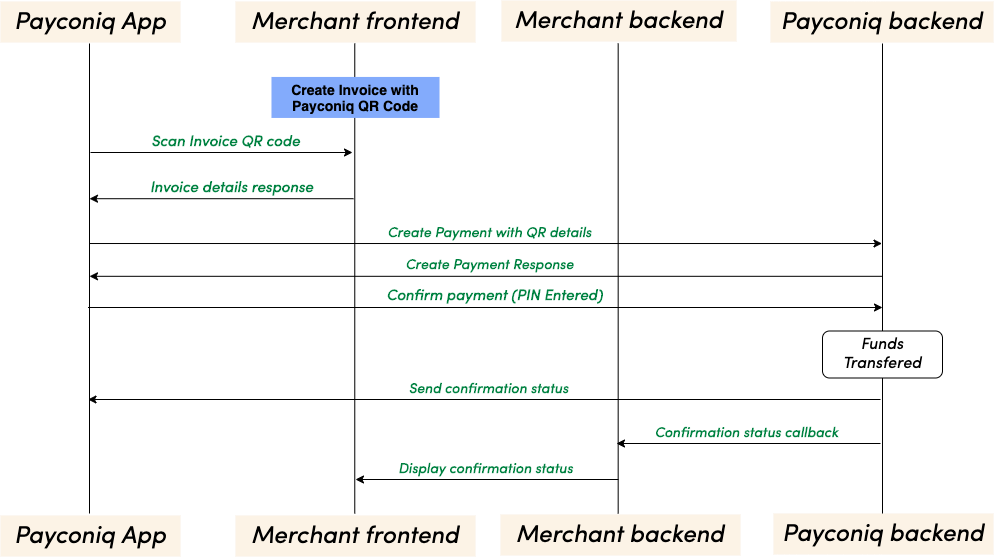
Step by step payment flow
- Merchant creates a QR code using the Payconiq QR URL schema. The URL will contain parameters which include an amount, description and a reference id.
- In the case structured remittance information is required then the reference parameter is used to provide the structured message.
- Merchant prints the Payconiq QR code according to the style guide on an invoice and offers it to the consumer for scanning.
- The consumer scans the Payconiq QR code using a Payconiq supported app which reads the details of the QR code and presents it for confirmation. The details would contain the amount to pay, the creditor name and a description.
- The consumer confirms the payment via fingerprint, face ID or by entering the pin. A confirm payment request is sent to the Payconiq backend for authorization.
- Payconiq initiates a callback notification request to the merchant’s backend with the status of the payment via a callback url. The details of the notification will contain a payment id and status among other fields.
- The merchant backend acknowledges the callback notification by responding appropriately.
- The merchant frontend is notified of the status of the payment.
- A payment response with the details is sent back to the Payconiq Supported App indicating a success or failure of the payment.
- The provided structured message will show up on the bank statement for automatic reconciliation.
NB: The order of consumer and merchant notification is not sequential. One may arrive before the other depending on internet and network connections.
Prerequisites
- Merchant CallbackUrl – This URL will be called by Payconiq’s backend servers in order to send the status of the payment to the merchant.
- Payment Profile Id - This is a unique identifier of the payment product used by a merchant.
- Payconiq URL Scheme - The Payconiq template QR URL scheme.
- API Key (Optional) – This is used to secure the request between the merchant’s backend and Payconiq’s backend. Do not share your API keys in public areas such as online sites or client-side code.
- Correct Configurations - In case structured remittance is required this should be specified on contract signature or signing.
Creating The Payconiq QR Code
The Payconiq QR code can be created using the Payconiq QR generation service. The following instructions have to be followed in order to successfully create the QR. Once created, the QR code can be printed on an invoice.
QR Parameters
| Attribute | Description |
|---|---|
f [String :: Enum] Allowed Values: SVG, PNG |
Image format. If not provided, the default format is PNG. |
s [String :: Enum] Allowed Values: S, M, L, XL |
Image size of the QR code to generate. Small (S) = 180x180 Medium (M) = 250x250 Large (L) = 400x400 Extra Large (XL) = 800x800 The sizes only applies to PNG format. *If not provided, the default size is Small. |
cl [String :: Enum] Allowed Values: magenta, black |
The colour of the QR code. Default is magenta. |
c [String, required] |
The Payconiq UTF-8 URL encoded content. This is comprised of the template URL scheme. |
c.D [String, optional] Maximum Length: 35 chars |
UTF-8 URL encoded description of the payment |
c.A [String, optional] Minimum: 1 Maximum: 999999 |
UTF-8 URL encoded amount of the QR code in Euro cents. |
c.R [String, optional] Maximum Length: 35 chars |
UTF-8 URL encoded reference of the QR code. |
NB: The following link provides a tool to encode the URL as an example: https://www.urlencoder.org/
NOTE: The combination of amount, reference, and description should always be unique. If not, the QR code could be considered paid.
Generating the QR Code
| Activity | Comment |
|---|---|
| 1. Obtain the pre-requisite information needed to generate the Payconiq QR Code. | • Format of the Payconiq QR code. • Size of the Payconiq QR code. • Template URL scheme. • Payment profile id of the merchant. • Amount of the Payconiq QR code. • Description of the Payconiq QR code. • Reference of the Payconiq QR code. |
| 2. Build the Payconiq service URL using the optional parameters which include: • Image format (PNG or SVG) • Image size (S, M, L, XL). This only applies to PNG. |
Sample format: https://portal.payconiq.com/qrcode?f={imageFormat}&s={ImageSize}&c= Example Output URL (PNG): https://portal.payconiq.com/qrcode?f=PNG&s=L&c= Sample URL (SVG) https://portal.payconiq.com/qrcode?f=SVG&c= |
| 3. UTF-8 encode the Payconiq URL payload parameter values using UTF-8 as the destination character set. This means encoding the following: • Description • Amount • Reference. |
Payconiq unencoded URL payload parameters D=Invoice Payment or any text from merchant that will be shown to user while paying. A=1000 R= reference used for structured remittance case(In case structured remittance is required this should be specified on contract signature or signing) For example, in case of structured remittance of type BBA = +++123/4567/89101+++,value of R would be 123456789101 Payconiq encoded URL payload parameters: D=Invoice%20Payment A=1000 R=123456789101 Reference used for structured remittance case (In case structured remittance is required this should be specified on contract signature or signing) For example,in case of structured remittance of type BBA = +++123/4567/89101+++,value of R would be 123456789101 |
| 4. Build the Payconiq URL payload using the following details. • Template URL scheme • Payment profile id of the merchant. • Amount of the Payconiq QR code. • Description of the Payconiq QR code. • Reference of the Payconiq QR code. |
Sample format:https://payconiq.com/t/1/{PaymentProfileId?D={Enc_description}&A={Enc_amount}&R={Enc_reference}Sample URL payload: https://payconiq.com/t/1/5c18cbd1296e9a26d3278518?D=Invoice%20Payment&A=1000&R=123456789101 |
| 5. UTF-8 encode the Payconiq URL Payload from step 4. | Payconiq URL Payload before Encoding:https://payconiq.com/t/1/5c18cbd1296e9a26d3278518?D=Invoice%20Payment&A=1000&R=123456789101Payconiq URL Payload after Encoding: https%3A%2F%2Fpayconiq.com%2Ft%2F1%2F5c18cbd1296e9a26d3278518%3FD%3DInvoice%2520Payment%26A%3D1000%26R%3D123456789101 |
| 6. Build full URL by combining results from step 2 and step 5. Once completed, execute the resulting URL in a web view to obtain the Payconiq QR code. The Payconiq QR code can be saved a file and printed subsequently. |
Sample full URL:https://portal.payconiq.com/qrcode?f=PNG&s=L&c=https%3A%2F%2Fpayconiq.com%2Ft%2F1%2F5c18cbd1296e9a26d3278518%3FD%3DInvoice%2520Payment%26A%3D1000%26R%3D123456789101 |
Sample formatted URL
Below is sample Payconiq QR code generated using the Payconiq QR Code generation service.
QR code properties:
Image Size: Medium
Image Format: PNG
QR code parameters:
Amount: 2.50 EUR
Description: Thanks for your money
Payment Profile Id: 61375f73093b13000669053e
Reference: 1nF97PCaUy5gm9thum15
Formatted Url: Sample Invoice QR Code
Sample QR Code Image
Invoice Deeplink
For the merchants who send the invoice over email and post both. They can provide the option to the user who opens the invoice received via email on phone to pay via deeplink.
Deeplink example
Prerequisites
Amount: 2.50 EUR
Description: Invoice Payment
Payment Profile Id: 5c18cbd1296e9a26d3278518
Reference: 4198798465
Example Template Deeplink
https://payconiq.com/t/1/5c18cbd1296e9a26d3278518?D=Invoice%20Payment&A=250&R=4198798465
The Payconiq Callback
Payconiq calls the merchant’s callbackUrl endpoint to send the status of a payment. This is only informational towards the merchant or partner. There is no impact on a payment if it is not processed successfully by the merchant or partner.
The merchant backend must verify that the notification message originated from Payconiq and was not altered or corrupted during transmission by validating the signature.
Type: REST
HTTP Verb: POST
EXT URL Definition: {callbackUrl}
PROD URL Definition: {callbackUrl}
Callback Request Header
The following parameters are included in the header of the callback request.
signature: eyJ0eXAiOiJKT1NFK0pTT04iLCJraWQiOiJ5ZXNPbmUiLCJhbGciOiJSUzI1NiIsImh0dHBzOi8vcGF5Y29uaXEuY29tL2lhdCI6IjIwMTktMDEtMTRUMTE6MTE6MTFaIiwiaHR0cHM6Ly9wYXljb25pcS5jb20vanRpIjoiR2l2ZU1lIiwiaHR0cHM6Ly9wYXljb25pcS5jb20vcGF0aCI6Ii90aGUvcm9hZC9sZXNzL3RyYXZlbGVkIiwiaHR0cHM6Ly9wYXljb25pcS5jb20vaXNzIjoiUGF5Y29uaXEiLCJjcml0IjpbImh0dHBzOi8vcGF5Y29uaXEuY29tL2lhdCIsImh0dHBzOi8vcGF5Y29uaXEuY29tL2p0aSIsImh0dHBzOi8vcGF5Y29uaXEuY29tL3BhdGgiLCJodHRwczovL3BheWNvbmlxLmNvbS9pc3MiXX0..LoBPG9T00c-0urv5FXrTWmumUJBTpTaqG5F0HciYHgi0Ck-bZrFxX8MLEgKbdv5YUMKKDnbLcFS0M4lNiGa17Qo8OOH4mCAjvuVEyoutHObd_TrZ4oUM0CX3uRNd88shemup9YPEMtRjmPZATXzStTBdQeRpq_f89bAqy2nCOxg_2BgqSnvC_R4JMA7I5SaRndvzbn80oeVHUEMkpmRFNnhRtVujeEUnfn3hBR_YIHh3vJKWArIYOV9eMkpDFb6nC_GoZoNGfPFunBUtOXU1y3gCDi6GOsa4eaDygNsBk-ZNj2v8cMRPBnHdw2oOaAjEs6K63An0bbkdKG7UzVojAw


content-type: application/json


user-agent: Payconiq Payments/v3
| Attribute | Comment/ Format |
|---|---|
signature [String, required] |
This represents a Payconiq digitally signed content using JSON data structures and base64url encoding. The signature is made up of JSON Web Signature (JWS) and a JSON Object Signing and Encryption (JOSE) header. |
content-type [String, required] application/json |
The Content-Type entity header is used to indicate the media type of the resource. |
user-agent [String, required] |
The User-Agent request header contains a characteristic string that allows the network protocol peers to identify the application type, operating system, software vendor or software version of the requesting software user agent. |
{
    "paymentId": "5ba37c3d0989e3000758b9d8",
    "transferAmount": 122,
    "tippingAmount": 0,
    "amount": 122,
    "totalAmount": 122,
    "description": "Sample description",
    "createdAt": "2019-11-26T15:26:19.363Z",
    "expireAt": "2019-11-26T15:29:19.363Z",
    "succeededAt": "2019-11-26T15:27:34.835Z",
    "status": "SUCCEEDED",
    "debtor": {
        "name": "John",
        "iban": "*************12636"
    },
    "currency": "EUR",
    "reference": "12346816AFV"
}
Callback Request Body
The following parameters are included in the body of the callback request.
| Attribute | Description |
|---|---|
paymentId [String, required] Fixed length: 24 chars |
The unique Payconiq payment id. |
amount [Integer, required] Minimum: 1 Maximum: 999999 |
Payment amount in Euro cents. |
transferAmount [Integer, required] Minimum: 1 Maximum: 999999 |
The amount the consumer will be charged in Euro cents |
tippingAmount [Integer, required] Minimum: 1 Maximum: 999999 |
The amount added as a tip by the consumer in Euro cents (currently not supported). |
totalAmount [Integer, required] Minimum: 1 Maximum: 999999 |
The amount the consumer pays in total in Euro cents. |
currency [String, optional] |
Payment currency code in ISO 4217 format. Only Euros supported at the moment. |
description [String, optional] |
Custom description of the payment. This will be shown to the consumer when making payments and will be present on the bank statement of the merchant and consumer for reconciliation purposes. Only the first 35 characters are used for the remittance information. |
reference [String, optional] |
Merchant’s payment reference used to reference the Payconiq payment in the merchant’s system. |
createdAt [String, required] Format: YYYY-MM-ddTHH:mm:ss.SSSZ |
The creation date and time of the Payconiq payment. |
expireAt [String, required] Format: YYYY-MM-ddTHH:mm:ss.SSSZ |
The date and time when a Payconiq payment expires. |
succeededAt [String, optional] Format: YYYY-MM-ddTHH:mm:ss.SSSZ |
The date and time when a Payconiq payment succeeded. |
status [String::enum, required] Allowed values: PENDING, IDENTIFIED, AUTHORIZED, AUTHORIZATION_FAILED, SUCCEEDED, FAILED, CANCELLED, EXPIRED. |
The status of the Payconiq Payment. |
debtor[JSON Object, required] |
The consumer account object that makes payments to the merchant |
debtor.name [String, optional] |
Debtor's first name. |
debtor.iban [String, optional] |
Debtor's IBAN masked. |
Callback Not Received or Signature Validation Fails
In the event where you don't receive the callback, you can initiate a Get Payments List call using your reference. The response will contain details of the payment.
If a callback is received but signature verification fails, merchants can Get the Payment Details using the payment id from the callback. This is another sure way to know the status in order to complete the payment.
Get Payment Details
Payment details of an existing payment may be obtained. A unique payment id is passed from a payment creation request and Payconiq will return the corresponding payment information.
Note: It is recommended to implement this as a fallback option to obtaining the response via the callback URL.
Type: REST
HTTP Verb: GET
EXT URL Definition: https://api.ext.payconiq.com/v3/payments/{paymentId}
PROD URL Definition: https://api.payconiq.com/v3/payments/{paymentId}
Get Payment Details Header
The following parameters are included in the header of the request.
| Attribute | Comment/ Format |
|---|---|
Authorization [String, required] |
Authorization field which contains the API Key. Bearer xxxxxxxx-xxxx-xxxx-xxxx-xxxxxxxxxxxx |
Content-type [String, required] application/json |
Content type of the data in the request body. |
Example Request:
curl -X GET
  https://api.ext.payconiq.com/v3/payments/5b976d11dd172a0007c4429d
  -H 'Authorization: Bearer xxxxxxxx-xxxx-xxxx-xxxx-xxxxxxxxxxxx'
  -H 'Content-Type: application/json'
Get Payment Details Request Path
The following parameters are included in the path of a get payment details request.
| Attribute | Description |
|---|---|
paymentId [String, required] |
The unique Payconiq identifier of a payment as provided by the create payment service. |
Get Payment Details Response Header
The following parameters are included in the header of the get payment details response.
| Attribute | Description |
|---|---|
Http Status Code [Integer] |
Status code of the HTTP POST response. 2xx – Indicates success 4xx – Indicates malformed client request 5xx – Indicates errors with Payconiq servers |
Content-type [String] application/json |
Content type of the data |
Example Response
HTTP/1.1 200 OK
Content-Type: application/json
{
    "paymentId": "5bdaf066b93d1c000bde9683",
    "createdAt": "2019-11-26T15:26:19.363Z",
    "expireAt": "2019-11-26T15:29:19.363Z",
    "succeededAt": "2019-11-26T15:27:34.835Z",
    "currency": "EUR",
    "status": "SUCCEEDED",
    "creditor": {
        "profileId": "5b71369f5832fd22658e0ef4",
        "merchantId": "5b71369f5832fd09188e0915",
        "name": "Merchant Name",
        "iban": "NL47FRBK0293409698",
        "callbackUrl": "https://www.testcallback.com/payconiq/payment"
    },
    "debtor": {
        "name": "John",
        "iban": "*************12636"
    },
    "amount": 10,
    "transferAmount": 10,
    "tippingAmount": 0,
    "totalAmount": 10,
    "description": "Otto's Payment Test",
    "bulkId": "centraal station pos-2",
    "_links": {
        "self": {
            "href": "https://api.ext.payconiq.com/v3/payments/5bdaf066b93d1c000bde9683"
        },
        "deeplink": {
            "href": "https://payconiq.com/pay/2/5bdaf066b93d1c000bde9683"
        },
        "qrcode": {
            "href": "https://portal.ext.payconiq.com/qrcode?c=https%3A%2F%2Fpayconiq.com%2Fpay%2F2%2F5bdaf066b93d1c000bde9683"
        },
        "refund": {
            "href": "https://api.ext.payconiq.com/v3/payments/5bdaf066b93d1c000bde9683/debtor/refundIban"
        }
    }
}
Get Payment Details Response Body
The following parameters are included in the body of the get payment details response.
| Attribute | Description |
|---|---|
paymentId [String, required] Fixed length: 24 chars |
The unique Payconiq payment id. |
createdAt [String, required] Format: YYYY-MM-ddTHH:mm:ss.SSSZ |
The creation date and time of the Payconiq payment. |
expireAt [String, required] Format: YYYY-MM-ddTHH:mm:ss.SSSZ |
The date and time when a Payconiq payment expires. |
succeededAt [String, optional] Format: YYYY-MM-ddTHH:mm:ss.SSSZ |
The date and time when a Payconiq payment succeeded. |
currency [String, required] |
Payment currency code in ISO 4217 format. Only Euros supported at the moment. |
status [String::enum, required] Allowed values: PENDING, IDENTIFIED, CANCELLED, AUTHORIZED, AUTHORIZATION_FAILED, EXPIRED, FAILED, SUCCEEDED |
The status of the Payconiq Payment. |
creditor [JSON Object, required] |
The merchant account object set to receive the Payconiq payment from a consumer. |
creditor.profileId [String, required] |
The unique payment product identifier of the merchant. |
creditor.merchantId [String, required] |
The unique identifier of a merchant. |
creditor.name [String, required] |
The merchant’s company name that will be shown to the consumer. |
creditor.iban [String, required] |
The bank account of the merchant where payments will be sent to. |
creditor.callbackUrl [String, optional] |
A URL to which the Merchant or Partner will be notified of a payment. Must be https for production. |
debtor[JSON Object, optional] |
The consumer account object that makes payments to the merchant |
debtor.name [String, optional] |
First name of Debtor. |
debtor.iban [String, optional] |
IBAN of Debtor masked. |
amount [Integer, required] |
Payment amount in Euro cents. |
transferAmount [Integer, required] Minimum: 1 Maximum: 999999 |
The amount the consumer will be charged in Euro cents |
tippingAmount [Integer, required] Minimum: 1 Maximum: 999999 |
The amount added as a tip by the consumer in Euro cents (currently not supported). |
totalAmount [Integer, required] Minimum: 1 Maximum: 999999 |
The amount the consumer pays in total in Euro cents. |
description [String, optional] |
Custom description of the payment. This will be shown to the consumer when making payments and will be present on the bank statement of the merchant and consumer for reconciliation purposes. Only the first 35 characters are used for the remittance information. |
message [String, optional] |
Custom message from the consumer. |
reference [String, optional] |
Merchant’s payment reference used to reference the Payconiq payment in the merchant’s system. |
bulkId [String, optional] Maximum Length: 35 chars |
A field set to reference a bulk batch payment. |
_links [Object, optional] |
Links object which contain urls to be used by merchants to load the QR codes, perform App2App linking, cancel a payment and get the payment details. |
_links.self [Object, optional] |
Hypermedia GET URL used to fetch payment details |
_links.self.href [String :: URI, optional] |
URL String. |
_links.deeplink [Object, optional] |
Hypermedia GET URL used to perform App2App linking |
_links.deeplink.href [String :: URI, optional] |
URL String. |
_links.qrcode [Object, optional] |
Hypermedia GET URL used to fetch QR code for display and scanning purposes (PNG/SVG) |
_links.qrcode.href [String :: URI, optional] |
URL String. |
_links.cancel [Object, optional] |
Hypermedia DELETE URL used to cancel a payment. |
_links.cancel.href [String :: URI, optional] |
URL String. |
_links.refund [Object, optional] |
Hypermedia GET Url used to fetch refund information for a payment. |
_links.refund.href [String :: URI, optional] |
URL String. |
HTTP/1.1 404 Not Found
{
    "traceId": "d7152b6b08caa620",
    "spanId": "556d68164b8e8ef6",
    "code": "PAYMENT_NOT_FOUND",
    "message": "Payment not found '5ba35a3d0989e3000758b9c2'"
}
Get Payment Details HTTP Status and Error Codes
Below are the status codes and descriptions returned as part of the API responses.
| Status Code | Error Codes |
|---|---|
401 [Integer] |
UNAUTHORIZED: The user not have an API Key or API Key is incorrect. |
403 [Integer] |
ACCESS_DENIED: The API key could not be verified or the API key does not contain the required authority to access the resource requested. |
404 [Integer] |
PAYMENT_NOT_FOUND: Payment could not be found for the corresponding payment id. |
429 [Integer] |
Too Many Requests |
500 [Integer] |
TECHNICAL_ERROR: Technical error in the Payconiq payment service. |
503 [Integer] |
Service Unavailable |
Get Payments List
This endpoint is use to retrieve a list of a Payconiq payments. The page and size parameters are used to specify how many records to return as well as filter the results for the total number of records returned per page. By default the latest 50 payments are returned per request and are sorted by creation date in descending order.
Type: REST
HTTP Verb: POST
EXT URL Definition: https://api.ext.payconiq.com/v3/payments/search?page={p}&size={s}
PROD URL Definition: https://api.payconiq.com/v3/payments/search?page={p}&size={s}
Get Payments List Request Header
| Attribute | Comment/ Format |
|---|---|
Authorization [String, required] |
Authorization field which contains the API Key. Bearer xxxxxxxx-xxxx-xxxx-xxxx-xxxxxxxxxxxx |
Content-type [String, required] application/json |
Content type of the data in the request body. |
Example Request:
curl -X POST
  'https://api.ext.payconiq.com/v3/payments/search?page=10&size=10'
  -H 'Authorization: Bearer xxxxxxxx-xxxx-xxxx-xxxx-xxxxxxxxxxxx'
  -H 'Cache-Control: no-cache'
  -H 'Content-Type: application/json'
  -d
  '{
        "from":"2018-08-01T00:10:10.000Z",
        "to":"2018-08-31T00:10:10.999Z",
        "paymentStatuses":["SUCCEEDED"],
        "reference":"1234568"
  }'
Get Payments List Request Path
| Attribute | Comment/ Format |
|---|---|
page [Integer, optional] |
Zero based page index in the list request. NB: The page defaults to 0 if not present in the request path. |
size [Integer, optional] |
The size of the page to be returned in the list. NB: The size defaults to 50 if not present in the request path. |
Get Payments List Request Body
| Attribute | Description |
|---|---|
from [String, required] Format: YYYY-MM-ddTHH:mm:ss.SSSZ |
The start date and time to filter the search results. Default: Current date and time minus one day. (Now - 1 day) |
to [String, optional] Format: YYYY-MM-ddTHH:mm:ss.SSSZ |
The end date and time to filter the search results.. Default: Current date and time. (Now) |
paymentStatuses [Array::String, Optional] |
An array of payment statuses to filter the search results on. |
reference [String, optional] Maximum Length: 36 chars |
External payment reference used to reference the Payconiq payment in the calling party's system. |
Get Payment List Response Header
The following parameters are included in the header of the get payment list response.
| Attribute | Description |
|---|---|
Http Status Code [Integer] |
Status code of the HTTP POST response. 2xx – Indicates success 4xx – Indicates malformed client request 5xx – Indicates errors with Payconiq servers |
Content-type [String] application/json |
Content type of the data |
HTTP/1.1 200 OK
{
    "size": 2,
    "totalPages": 7,
    "totalElements": 13,
    "number": 0,
    "details": [
        {
            "paymentId": "5bdaf066b93d1c000bde9683",
            "createdAt": "2019-11-26T15:26:19.363Z",
            "expireAt": "2019-11-26T15:29:19.363Z",
            "succeededAt": "2019-11-26T15:27:34.835Z",
            "currency": "EUR",
            "status": "SUCCEEDED",
            "creditor": {
                "profileId": "5b71369f5832fd22658e0ef4",
                "merchantId": "5b71369f5832fd09188e0915",
                "name": "Merchant Name",
                "iban": "NL47FRBK0293409698",
                "callbackUrl": "https://www.testcallback.com/payconiq/payment"
            },
            "debtor": {
                "name": "John",
                "iban": "*************12636"
            },
            "amount": 10,
            "transferAmount": 10,
            "tippingAmount": 0,
            "totalAmount": 10,
            "description": "Otto's Payment Test",
            "bulkId": "centraal station pos-2",
            "_links": {
                "self": {
                    "href": "https://api.ext.payconiq.com/v3/payments/5bdaf066b93d1c000bde9683"
                },
                "deeplink": {
                    "href": "https://payconiq.com/pay/2/5bdaf066b93d1c000bde9683"
                },
                "qrcode": {
                    "href": "https://portal.ext.payconiq.com/qrcode?c=https%3A%2F%2Fpayconiq.com%2Fpay%2F2%2F5bdaf066b93d1c000bde9683"
                },
                "refund": {
                    "href": "https://api.ext.payconiq.com/v3/payments/5bdaf066b93d1c000bde9683/debtor/refundIban"
                }
            }
        },
        {
            "paymentId": "5bdaf066b93d1c000bde9683",
           "createdAt": "2019-11-26T15:26:19.363Z",
           "expireAt": "2019-11-26T15:29:19.363Z",
           "succeededAt": "2019-11-26T15:27:34.835Z",
            "currency": "EUR",
            "status": "SUCCEEDED",
            "creditor": {
                "profileId": "5b71369f5832fd22658e0ef4",
                "merchantId": "5b71369f5832fd09188e0915",
                "name": "Merchant Name",
                "iban": "NL47FRBK0293409698",
                "callbackUrl": "https://www.testcallback.com/payconiq/payment"
            },
            "debtor": {
                "name": "John",
                "iban": "*************12636"
            },
            "amount": 10,
            "transferAmount": 10,
            "tippingAmount": 0,
            "totalAmount": 10,
            "description": "Otto's Payment Test",
            "bulkId": "centraal station pos-2",
            "_links": {
                "self": {
                    "href": "https://api.ext.payconiq.com/v3/payments/5bdaf066b93d1c000bde9683"
                },
                "deeplink": {
                    "href": "https://payconiq.com/pay/2/5bdaf066b93d1c000bde9683"
                },
                "qrcode": {
                    "href": "https://portal.ext.payconiq.com/qrcode?c=https%3A%2F%2Fpayconiq.com%2Fpay%2F2%2F5bdaf066b93d1c000bde9683"
                },
                "refund": {
                    "href": "https://api.ext.payconiq.com/v3/payments/5bdaf066b93d1c000bde9683/debtor/refundIban"
                }
            }
        }
    ]
}
Get Payments list Response Body
The following parameters are included in the body of the get payment details response.
| Attribute | Description |
|---|---|
size [Integer, required] |
The total size of elements returned in the current page. |
totalPages [Integer, required] |
Total number of pages that contain the list of results. |
totalElements [Integer, required] |
Total number of elements in the list requested. |
number [Integer, required] |
The current page number. |
details [JSON Object, required] |
An array of payment details returned for the search criteria. |
details.paymentId [String, required] Fixed length: 24 chars |
The unique Payconiq payment id. |
details.createdAt [String, required] Format: YYYY-MM-ddTHH:mm:ss.SSSZ |
The creation date and time of the Payconiq payment. |
details.expireAt [String, required] Format: YYYY-MM-ddTHH:mm:ss.SSSZ |
The date and time when a Payconiq payment expires. |
details.succeededAt [String, optional] Format: YYYY-MM-ddTHH:mm:ss.SSSZ |
The date and time when a Payconiq payment succeeded. |
details.currency [String, required] |
Payment currency code in ISO 4217 format. Only Euros supported at the moment. |
details.status [String::enum, required] Allowed values: PENDING, IDENTIFIED, CANCELLED, AUTHORIZED, AUTHORIZATION_FAILED, EXPIRED, FAILED, SUCCEEDED |
The status of the Payconiq Payment. |
details.creditor [JSON Object, required] |
The merchant account object set to receive the Payconiq payment from a consumer. |
details.creditor.profileId [String, required] |
The unique payment product identifier of the merchant. |
details.creditor.merchantId [String, required] |
The unique identifier of a merchant. |
details.creditor.name [String, required] |
The merchant’s company name that will be shown to the consumer. |
details.creditor.iban [String, required] |
The bank account of the merchant where payments will be sent to. |
details.creditor.callbackUrl [String, optional] |
A URL to which the Merchant or Partner will be notified of a payment. Must be https for production. |
details.debtor[JSON Object, required] |
The consumer account object that makes payments to the merchant |
details.debtor.name [String, optional] |
First name of Debtor. |
details.debtor.iban [String, optional] |
IBAN of Debtor masked. |
details.amount [Integer, required] |
Payment amount in Euro cents. |
details.transferAmount [Integer, required] Minimum: 1 Maximum: 999999 |
The amount the consumer will be charged in Euro cents |
details.tippingAmount [Integer, required] Minimum: 1 Maximum: 999999 |
The amount added as a tip by the consumer in Euro cents (currently not supported). |
details.totalAmount [Integer, required] Minimum: 1 Maximum: 999999 |
The amount the consumer pays in total in Euro cents. |
details.description [String, optional] |
Custom description of the payment. This will be shown to the consumer when making payments and will be present on the bank statement of the merchant and consumer for reconciliation purposes. Only the first 35 characters are used for the remittance information. |
details.message [String, optional] |
Custom message from the consumer. |
details.reference [String, optional] |
Merchant’s payment reference used to reference the Payconiq payment in the merchant’s system. |
details.bulkId [String, optional] Maximum Length: 35 chars |
A field set to reference a bulk batch payment. |
details._links [Object, optional] |
Links object which contain urls to be used by merchants to load the QR codes, perform App2App linking, cancel a payment and get the payment details. |
details._links.self [Object, optional] |
Hypermedia GET URL used to fetch payment details |
details._links.self.href [String :: URI, optional] |
URL String. |
details._links.deeplink [Object, optional] |
Hypermedia GET URL used to perform App2App linking |
details._links.deeplink.href [String :: URI, optional] |
URL String. |
details._links.qrcode [Object, optional] |
Hypermedia GET URL used to fetch QR code for display and scanning purposes (PNG/SVG) |
details._links.qrcode.href [String :: URI, optional] |
URL String. |
details._links.cancel [Object, optional] |
Hypermedia DELETE URL used to cancel a payment. |
details._links.cancel.href [String :: URI, optional] |
URL String. |
details._links.refund [Object, optional] |
Hypermedia GET Url used to fetch refund information for a payment. |
details._links.refund.href [String :: URI, optional] |
URL String. |
HTTP/1.1 401 Unauthorized
{
    "traceId": "d7152b6b08caa620",
    "spanId": "556d68164b8e8ef6",
    "code": "UNAUTHORIZED",
    "message": "Payment not found '5ba35a3d0989e3000758b9c2'"
}
Get Payments List HTTP Status and Error Codes
| Status Code | Error Codes |
|---|---|
401 [Integer] |
UNAUTHORIZED: The user not have an API Key or API Key is incorrect. |
403 [Integer] |
ACCESS_DENIED: The API key could not be verified or the API key does not contain the required authority to access the resource requested. |
429 [Integer] |
Too Many Requests |
500 [Integer] |
TECHNICAL_ERROR: Technical error in the Payconiq payment service. |
503 [Integer] |
Service Unavailable |
Remittance Information
Structured Remittance
A successful Payment results in a credit transfer from the consumer’s (payer) payment account (held with the consumer’s bank) to the Merchant's/Partner's payment bank account. There are 1 exemption to this:
If the Merchant/Partner makes use of the Payconiq Bulking Service, then Payconiq will credit Merchant's/Partner’s payment account via aggregated amounts in a batched fashion in an agreed timetable.
Bank Statement Description
When a Payment reaches the final status “SUCCEEDED”, the Payconiq backend initiates a credit transfer from the consumer’s payment account to the Merchant's/Partner’s payment account or Payconiq's payment account. The remittance information provided with the credit transfer will show the structured message.
Sample Remittance Information


"424779266492"
| Field Name | Description | Format |
|---|---|---|
Description |
A description linked to a Payconiq Payment Transaction. Field is padded with spaces if the max length is not reached. | String [Max Length: 46] |
Note: The above does not apply to the bulked Payconiq Payments.
Unstructured Remittance
A successful Payment results in a credit transfer from the consumer’s (payer) payment account (held with the consumer’s bank) to the Merchant's/Partner's payment bank account. There are 1 exemption to this:
If the Merchant/Partner makes use of the Payconiq Bulking Service, then Payconiq will credit Merchant's/Partner’s payment account via aggregated amounts in a batched fashion in an agreed timetable.
Bank Statement Description
When a Payment reaches the final status “SUCCEEDED”, the Payconiq backend initiates a credit transfer from the consumer’s payment account to the Merchant's/Partner’s payment account or Payconiq's payment account.
Sample Remittance Information


"Payconiq f60454fd52e429d71964745d Online Kassa            4zyeYIKOw54Ybc9yenL5                Mars Bars                          "
| Field Name | Description | Format |
|---|---|---|
Issuer |
The entity that facilitates Payconiq Payment | String [Max Length: 8] |
Delimiter |
Field separator | String: Space [Max Length: 1] |
Payment Identifier |
A unique identifier representing a Payconiq Payment Transaction | String: Space [Max Length: 24] |
Delimiter |
Field separator | String: Space [Max Length: 1] |
Merchant Name |
The name of the merchant where the Payconiq Payment Transaction takes place. Field is padded with spaces if the max length is not reached | String [Max Length: 23] |
Delimiter |
Field separator | String: Space [Max Length: 1] |
Reference |
A unique identifier referencing a Payconiq Payment Transaction in the Partner's system. Field is padded with spaces if the max length is not reached. | String [Max Length: 35] |
Delimiter |
Field separator | String: Space [Max Length: 1] |
Description |
A description linked to a Payconiq Payment Transaction. Field is padded with spaces if the max length is not reached. | String [Max Length: 46] |
An example of the remittance information entry is as follows for the sample values provided in the table above.
“Payconiq f60454fd52e429d71964745d Online Kassa 4zyeYIKOw54Ybc9yenL5 Mars Bars ”
Note: The above does not apply to the bulked Payconiq Payments.
Payconiq Online (V3) - Custom Online
In e-commerce, pay mobile by scanning the QR code during the check out.
Process Flow With Merchant's Checkout Page
Involved Parties:
- Payconiq-supported app – Payconiq consumer application.
- Merchant Frontend – Website checkout page.
- Merchant Backend – Backend of merchant that integrates and interacts with Payconiq.
- Payconiq Backend – Backend of Payconiq that provides integration and payment services.
Online Custom Process Flow With Merchant Checkout Page
Step by step payment flow
- Merchant frontend sends payment creation details to Merchant’s backend. This will contain at least the payment amount.
- Merchant backend sends a REST request to the Payconiq backend to create a payment. The parameters passed in this request are the payment amount, payment currency, payment description and other parameters.
- Payconiq backend returns the created payment with the Payconiq payment id and other relevant details to the merchant’s backend – including the QR code.
- The merchant’s backend sends the Payconiq QR url to the merchant frontend to render the payment as a QR code.
- Payconiq-supported app scans the QR code in order to start the payment for the amount displayed. A request for payment details is sent to the Payconiq backend for the payment.
- Payconiq backend sends the payment details to the Payconiq-supported app which would contain the name of the merchant and the amount to pay.
- The consumer confirms the payment by entering his/her PIN, fingerprint or face id and a payment request is sent to the Payconiq Backend for authorization.
- A payment response with the details is sent back to the Payconiq-supported app indicating a success or failure of the payment.
- Payconiq backend sends a payment notification to the Merchant backend with the payment details to the callback url. The details of the notification will either contain success or failure details.
- The merchant frontend displays the confirmation status it receives from Payconiq.
- The consumer is notified of the payment status via the app.
NB: The order of consumer and merchant notification is not sequential. One may arrive before the other depending on internet and network connections.
Process Flow With Payconiq Checkout Page
If you want user to complete the payment on Payconiq checkout page instead of your own checkout page then you can use the checkout URL in the create response and implement it instead of QR code URL. This will take the user to the Payconiq checkout page and display the QR code or "Pay with Payconiq-supported app" button based on the device they are accessing your website. The Consumer sees the amount, the shop name and description after scanning. The Consumer then confirms the payment using a Payconiq supported app. The created Payment is valid for 1200 seconds (20 minutes). Once the Payment is confirmed by the consumer, an optional callback is sent to the merchant indicating the status of the Payment. After payment is completed, consumer is automatically redirected back to merchant's web shop using returnUrl, provided by merchant during payment creation.
Involved Parties:
- Payconiq Supported App – Payconiq consumer application.
- Merchant – Backend of merchant that integrates and interacts with Payconiq.
- Payconiq Backend – Backend of Payconiq that provides integration and payment services.
- Payconiq Checkout Page – Web page hosted by Payconiq, which will facilitate payment process for consumer.
Online Custom Process Flow
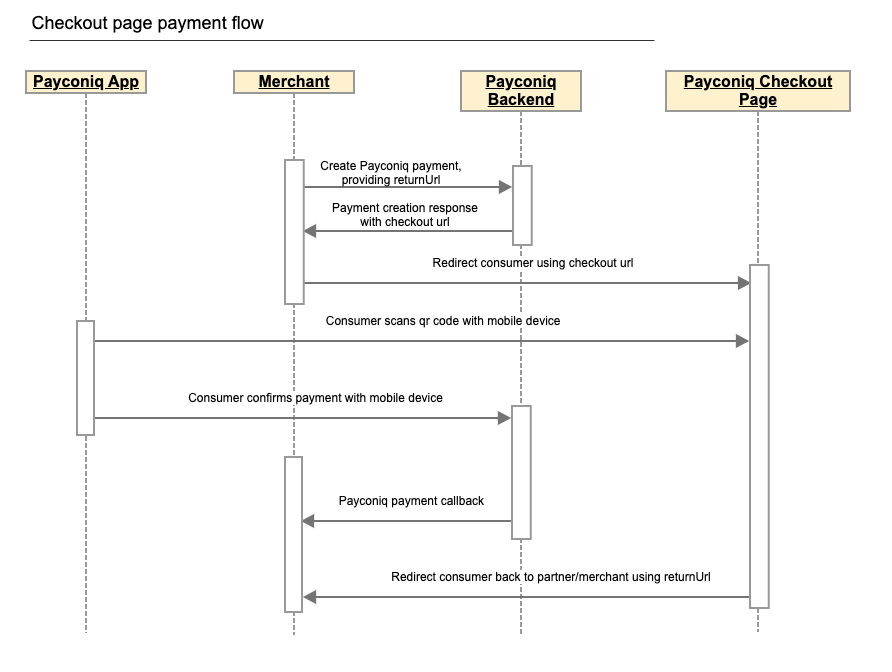
Step by step payment flow
- Merchant frontend sends payment creation details to Merchant’s backend. This will contain at least the payment amount.
- Merchant backend sends a REST request to the Payconiq backend to create a payment. The parameters passed in this request are the payment amount, payment currency, payment description, return url and other parameters.
- Payconiq backend returns the created payment with the Payconiq payment id and other relevant details to the merchant’s backend – including checkout url link.
- The merchant’s backend redirects consumer to Payconiq-hosted checkout page using checkout url provided in response for payment creation.
- Payconiq Supported app scans the QR code in order to start the payment for the amount displayed. A request for payment details is sent to the Payconiq backend for the payment.
- Payconiq backend sends the payment details to the Payconiq-supported app which would contain the name of the merchant and the amount to pay.
- The consumer confirms the payment by entering his/her PIN, fingerprint or face id and a payment request is sent to the Payconiq Backend for authorization.
- A payment response with the details is sent back to the Payconiq-supported app indicating a success or failure of the payment.
- Checkout web page is redirecting consumer back to merchant's web shop using returnUrl, provided by the merchant during payment creation.
- Payconiq backend sends a payment notification to the Merchant backend with the payment details to the callback url. The details of the notification will either contain success or failure details.
- The merchant frontend displays the confirmation status it receives from Payconiq.
- The consumer is notified of the payment status via the app.
NB: The order of consumer and merchant notification is not sequential. One may arrive before the other depending on internet and network connections.
Prerequisites
- API Key – This is used to secure the request between the merchant’s backend and Payconiq’s backend. Do not share your API keys in public areas such as online sites or client-side code.
- Merchant CallbackUrl – This URL will be called by Payconiq’s backend servers in order to send the status of the payment to the merchant.
- Merchant's ReturnUrl – This URL should be provided during payment creation request by merchant in order to redirect consumer back to the merchant's web shop after payment is completed on checkout page.
The Payconiq Brand Guide
You can find Payconiq's Branding Guidelines for Online Payments here.
Please follow the below steps to successfully implement the Payconiq API in your payment terminal or customer facing display.
Create Payment
In order to begin a payment, you need to create a payment via the Payconiq through a POST request. A unique payment identifier is valid for twenty(20) minutes (1200 seconds) after which it expires. If a payment does not take place within these twenty(20) minutes, a new payment has to be created.
Type: REST
HTTP Verb: POST
EXT URL Definition: https://api.ext.payconiq.com/v3/payments
PROD URL Definition: https://api.payconiq.com/v3/payments
Create Payment Request Header
| Attribute | Comment/ Format |
|---|---|
Authorization [String, required] |
Authorization field which contains the API Key. Bearer xxxxxxxx-xxxx-xxxx-xxxx-xxxxxxxxxxxx |
Content-type [String, required] application/json |
Content type of the data in the request body. |
Example Request:
curl -X POST
  https://api.ext.payconiq.com/v3/payments
  -H 'Authorization: Bearer xxxxxxxx-xxxx-xxxx-xxxx-xxxxxxxxxxxx'
  -H 'Cache-Control: no-cache'
  -H 'Content-Type: application/json'
  -d '{
         "amount" : "999999",
         "currency" : "EUR",
         "callbackUrl": "https://dummy.network/api/v1/orders/payconiq",
         "description": "Test payment 12345",
         "reference": "12345",
         "bulkId":"Bulk-1-200",
         "returnUrl": "https://dummy.webshop/checkout/success"
      }'
Create Payment Request Body
| Attribute | Description |
|---|---|
amount [Integer, required] Minimum: 1 Maximum: 999999 |
Payment amount in Euro cents. |
callbackUrl [URI, optional] |
A url to which the Merchant will be notified of a payment. Must be Https for production. |
currency [String, Optional] |
Payment currency code in ISO 4217 format. Only Euros supported at the moment. Value: EUR |
description[String, optional] Maximum Length: 140 chars |
Custom description of the payment. This will be shown to the consumer when making payments and will be present on the bank statement of the merchant and consumer for reconciliation purposes. Only the first 35 characters are used for the remittance information. |
reference [String, optional] Maximum Length: 36 chars |
External payment reference used to reference the Payconiq payment in the calling party's system. |
bulkId [String, optional] Maximum Length: 35 chars |
A field set to reference a bulk batch payment. |
returnUrl [String, optional] Maximum Length: 2048 chars |
A field set by the calling party used to redirect consumer back after payment is completed on checkout web page hosted by Payconiq. This field is mandatory if merchant wants to use checkout web page flow. |
Example Response:
HTTP/1.1 201 Created
{
    "paymentId": "5bdb1685b93d1c000bde96f2",
    "status": "PENDING",
    "createdAt": "2018-09-18T11:43:29.160Z",
    "expiresAt": "2018-09-18T11:43:29.160Z",
    "description": "Sample description",
    "reference": "987456264",
    "amount": 999999,
    "currency": "EUR",
    "creditor": {
        "profileId": "5b71369f5832fd22658e0ef4",
        "merchantId": "5b71369f5832fd09188e0915",
        "name": "Merchant Name",
        "iban": "NL47FRBK0293409698",
        "callbackUrl": "https://www.testcallback.com/payconiq/payment"
    },
    "_links": {
        "self": {
            "href": "https://api.ext.payconiq.com/v3/payments/5bdb1685b93d1c000bde96f2"
        },
        "deeplink": {
            "href": "https://payconiq.com/pay/2/5bdb1685b93d1c000bde96f2"
        },
        "qrcode": {
            "href": "https://portal.ext.payconiq.com/qrcode?c=https%3A%2F%2Fpayconiq.com%2Fpay%2F2%2F5bdb1685b93d1c000bde96f2"
        },
        "cancel": {
            "href": "https://api.ext.payconiq.com/v3/payments/5bdb1685b93d1c000bde96f2"
        },
        "checkout": {
            "href": "https://payconiq.com/pay/2/5bdb1685b93d1c000bde96f2?token=530ea8a4ec8ded7d87620c8637354022cd965b143f257f8f8cb118e7f4a22d8f&returnUrl=https%3A%2F%2Fummy.webshop%2Fcheckout%2Fsuccess"
        }
    }
}
Create Payment Response
The following parameters are included in the header and body of the create payment response.
Response Header
| Attribute | Description |
|---|---|
Http Status Code [Integer] |
Status code of the HTTP POST response. 2xx – Indicates success 4xx – Indicates malformed client request 5xx – Indicates errors with Payconiq servers |
Content-type [String] application/json |
Content type of the data |
Response Body
| Attribute | Description |
|---|---|
paymentId [String, required] Fixed length: 24 chars |
The unique Payconiq payment id. |
status [String::enum, required] Allowed values: PENDING |
The status of the Payconiq Payment. |
createdAt [String, required] Format: YYYY-MM-ddTHH:mm:ss.SSSZ |
The creation date and time of the Payconiq payment. |
expiresAt [String, required] Format: YYYY-MM-ddTHH:mm:ss.SSSZ |
The date and time when a Payconiq payment expires. |
description [String, optional] |
Custom description of the payment. This will be shown to the consumer when making payments and will be present on the bank statement of the merchant and consumer for reconciliation purposes. Only the first 35 characters are used for the remmittance information. |
reference [String, optional] |
Merchant’s payment reference used to reference the Payconiq payment in the merchant’s system. |
amount [Integer, required] |
Payment amount in Euro cents. |
currency [String, optional] |
Payment currency code in ISO 4217 format. Only Euros supported at the moment. |
creditor [Object, required] |
The merchant account object set to receive the Payconiq payment from a consumer. |
creditor.profileId [String, required] |
The unique payment product identifier of the merchant. |
creditor.merchantId [String, required] |
The unique identifier of a merchant. |
creditor.name [String, required] |
The merchant’s company name that will be shown to the consumer. |
creditor.iban [String, required] |
The bank account of the merchant where payments will be sent to. |
creditor.callbackUrl [String, optional] |
A URL to which the Merchant will be notified of a payment. Must be https for production. |
_links [Object, optional] |
Links object which contain urls to be used by merchants to load the QR codes, perform App2App linking, cancel a payment and get the payment details. |
_links.self [Object, optional] |
Hypermedia GET URL used to fetch payment details |
_links.self.href [String :: URI, optional] |
URL String. |
_links.deeplink [Object, optional] |
Hypermedia GET URL used to perform App2App linking |
_links.deeplink.href [String :: URI, optional] |
URL String. |
_links.qrcode [Object, optional] |
Hypermedia GET URL used to fetch QR code for display and scanning purposes (PNG/SVG) |
_links.qrcode.href [String :: URI, optional] |
URL String. |
_links.cancel [Object, optional] |
Hypermedia DELETE URL used to cancel a payment. |
_links.cancel.href [String :: URI, optional] |
URL String. |
_links.checkout [Object, optional] |
Hypermedia GET URL used to redirect consumer to checkout web page hosted by Payconiq |
_links.checkout.href [String :: URI, optional] |
URL String. |
HTTP/1.1 400 Bad Request
{
    "traceId": "b2586833395d4750",
    "spanId": "c235e54376fab4b9",
    "code": "FIELD_IS_REQUIRED",
    "message": "Field 'amount' is mandatory"
}
Create Payments HTTP Status and Error Codes
Below are the status codes and descriptions returned as part of the API responses.
| Status Code | Error Codes |
|---|---|
400[Integer] |
BODY_MISSING: A JSON body needs to be provided. FIELD_IS_REQUIRED: A mandatory field is missing from the JSON request. FIELD_IS_INVALID: A field provided is not valid. Eg: The length of a field exceeds what is required. |
401 [Integer] |
UNAUTHORIZED: The user not have an API Key or API Key is incorrect. |
403 [Integer] |
ACCESS_DENIED: The API key could not be verified or the API key does not contain the required authority to access the resource requested. |
404 [Integer] |
MERCHANT_PROFILE_NOT_FOUND: The merchant profile for creating a payment does not exist. |
422 [Integer] |
UNABLE_TO_PAY_CREDITOR: This could be returned for multiple reasons in case something goes wrong. |
429 [Integer] |
Too Many Requests |
500 [Integer] |
TECHNICAL_ERROR: Technical error in the Payconiq payment service. |
503 [Integer] |
Service Unavailable |
The Payconiq QR Code
The QR Code can be displayed using the following method.
The Payconiq QR code can be rendered in a web view container for quick scanning. A parameter with name _links.qrcode.href returns a link that can be easily rendered in a web view. This url makes use of Payconiq’s QR code generation service. By default, the Payconiq QR code is returned as a PNG, small (S) size and magenta in color.
| Attribute | Description |
|---|---|
f [String :: Enum] Allowed Values: SVG, PNG |
Image format |
s [String :: Enum] Allowed Values: S, M, L, XL |
Image size of the QR code to generate. Small (S) = 180x180 Medium (M) = 250x250 Large (L) = 400x400 Extra Large (XL) = 800x800 The sizes only applies to PNG format. |
cl [String :: Enum] Allowed Values: magenta, black |
The colour of the QR code. Default is magenta. |
Sample formatted URL
Size: (L) Large
Image Format: PNG
Formatted Url: https://portal.payconiq.com/qrcode?c=https://payconiq.com/pay/1/5c1b589a296e9a3330aebbe0&s=L&f=PNG
Sample QR Code Image
Payconiq QR Code Sizes and Scan Distances.
- Payconiq recommends the following Payconiq QR Code sizes and scanning distances when displaying the Payconiq QR Code.
- Take note of the scanning distance in order to use the correct Payconiq QR Code size.
| Recommended Size | Pixels | Scanning Distance |
|---|---|---|
| Small (S) | 180x180 pixels | 15 cm |
| Medium (M) | 250x250 pixels | 20 cm |
| Large (L) | 400x400 pixels | 30 cm |
| Extra Large (XL) | 800x800 pixels | 40 cm |
Note:
- If the resolution is lower than the screen resolution please use the SVG instead of the PNG to keep a sharp image.
- In case any of these sizes are not compatible with your setup please get in touch via [email protected] for further assistance.
The Payconiq Callback
Payconiq calls the merchant’s callbackUrl endpoint to send the status of a payment. This is only informational towards the merchant. There is no impact on a payment if it is not processed successfully by the merchant.
The merchant backend must verify that the notification message originated from Payconiq and was not altered or corrupted during transmission by validating the signature.
Type: REST
HTTP Verb: POST
EXT URL Definition: {callbackUrl}
PROD URL Definition: {callbackUrl}
Callback Request Header
The following parameters are included in the header of the callback request.
signature: eyJ0eXAiOiJKT1NFK0pTT04iLCJraWQiOiJ5ZXNPbmUiLCJhbGciOiJSUzI1NiIsImh0dHBzOi8vcGF5Y29uaXEuY29tL2lhdCI6IjIwMTktMDEtMTRUMTE6MTE6MTFaIiwiaHR0cHM6Ly9wYXljb25pcS5jb20vanRpIjoiR2l2ZU1lIiwiaHR0cHM6Ly9wYXljb25pcS5jb20vcGF0aCI6Ii90aGUvcm9hZC9sZXNzL3RyYXZlbGVkIiwiaHR0cHM6Ly9wYXljb25pcS5jb20vaXNzIjoiUGF5Y29uaXEiLCJjcml0IjpbImh0dHBzOi8vcGF5Y29uaXEuY29tL2lhdCIsImh0dHBzOi8vcGF5Y29uaXEuY29tL2p0aSIsImh0dHBzOi8vcGF5Y29uaXEuY29tL3BhdGgiLCJodHRwczovL3BheWNvbmlxLmNvbS9pc3MiXX0..LoBPG9T00c-0urv5FXrTWmumUJBTpTaqG5F0HciYHgi0Ck-bZrFxX8MLEgKbdv5YUMKKDnbLcFS0M4lNiGa17Qo8OOH4mCAjvuVEyoutHObd_TrZ4oUM0CX3uRNd88shemup9YPEMtRjmPZATXzStTBdQeRpq_f89bAqy2nCOxg_2BgqSnvC_R4JMA7I5SaRndvzbn80oeVHUEMkpmRFNnhRtVujeEUnfn3hBR_YIHh3vJKWArIYOV9eMkpDFb6nC_GoZoNGfPFunBUtOXU1y3gCDi6GOsa4eaDygNsBk-ZNj2v8cMRPBnHdw2oOaAjEs6K63An0bbkdKG7UzVojAw


content-type: application/json


user-agent: Payconiq Payments/v3
| Attribute | Comment/ Format |
|---|---|
signature [String, required] |
This represents a Payconiq digitally signed content using JSON data structures and base64url encoding. The signature is made up of JSON Web Signature (JWS) and a JSON Object Signing and Encryption (JOSE) header. |
content-type [String, required] application/json |
The Content-Type entity header is used to indicate the media type of the resource. |
user-agent [String, required] |
The User-Agent request header contains a characteristic string that allows the network protocol peers to identify the application type, operating system, software vendor or software version of the requesting software user agent. |
{
    "paymentId": "5ba37c3d0989e3000758b9d8",
    "transferAmount": 122,
    "tippingAmount": 0,
    "amount": 122,
    "totalAmount": 122,
    "description": "Sample description",
    "createdAt": "2019-11-26T15:26:19.363Z",
    "expireAt": "2019-11-26T15:29:19.363Z",
    "succeededAt": "2019-11-26T15:27:34.835Z",
    "status": "SUCCEEDED",
    "debtor": {
        "name": "John",
        "iban": "*************12636"
    },
    "currency": "EUR",
    "reference": "12346816AFV"
}
Callback Request Body
The following parameters are included in the body of the callback request.
| Attribute | Description |
|---|---|
paymentId [String, required] Fixed length: 24 chars |
The unique Payconiq payment id. |
amount [Integer, required] Minimum: 1 Maximum: 999999 |
Payment amount in Euro cents. |
transferAmount [Integer, required] Minimum: 1 Maximum: 999999 |
The amount the consumer will be charged in Euro cents |
tippingAmount [Integer, required] Minimum: 1 Maximum: 999999 |
The amount added as a tip by the consumer in Euro cents (currently not supported). |
totalAmount [Integer, required] Minimum: 1 Maximum: 999999 |
The amount the consumer pays in total in Euro cents. |
currency [String, optional] |
Payment currency code in ISO 4217 format. Only Euros supported at the moment. |
description [String, optional] |
Custom description of the payment. This will be shown to the consumer when making payments and will be present on the bank statement of the merchant and consumer for reconciliation purposes. Only the first 35 characters are used for the remittance information. |
reference [String, optional] |
Merchant’s payment reference used to reference the Payconiq payment in the merchant’s system. |
createdAt [String, required] Format: YYYY-MM-ddTHH:mm:ss.SSSZ |
The creation date and time of the Payconiq payment. |
expireAt [String, required] Format: YYYY-MM-ddTHH:mm:ss.SSSZ |
The date and time when a Payconiq payment expires. |
succeededAt [String, optional] Format: YYYY-MM-ddTHH:mm:ss.SSSZ |
The date and time when a Payconiq payment succeeded. |
status [String::enum, required] Allowed values: PENDING, IDENTIFIED, AUTHORIZED, AUTHORIZATION_FAILED, SUCCEEDED, FAILED, CANCELLED, EXPIRED. |
The status of the Payconiq Payment. |
debtor[JSON Object, required] |
The consumer account object that makes payments to the merchant |
debtor.name [String, optional] |
Debtor's first name. |
debtor.iban [String, optional] |
Debtor's IBAN masked. |
The main statuses that are most important to the implementation are as follows and have been described above. These are returned as the end state of a transaction.
- SUCCEEDED
- FAILED
- AUTHORIZATION_FAILED
- CANCELLED
- EXPIRED
Other status names that can also be returned when the transaction status is obtained are as follows.
- IDENTIFIED
- PENDING
Callback Not Received or Signature Validation Fails
In the event where you don't receive the callback or the callback validation fails, you should Get the Transaction Details as described below. Getting the details of a payment is another sure way to know the status in order to complete the payment.
Get Payment Details
Payment details of an existing payment may be obtained. A unique payment id is passed from a payment creation request and Payconiq will return the corresponding payment information.
Note: It is recommended to implement this as a fallback option to obtaining the response via the callback URL.
Type: REST
HTTP Verb: GET
EXT URL Definition: https://api.ext.payconiq.com/v3/payments/{paymentId}
PROD URL Definition: https://api.payconiq.com/v3/payments/{paymentId}
Get Payment Details Header
The following parameters are included in the header of the request.
| Attribute | Comment/ Format |
|---|---|
Authorization [String, required] |
Authorization field which contains the API Key. Bearer xxxxxxxx-xxxx-xxxx-xxxx-xxxxxxxxxxxx |
Content-type [String, required] application/json |
Content type of the data in the request body. |
Example Request:
curl -X GET
  https://api.ext.payconiq.com/v3/payments/5b976d11dd172a0007c4429d
  -H 'Authorization: Bearer xxxxxxxx-xxxx-xxxx-xxxx-xxxxxxxxxxxx'
  -H 'Content-Type: application/json'
Get Payment Details Request Path
The following parameters are included in the path of a get payment details request.
| Attribute | Description |
|---|---|
paymentId [String, required] |
The unique Payconiq identifier of a payment as provided by the create payment service. |
Get Payment Details Response Header
The following parameters are included in the header of the get payment details response.
| Attribute | Description |
|---|---|
Http Status Code [Integer] |
Status code of the HTTP POST response. 2xx – Indicates success 4xx – Indicates malformed client request 5xx – Indicates errors with Payconiq servers |
Content-type [String] application/json |
Content type of the data |
Example Response
HTTP/1.1 200 OK
Content-Type: application/json
{
    "paymentId": "5bdaf066b93d1c000bde9683",
    "createdAt": "2019-11-26T15:26:19.363Z",
    "expireAt": "2019-11-26T15:29:19.363Z",
    "succeededAt": "2019-11-26T15:27:34.835Z",
    "currency": "EUR",
    "status": "SUCCEEDED",
    "creditor": {
        "profileId": "5b71369f5832fd22658e0ef4",
        "merchantId": "5b71369f5832fd09188e0915",
        "name": "Merchant Name",
        "iban": "NL47FRBK0293409698",
        "callbackUrl": "https://www.testcallback.com/payconiq/payment"
    },
    "debtor": {
        "name": "John",
        "iban": "*************12636"
    },
    "amount": 10,
    "transferAmount": 10,
    "tippingAmount": 0,
    "totalAmount": 10,
    "description": "Otto's Payment Test",
    "bulkId": "centraal station pos-2",
    "_links": {
        "self": {
            "href": "https://api.ext.payconiq.com/v3/payments/5bdaf066b93d1c000bde9683"
        },
        "deeplink": {
            "href": "https://payconiq.com/pay/2/5bdaf066b93d1c000bde9683"
        },
        "qrcode": {
            "href": "https://portal.ext.payconiq.com/qrcode?c=https%3A%2F%2Fpayconiq.com%2Fpay%2F2%2F5bdaf066b93d1c000bde9683"
        },
        "refund": {
            "href": "https://api.ext.payconiq.com/v3/payments/5bdaf066b93d1c000bde9683/debtor/refundIban"
        }
    }
}
Get Payment Details Response Body
The following parameters are included in the body of the get payment details response.
| Attribute | Description |
|---|---|
paymentId [String, required] Fixed length: 24 chars |
The unique Payconiq payment id. |
createdAt [String, required] Format: YYYY-MM-ddTHH:mm:ss.SSSZ |
The creation date and time of the Payconiq payment. |
expireAt [String, required] Format: YYYY-MM-ddTHH:mm:ss.SSSZ |
The date and time when a Payconiq payment expires. |
succeededAt [String, optional] Format: YYYY-MM-ddTHH:mm:ss.SSSZ |
The date and time when a Payconiq payment succeeded. |
currency [String, required] |
Payment currency code in ISO 4217 format. Only Euros supported at the moment. |
status [String::enum, required] Allowed values: PENDING, IDENTIFIED, CANCELLED, AUTHORIZED, AUTHORIZATION_FAILED, EXPIRED, FAILED, SUCCEEDED |
The status of the Payconiq Payment. |
creditor [JSON Object, required] |
The merchant account object set to receive the Payconiq payment from a consumer. |
creditor.profileId [String, required] |
The unique payment product identifier of the merchant. |
creditor.merchantId [String, required] |
The unique identifier of a merchant. |
creditor.name [String, required] |
The merchant’s company name that will be shown to the consumer. |
creditor.iban [String, required] |
The bank account of the merchant where payments will be sent to. |
creditor.callbackUrl [String, optional] |
A URL to which the Merchant will be notified of a payment. Must be https for production. |
debtor[JSON Object, optional] |
The consumer account object that makes payments to the merchant |
debtor.name [String, optional] |
First name of Debtor. |
debtor.iban [String, optional] |
IBAN of Debtor masked. |
amount [Integer, required] |
Payment amount in Euro cents. |
transferAmount [Integer, required] Minimum: 1 Maximum: 999999 |
The amount the consumer will be charged in Euro cents. |
tippingAmount [Integer, required] Minimum: 1 Maximum: 999999 |
The amount added as a tip by the consumer in Euro cents (currently not supported). |
totalAmount [Integer, required] Minimum: 1 Maximum: 999999 |
The amount the consumer pays in total in Euro cents. |
description [String, optional] |
Custom description of the payment. This will be shown to the consumer when making payments and will be present on the bank statement of the merchant and consumer for reconciliation purposes. Only the first 35 characters are used for the remittance information. |
message [String, optional] |
Custom message from the consumer. |
reference [String, optional] |
Merchant’s payment reference used to reference the Payconiq payment in the merchant’s system. |
bulkId [String, optional] Maximum Length: 35 chars |
A field set to reference a bulk batch payment. |
_links [Object, optional] |
Links object which contain urls to be used by merchants to load the QR codes, perform App2App linking, cancel a payment and get the payment details. |
_links.self [Object, optional] |
Hypermedia GET URL used to fetch payment details |
_links.self.href [String :: URI, optional] |
URL String. |
_links.deeplink [Object, optional] |
Hypermedia GET URL used to perform App2App linking |
_links.deeplink.href [String :: URI, optional] |
URL String. |
_links.qrcode [Object, optional] |
Hypermedia GET URL used to fetch QR code for display and scanning purposes (PNG/SVG) |
_links.qrcode.href [String :: URI, optional] |
URL String. |
_links.cancel [Object, optional] |
Hypermedia DELETE URL used to cancel a payment. |
_links.cancel.href [String :: URI, optional] |
URL String. |
_links.refund [Object, optional] |
Hypermedia GET Url used to fetch refund information for a payment. |
_links.refund.href [String :: URI, optional] |
URL String. |
HTTP/1.1 404 Not Found
{
    "traceId": "d7152b6b08caa620",
    "spanId": "556d68164b8e8ef6",
    "code": "PAYMENT_NOT_FOUND",
    "message": "Payment not found '5ba35a3d0989e3000758b9c2'"
}
Get Payment Details HTTP Status and Error Codes
Below are the status codes and descriptions returned as part of the API responses.
| Status Code | Error Codes |
|---|---|
401 [Integer] |
UNAUTHORIZED: The user not have an API Key or API Key is incorrect. |
403 [Integer] |
ACCESS_DENIED: The API key could not be verified or the API key does not contain the required authority to access the resource requested. |
404 [Integer] |
PAYMENT_NOT_FOUND: Payment could not be found for the corresponding payment id. |
429 [Integer] |
Too Many Requests |
500 [Integer] |
TECHNICAL_ERROR: Technical error in the Payconiq payment service. |
503 [Integer] |
Service Unavailable |
Get Payments List
This endpoint is use to retrieve a list of a Payconiq payments. The page and size parameters are used to specify how many records to return as well as filter the results for the total number of records returned per page. By default the latest 50 payments are returned per request and are sorted by creation date in descending order.
Type: REST
HTTP Verb: POST
EXT URL Definition: https://api.ext.payconiq.com/v3/payments/search?page={p}&size={s}
PROD URL Definition: https://api.payconiq.com/v3/payments/search?page={p}&size={s}
Get Payments List Request Header
| Attribute | Comment/ Format |
|---|---|
Authorization [String, required] |
Authorization field which contains the API Key. Bearer xxxxxxxx-xxxx-xxxx-xxxx-xxxxxxxxxxxx |
Content-type [String, required] application/json |
Content type of the data in the request body. |
Example Request:
curl -X POST
  'https://api.ext.payconiq.com/v3/payments/search?page=10&size=10'
  -H 'Authorization: Bearer xxxxxxxx-xxxx-xxxx-xxxx-xxxxxxxxxxxx'
  -H 'Cache-Control: no-cache'
  -H 'Content-Type: application/json'
  -d
  '{
        "from":"2018-08-01T00:10:10.000Z",
        "to":"2018-08-31T00:10:10.999Z",
        "paymentStatuses":["SUCCEEDED"],
        "reference":"1234568"
  }'
Get Payments List Request Path
| Attribute | Comment/ Format |
|---|---|
page [Integer, optional] |
Zero based page index in the list request. NB: The page defaults to 0 if not present in the request path. |
size [Integer, optional] |
The size of the page to be returned in the list. NB: The size defaults to 50 if not present in the request path. |
Get Payments List Request Body
| Attribute | Description |
|---|---|
from [String, required] Format: YYYY-MM-ddTHH:mm:ss.SSSZ |
The start date and time to filter the search results. Default: Current date and time minus one day. (Now - 1 day) |
to [String, optional] Format: YYYY-MM-ddTHH:mm:ss.SSSZ |
The end date and time to filter the search results.. Default: Current date and time. (Now) |
paymentStatuses [Array::String, Optional] |
An array of payment statuses to filter the search results on. |
reference [String, optional] Maximum Length: 36 chars |
External payment reference used to reference the Payconiq payment in the calling party's system. |
Get Payment List Response Header
The following parameters are included in the header of the get payment list response.
| Attribute | Description |
|---|---|
Http Status Code [Integer] |
Status code of the HTTP POST response. 2xx – Indicates success 4xx – Indicates malformed client request 5xx – Indicates errors with Payconiq servers |
Content-type [String] application/json |
Content type of the data |
HTTP/1.1 200 OK
{
    "size": 2,
    "totalPages": 7,
    "totalElements": 13,
    "number": 0,
    "details": [
        {
            "paymentId": "5bdaf066b93d1c000bde9683",
            "createdAt": "2019-11-26T15:26:19.363Z",
            "expireAt": "2019-11-26T15:29:19.363Z",
            "succeededAt": "2019-11-26T15:27:34.835Z",
            "currency": "EUR",
            "status": "SUCCEEDED",
            "creditor": {
                "profileId": "5b71369f5832fd22658e0ef4",
                "merchantId": "5b71369f5832fd09188e0915",
                "name": "Merchant Name",
                "iban": "NL47FRBK0293409698",
                "callbackUrl": "https://www.testcallback.com/payconiq/payment"
            },
            "debtor": {
                "name": "John",
                "iban": "*************12636"
            },
            "amount": 10,
            "transferAmount": 10,
            "tippingAmount": 0,
            "totalAmount": 10,
            "description": "Otto's Payment Test",
            "bulkId": "centraal station pos-2",
            "_links": {
                "self": {
                    "href": "https://api.ext.payconiq.com/v3/payments/5bdaf066b93d1c000bde9683"
                },
                "deeplink": {
                    "href": "https://payconiq.com/pay/2/5bdaf066b93d1c000bde9683"
                },
                "qrcode": {
                    "href": "https://portal.ext.payconiq.com/qrcode?c=https%3A%2F%2Fpayconiq.com%2Fpay%2F2%2F5bdaf066b93d1c000bde9683"
                },
                "refund": {
                    "href": "https://api.ext.payconiq.com/v3/payments/5bdaf066b93d1c000bde9683/debtor/refundIban"
                }
            }
        },
        {
            "paymentId": "5bdaf066b93d1c000bde9683",
            "createdAt": "2019-11-26T15:26:19.363Z",
            "expireAt": "2019-11-26T15:29:19.363Z",
            "succeededAt": "2019-11-26T15:27:34.835Z",
            "currency": "EUR",
            "status": "SUCCEEDED",
            "creditor": {
                "profileId": "5b71369f5832fd22658e0ef4",
                "merchantId": "5b71369f5832fd09188e0915",
                "name": "Merchant Name",
                "iban": "NL47FRBK0293409698",
                "callbackUrl": "https://www.testcallback.com/payconiq/payment"
            },
            "debtor": {
                "name": "John",
                "iban": "*************12636"
            },
            "amount": 10,
            "transferAmount": 10,
            "tippingAmount": 0,
            "totalAmount": 10,
            "description": "Otto's Payment Test",
            "bulkId": "centraal station pos-2",
            "_links": {
                "self": {
                    "href": "https://api.ext.payconiq.com/v3/payments/5bdaf066b93d1c000bde9683"
                },
                "deeplink": {
                    "href": "https://payconiq.com/pay/2/5bdaf066b93d1c000bde9683"
                },
                "qrcode": {
                    "href": "https://portal.ext.payconiq.com/qrcode?c=https%3A%2F%2Fpayconiq.com%2Fpay%2F2%2F5bdaf066b93d1c000bde9683"
                },
                "refund": {
                    "href": "https://api.ext.payconiq.com/v3/payments/5bdaf066b93d1c000bde9683/debtor/refundIban"
                }
            }
        }
    ]
}
Get Payments list Response Body
The following parameters are included in the body of the get payment details response.
| Attribute | Description |
|---|---|
size [Integer, required] |
The total size of elements returned in the current page. |
totalPages [Integer, required] |
Total number of pages that contain the list of results. |
totalElements [Integer, required] |
Total number of elements in the list requested. |
number [Integer, required] |
The current page number. |
details [JSON Object, required] |
An array of payment details returned for the search criteria. |
details.paymentId [String, required] Fixed length: 24 chars |
The unique Payconiq payment id. |
details.createdAt [String, required] Format: YYYY-MM-ddTHH:mm:ss.SSSZ |
The creation date and time of the Payconiq payment. |
details.expireAt [String, required] Format: YYYY-MM-ddTHH:mm:ss.SSSZ |
The date and time when a Payconiq payment expires. |
details.succeededAt [String, optional] Format: YYYY-MM-ddTHH:mm:ss.SSSZ |
The date and time when a Payconiq payment succeeded. |
details.currency [String, required] |
Payment currency code in ISO 4217 format. Only Euros supported at the moment. |
details.status [String::enum, required] Allowed values: PENDING, IDENTIFIED, CANCELLED, AUTHORIZED, AUTHORIZATION_FAILED, EXPIRED, FAILED, SUCCEEDED |
The status of the Payconiq Payment. |
details.creditor [JSON Object, required] |
The merchant account object set to receive the Payconiq payment from a consumer. |
details.creditor.profileId [String, required] |
The unique payment product identifier of the merchant. |
details.creditor.merchantId [String, required] |
The unique identifier of a merchant. |
details.creditor.name [String, required] |
The merchant’s company name that will be shown to the consumer. |
details.creditor.iban [String, required] |
The bank account of the merchant where payments will be sent to. |
details.creditor.callbackUrl [String, optional] |
A URL to which the Merchant will be notified of a payment. Must be https for production. |
details.debtor[JSON Object, required] |
The consumer account object that makes payments to the merchant |
details.debtor.name [String, optional] |
First name of Debtor. |
details.debtor.iban [String, optional] |
IBAN of Debtor masked. |
details.amount [Integer, required] |
Payment amount in Euro cents. |
details.transferAmount [Integer, required] Minimum: 1 Maximum: 999999 |
The amount the consumer will be charged in Euro cents |
details.tippingAmount [Integer, required] Minimum: 1 Maximum: 999999 |
The amount added as a tip by the consumer in Euro cents (currently not supported). |
details.totalAmount [Integer, required] Minimum: 1 Maximum: 999999 |
The amount the consumer pays in total in Euro cents. |
details.description [String, optional] |
Custom description of the payment. This will be shown to the consumer when making payments and will be present on the bank statement of the merchant and consumer for reconciliation purposes. Only the first 35 characters are used for the remittance information. |
details.message [String, optional] |
Custom message from the consumer. |
details.reference [String, optional] |
Merchant’s payment reference used to reference the Payconiq payment in the merchant’s system. |
details.bulkId [String, optional] Maximum Length: 35 chars |
A field set to reference a bulk batch payment. |
details._links [Object, optional] |
Links object which contain urls to be used by merchants to load the QR codes, perform App2App linking, cancel a payment and get the payment details. |
details._links.self [Object, optional] |
Hypermedia GET URL used to fetch payment details |
details._links.self.href [String :: URI, optional] |
URL String. |
details._links.deeplink [Object, optional] |
Hypermedia GET URL used to perform App2App linking |
details._links.deeplink.href [String :: URI, optional] |
URL String. |
details._links.qrcode [Object, optional] |
Hypermedia GET URL used to fetch QR code for display and scanning purposes (PNG/SVG) |
details._links.qrcode.href [String :: URI, optional] |
URL String. |
details._links.cancel [Object, optional] |
Hypermedia DELETE URL used to cancel a payment. |
details._links.cancel.href [String :: URI, optional] |
URL String. |
details._links.refund [Object, optional] |
Hypermedia GET Url used to fetch refund information for a payment. |
details._links.refund.href [String :: URI, optional] |
URL String. |
HTTP/1.1 401 Unauthorized
{
    "traceId": "d7152b6b08caa620",
    "spanId": "556d68164b8e8ef6",
    "code": "UNAUTHORIZED",
    "message": "Payment not found '5ba35a3d0989e3000758b9c2'"
}
Get Payments List HTTP Status and Error Codes
| Status Code | Error Codes |
|---|---|
401 [Integer] |
UNAUTHORIZED: The user not have an API Key or API Key is incorrect. |
403 [Integer] |
ACCESS_DENIED: The API key could not be verified or the API key does not contain the required authority to access the resource requested. |
429 [Integer] |
Too Many Requests |
500 [Integer] |
TECHNICAL_ERROR: Technical error in the Payconiq payment service. |
503 [Integer] |
Service Unavailable |
Cancel Payment
This endpoint is used to cancel a created Payment. A payment can only be cancelled only if the status is either PENDING or IDENTIFIED. For some cases when payment is still in IDENTIFIED cancellation is not possible because a customer has already initiated payment confirmation. Once confirmation is complete, the payment will be moved to SUCCEEDED. Once cancelled, the status of the payment is set to CANCELLED.
Type: REST
HTTP Verb: DELETE
EXT URL Definition: https://api.ext.payconiq.com/v3/payments/{paymentId}
PROD URL Definition: https://api.payconiq.com/v3/payments/{paymentId}
Cancel Payment Request Header
| Attribute | Comment/ Format |
|---|---|
Authorization [String, required] |
Authorization field which contains the API Key. Bearer xxxxxxxx-xxxx-xxxx-xxxx-xxxxxxxxxxxx |
Example Request:

curl -X DELETE
  https://api.ext.payconiq.com/v3/payments/5ba35a3d0989e3000758b9c1
  -H 'Authorization: Bearer xxxxxxxx-xxxx-xxxx-xxxx-xxxxxxxxxxxx'
Cancel Payment Request Path
| Attribute | Comment/ Format |
|---|---|
paymentId [Integer, required] Fixed length: 24 chars |
The unique identifier of a payment as provided by the create payment service. |
Cancel Payment Request Body
There is no body in cancel payment request.
Cancel Payment Response Header
HTTP/1.1 204 No Content
The following parameters are included in the header of the cancel payment response.
| Attribute | Description |
|---|---|
Http Status Code [Integer] |
Status code of the HTTP POST response. 2xx – Indicates success 4xx – Indicates malformed client request 5xx – Indicates errors with Payconiq servers |
Content-type [String] application/json |
Content type of the data |
Cancel Payment Response Body
There is no body returned in the body of a cancel payment response.
HTTP/1.1 422 Unprocessable Entity
{
    "traceId": "8abc6e29041adb94",
    "spanId": "6ba82033652b5b41",
    "code": "PAYMENT_NOT_PENDING",
    "message": "Payment '5ba35d610989e3000758b9cc' is not allowed to be cancelled"
}
Cancel Payment HTTP Status and Error Codes
| Status Code | Error Codes |
|---|---|
401 [Integer] |
UNAUTHORIZED: The user not have an API Key or API Key is incorrect. |
403 [Integer] |
ACCESS_DENIED: The API key could not be verified or the API key does not contain the required authority to access the resource requested. CALLER_NOT_ALLOWED_TO_CANCEL: The merchant is not allowed to cancel this payment. |
404 [Integer] |
PAYMENT_NOT_FOUND: Payment could not be found for the corresponding payment id. |
422 [Integer] |
PAYMENT_NOT_PENDING: Payment is not in a pending or identify state. |
429 [Integer] |
Too Many Requests |
500 [Integer] |
TECHNICAL_ERROR: Technical error in the Payconiq payment service. |
503 [Integer] |
Service Unavailable |
Payconiq Online (V3) - App2App
In m-commerce, pay mobile with a redirect to a Payconiq enabled app.
Process Flow
Involved Parties:
- Payconiq Supported App – Payconiq consumer application.
- Merchant Frontend – Merchant App or Mobile websie.
- Merchant Backend – Backend of merchant that integrates and interacts with Payconiq.
- Payconiq Backend – Backend of Payconiq that provides integration and payment services.

Generic App2App Implementation Steps
- Merchant App/Mobile website sends payment creation details to Merchant’s backend. This will contain at least the payment amount.
- Merchant backend sends a REST request to the Payconiq backend to create a payment. The parameters passed in this request are the payment amount, payment currency, payment description and other parameters.
- Payconiq backend returns the created payment with the Payconiq payment id and other relevant details to the merchant’s backend – including several links.
- The merchant’s backend sends the payment id and the necessary universal link to the merchant app.
- The merchant app/mobile website adds a return url to the Payconiq deeplink to create a universal link.
- The merchant app/mobile website executes or fires off the constructed universal link to invoke the Payconiq-supported app.
- The Payconiq-supported app requests for the payment details from the Payconiq backend.
- Payconiq backend sends the payment details to the Payconiq-supported app which would contain the name of the merchant and the amount to pay.
- The consumer confirms the payment by entering his/her PIN, fingerprint or face id and a payment request is sent to the Payconiq Backend for authorization.
- A payment response with the details is sent back to the Payconiq-supported app indicating a success or failure of the payment.
- Payconiq backend sends a payment notification to the merchant backend with the payment details via the callback url. The details of the notification will either contain success or failure details.
- The Payconiq-supported app returns the merchant app/mobile website by invoking the specified return url.
- The merchant App/mobile website gets the payment details to determine the final status of the payment and presents it to the consumer.
Process Flow with Payconiq Fallback Page
This solution is to avoid the cases where the user is taken to the browser showing Payconiq page to download the Payconiq-supported app even when the user has the Payconiq-supported app or Payconiq supported app installed in the phone. You can implement the checkout URL in the response of the create payment request instead of creating your own universal link from the deeplink href received in the response. The checkout URL works as a universal link if everything goes fine the user will be directly taken to the Payconiq supported app to complete the payment. In the edge cases, the user will be taken to the Payconiq fallback page where they can choose the Payconiq supported app and complete the payment. The Consumer sees the amount,the shop name and description after scanning. The Consumer then confirms the payment using a Payconiq supported app. The created Payment is valid for 1200 seconds (20 minutes). Once the Payment is confirmed by the consumer, an optional callback is sent to the merchant indicating the status of the Payment. After payment is completed, consumer is automatically redirected back to merchant's web shop using returnUrl, provided by merchant during payment creation.
Involved Parties:
- Payconiq Supported App – Payconiq consumer application.
- Merchant – Backend of merchant that integrates and interacts with Payconiq.
- Payconiq Backend – Backend of Payconiq that provides integration and payment services.
- Payconiq Checkout Page – Web page hosted by Payconiq, which will facilitate payment process for consumer.
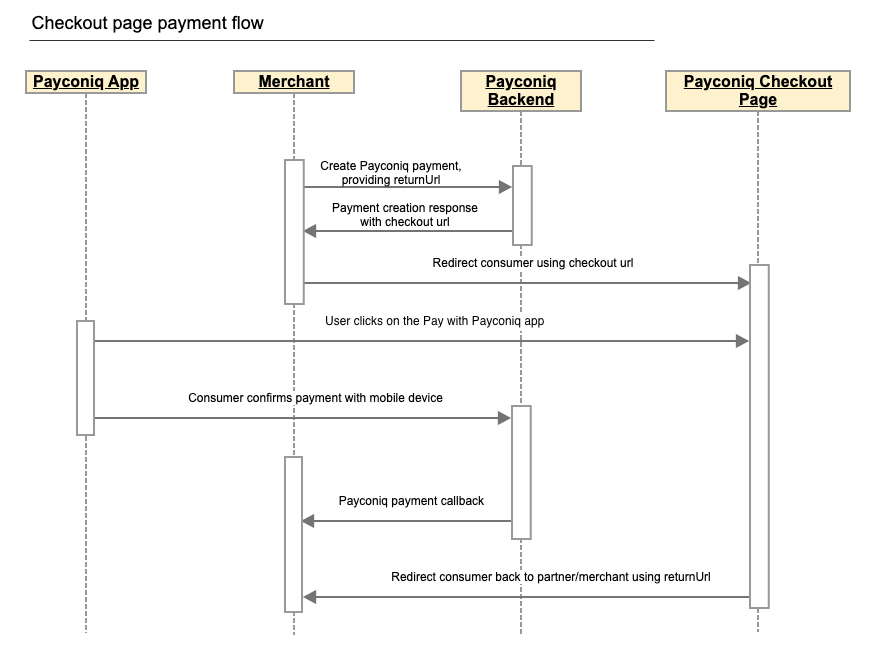
Step by step payment flow
- Merchant frontend sends payment creation details to Merchant’s backend. This will contain at least the payment amount.
- Merchant backend sends a REST request to the Payconiq backend to create a payment. The parameters passed in this request are the payment amount, payment currency, payment description, return url and other parameters.
- Payconiq backend returns the created payment with the Payconiq payment id and other relevant details to the merchant’s backend – including checkout url link.
- The merchant’s backend redirects consumer to Payconiq-hosted checkout page using checkout url provided in response for payment creation.
- User clicks on "Pay by Payconiq-supported app" button and is taken to the Payconiq supported app to complete the payment.
- Payconiq backend sends the payment details to the Payconiq-supported app which would contain the name of the merchant and the amount to pay.
- The consumer confirms the payment by entering his/her PIN, fingerprint or face id and a payment request is sent to the Payconiq Backend for authorization.
- A payment response with the details is sent back to the Payconiq-supported app indicating a success or failure of the payment.
- Checkout web page is redirecting consumer back to merchant's web shop using returnUrl, provided by the merchant during payment creation.
- Payconiq backend sends a payment notification to the Merchant backend with the payment details to the callback url. The details of the notification will either contain success or failure details.
- The merchant frontend displays the confirmation status it receives from Payconiq.
- The consumer is notified of the payment status via the app.
NB: The order of consumer and merchant notification is not sequential. One may arrive before the other depending on internet and network connections.
Implementation Options
There are two ways in which we offer App linking:
- App to App Linking
- Mobile Browser to App Linking
App to App (App2App)
From any app to the Payconiq-supported app (App2App), and back users will be able to make Payconiq payments. For example, a native app may have a "Pay with Payconiq button", which redirects the user to a Payconiq supported app, and goes back to the original app after the payment is processed. A Payconiq URL is used to achieve this.
The URL is returned after a payment is created using the APIs. You will find the URL in a field with name _links.deeplink.href. You simply need to append your return url in order to create a universal link.
Prerequisites Before implementing the App2App integration you should have the following.
- API Key – This is used to secure the request between the merchant’s backend and Payconiq’s backend. Do not share your API keys in public areas such as online sites or client-side code.
- Return Url - A url which is executed in the case of a successful or unsuccessful payment(This excludes special error cases). Your URL must be a universal link(mobile apps) in order for Payconiq to return to your app after finishing a payment. Universal links provides users with a seamless integrated mobile experience. It must also be a valid https URL encoded web or link.
- Merchant Callback Url – This URL will be called by Payconiq’s backend servers in order to send the status of the payment to the merchant.
General iOS & Android Implementation Steps
- Using credentials provided after onboarding, create a Payconiq payment.
- Using the deeplink url and your returnUrl, construct a Payconiq universal URL.
- Execute or fire off the constructed URL to switch to the Payconiq-supported application.
- After payment has been confirmed by the customer in the Payconiq-supported app, the calling application is opened using the specified return url.
- The payment status must be fetched by the calling application in order to determine the status of the payment.
To implement universal links in your iOS app, please follow this link.
To implement universal links in your Android app, please follow this link.
Create Payment
In order to begin a payment, you need to create a payment via the Payconiq through a POST request. A unique payment identifier is valid for twenty(20) minutes (1200 seconds) after which it expires. If a payment does not take place within these twenty(20) minutes, a new payment has to be created.
Type: REST
HTTP Verb: POST
EXT URL Definition: https://api.ext.payconiq.com/v3/payments
PROD URL Definition: https://api.payconiq.com/v3/payments
Create Payment Request Header
| Attribute | Comment/ Format |
|---|---|
Authorization [String, required] |
Authorization field which contains the API Key. Bearer xxxxxxxx-xxxx-xxxx-xxxx-xxxxxxxxxxxx |
Content-type [String, required] application/json |
Content type of the data in the request body. |
Example Request:
curl -X POST
  https://api.ext.payconiq.com/v3/payments
  -H 'Authorization: Bearer xxxxxxxx-xxxx-xxxx-xxxx-xxxxxxxxxxxx'
  -H 'Cache-Control: no-cache'
  -H 'Content-Type: application/json'
  -d '{
         "amount" : "999999",
         "currency" : "EUR",
         "callbackUrl": "https://dummy.network/api/v1/orders/payconiq",
         "description": "Test payment 12345",
         "reference": "12345",
         "bulkId":"Bulk-1-200",
         "returnUrl": "https://dummy.webshop/checkout/success"
      }'
Create Payment Request Body
| Attribute | Description |
|---|---|
amount [Integer, required] Minimum: 1 Maximum: 999999 |
Payment amount in Euro cents. |
callbackUrl [URI, optional] |
A url to which the Merchant will be notified of a payment. Must be Https for production. |
currency [String, Optional] |
Payment currency code in ISO 4217 format. Only Euros supported at the moment. Value: EUR |
description[String, optional] Maximum Length: 140 chars |
Custom description of the payment. This will be shown to the consumer when making payments and will be present on the bank statement of the merchant and consumer for reconciliation purposes. Only the first 35 characters are used for the remittance information. |
reference [String, optional] Maximum Length: 36 chars |
External payment reference used to reference the Payconiq payment in the calling party's system. |
bulkId [String, optional] Maximum Length: 35 chars |
A field set to reference a bulk batch payment. |
returnUrl [String, optional] Maximum Length: 2048 chars |
A field set by the calling party used to redirect consumer back after payment is completed on checkout web page hosted by Payconiq. This field is mandatory if merchant wants to use checkout web page flow. |
Example Response:
HTTP/1.1 201 Created
{
    "paymentId": "5bdb1685b93d1c000bde96f2",
    "status": "PENDING",
    "createdAt": "2018-09-18T11:43:29.160Z",
    "expiresAt": "2018-09-18T11:43:29.160Z",
    "description": "Sample description",
    "reference": "987456264",
    "amount": 999999,
    "currency": "EUR",
    "creditor": {
        "profileId": "5b71369f5832fd22658e0ef4",
        "merchantId": "5b71369f5832fd09188e0915",
        "name": "Merchant Name",
        "iban": "NL47FRBK0293409698",
        "callbackUrl": "https://www.testcallback.com/payconiq/payment"
    },
    "_links": {
        "self": {
            "href": "https://api.ext.payconiq.com/v3/payments/5bdb1685b93d1c000bde96f2"
        },
        "deeplink": {
            "href": "https://payconiq.com/pay/2/5bdb1685b93d1c000bde96f2"
        },
        "qrcode": {
            "href": "https://portal.ext.payconiq.com/qrcode?c=https%3A%2F%2Fpayconiq.com%2Fpay%2F2%2F5bdb1685b93d1c000bde96f2"
        },
        "cancel": {
            "href": "https://api.ext.payconiq.com/v3/payments/5bdb1685b93d1c000bde96f2"
        },
        "checkout": {
            "href": "https://payconiq.com/pay/2/5bdb1685b93d1c000bde96f2?token=530ea8a4ec8ded7d87620c8637354022cd965b143f257f8f8cb118e7f4a22d8f&returnUrl=https%3A%2F%2Fummy.webshop%2Fcheckout%2Fsuccess"
        }
    }
}
Create Payment Response
The following parameters are included in the header and body of the create payment response.
Response Header
| Attribute | Description |
|---|---|
Http Status Code [Integer] |
Status code of the HTTP POST response. 2xx – Indicates success 4xx – Indicates malformed client request 5xx – Indicates errors with Payconiq servers |
Content-type [String] application/json |
Content type of the data |
Response Body
| Attribute | Description |
|---|---|
paymentId [String, required] Fixed length: 24 chars |
The unique Payconiq payment id. |
status [String::enum, required] Allowed values: PENDING |
The status of the Payconiq Payment. |
createdAt [String, required] Format: YYYY-MM-ddTHH:mm:ss.SSSZ |
The creation date and time of the Payconiq payment. |
expiresAt [String, required] Format: YYYY-MM-ddTHH:mm:ss.SSSZ |
The date and time when a Payconiq payment expires. |
description [String, optional] |
Custom description of the payment. This will be shown to the consumer when making payments and will be present on the bank statement of the merchant and consumer for reconciliation purposes. Only the first 35 characters are used for the remmittance information. |
reference [String, optional] |
Merchant’s payment reference used to reference the Payconiq payment in the merchant’s system. |
amount [Integer, required] |
Payment amount in Euro cents. |
currency [String, optional] |
Payment currency code in ISO 4217 format. Only Euros supported at the moment. |
creditor [Object, required] |
The merchant account object set to receive the Payconiq payment from a consumer. |
creditor.profileId [String, required] |
The unique payment product identifier of the merchant. |
creditor.merchantId [String, required] |
The unique identifier of a merchant. |
creditor.name [String, required] |
The merchant’s company name that will be shown to the consumer. |
creditor.iban [String, required] |
The bank account of the merchant where payments will be sent to. |
creditor.callbackUrl [String, optional] |
A URL to which the Merchant will be notified of a payment. Must be https for production. |
_links [Object, optional] |
Links object which contain urls to be used by merchants to load the QR codes, perform App2App linking, cancel a payment and get the payment details. |
_links.self [Object, optional] |
Hypermedia GET URL used to fetch payment details |
_links.self.href [String :: URI, optional] |
URL String. |
_links.deeplink [Object, optional] |
Hypermedia GET URL used to perform App2App linking |
_links.deeplink.href [String :: URI, optional] |
URL String. |
_links.qrcode [Object, optional] |
Hypermedia GET URL used to fetch QR code for display and scanning purposes (PNG/SVG) |
_links.qrcode.href [String :: URI, optional] |
URL String. |
_links.cancel [Object, optional] |
Hypermedia DELETE URL used to cancel a payment. |
_links.cancel.href [String :: URI, optional] |
URL String. |
_links.checkout [Object, optional] |
Hypermedia GET URL used to redirect consumer to checkout web page hosted by Payconiq |
_links.checkout.href [String :: URI, optional] |
URL String. |
HTTP/1.1 400 Bad Request
{
    "traceId": "b2586833395d4750",
    "spanId": "c235e54376fab4b9",
    "code": "FIELD_IS_REQUIRED",
    "message": "Field 'amount' is mandatory"
}
Create Payments HTTP Status and Error Codes
Below are the status codes and descriptions returned as part of the API responses.
| Status Code | Error Codes |
|---|---|
400[Integer] |
BODY_MISSING: A JSON body needs to be provided. FIELD_IS_REQUIRED: A mandatory field is missing from the JSON request. FIELD_IS_INVALID: A field provided is not valid. Eg: The length of a field exceeds what is required. |
401 [Integer] |
UNAUTHORIZED: The user not have an API Key or API Key is incorrect. |
403 [Integer] |
ACCESS_DENIED: The API key could not be verified or the API key does not contain the required authority to access the resource requested. |
404 [Integer] |
MERCHANT_PROFILE_NOT_FOUND: The merchant profile for creating a payment does not exist. |
422 [Integer] |
UNABLE_TO_PAY_CREDITOR: This could be returned for multiple reasons in case something goes wrong. |
429 [Integer] |
Too Many Requests |
500 [Integer] |
TECHNICAL_ERROR: Technical error in the Payconiq payment service. |
503 [Integer] |
Service Unavailable |
Invoke the Payconiq Universal Link
Apple iOS
/* Create Payconiq payment */
let createdPayment = createPayconiqPayment(amount: paymentAmount, "description": paymentDescription, "reference": paymentReference, "currency": paymentCurrency, "callbackUrl": paymentCallbackUrl)

//Get deeplink url from created payment
let deeplinkUrl = createdPayment.deeplinkUrl

//Specify return url
let returnUrl = "?returnUrl=https://example.com"

//Start the Payconiq-supported application
if let url = URL(deeplinkUrl + returnUrl) {
    if #available(iOS 10.0, *) {
        // Pass custom options if needed
        UIApplication.shared.open(url, options: [:], completionHandler: { result in
            //Handle result
        })
    }else {
        let result = UIApplication.shared.openURL(url)
        //Handle result
    }
}
The following parameters are used to invoke the Payconiq
| Attribute | Description |
|---|---|
_links.deeplink.href [String :: URI] |
URL String used to perform App2App linking |
| Return Url [String:: URI] |
A url to which the Merchant will be notified of a payment. Must be Https for production. |
iOS Universal Link Integration
If you don't want to check manually if the Payconiq-supported app is installed on a device, you can use a universal link. In this case, if the Payconiq-supported app is not installed, a web page will be opened which will ask user to install Payconiq-supported app. See sample implementation using the Universal Link.
Android
// Create a Payconiq Payment
PayconiqPayment createdPayment = createPayconiqPayment(amount, description, reference, currency, callbackUrl);

//Get the deeplink url from the created payment
String deeplinkUrl = createdPayment.getDeeplinkUrl();

// Construct the universal link
String returnUrl = "https://example.com/";
String universalLink = String.format(deeplinkUrl + "?returnUrl=%s", returnUrl);

// Start the Payconiq-supported app
startActivity(new Intent(Intent.ACTION_VIEW, Uri.parse(universalLink)));
The following parameters are used to invoke the Payconiq
| Attribute | Description |
|---|---|
_links.deeplink.href [String :: URI] |
URL String used to perform App2App linking |
| Return Url [String:: URI] |
A url to which the Merchant will be notified of a payment. Must be Https for production. |
Mobile Browser to App Linking
For the Browser to App linking, the link returned in the field with name _links.deeplink.href after a payment has been created is used.
A return url is needed in order to return to the page from where the Payconiq-supported app was called.
The setup is almost the same as for App to App linking. In addition, the web page in the browser should contain logic to determine the host OS of the phone and fires a Payconiq URL for iOS and and an intent with the Payconiq URL for Android. If the Payconiq-supported app is not installed, the user is redirected to the Apple App store or Google Play store to download the Payconiq-supported application.
Note:
- For EXT testing, you must install only the EXT app on your phone in order to test successfully.
- Having the EXT and PROD app installed on the phone while testing in the EXT environment will not work.
General Implementation Steps
- Using credentials provided after onboarding, create a Payconiq payment.
- Using the deeplink url and your returnUrl, construct a Payconiq universal URL.
- Execute or fire off the constructed URL to switch to the Payconiq-supported app.
- After payment has been finalized by the customer in the Payconiq-supported app, the calling website is opened using the specified return url.
- The payment status must be fetched by the calling application in order to determine the status of the payment.
iOS Implementation
function isIOS(){
  if (/iphone|XBLWP7/i.test(navigator.userAgent.toLowerCase())) {
    return true;
  }
  else
    return false;
}
In order to execute this flow, the following javascript sample code is implemented in the web page for iOS devices.
This function is used to identify an iOS device.
iOS Browser2App Linking (EXT & PROD)

<script>
function createPayconiqUniversalLink()
{
  var deeplinkUrl = getDeeplinkUrlFromPaycconiqPayment();
  var returnUrl = "?returnUrl=www.example.com";
  return deeplinkUrl.concat(returnUrl);
}
</script>

<button>
  <a href = "createPayconiqUniversalLink()>
      Pay with Payconiq iOS
  </a>
</button>
The code sample to the right triggers the Payconiq-supported app. You may place this behind a “Pay with Payconiq” button.
Please use the EXT Payconiq app for EXT environment testing and the PROD Payconiq-supported application for the production environment testing.
Android Implementation
 function isAndroid(){
   if (/android|XBLWP7/i.test(navigator.userAgent.toLowerCase())) {
     return true;
   }
   else
     return false;
 }
The following javascript sample code is implemented in the web page for Android devices.
This function is used to identify an Android device.
PROD - Android Browser2App Linking

<script>
function createPayconiqUniversalLink()
{
  var deeplinkUrl = getDeeplinkUrlFromPaycconiqPayment();
  var returnUrl = "?returnUrl=www.example.com";
  return deeplinkUrl.concat(returnUrl);
}
</script>

<button>
  <a href = "createPayconiqUniversalLink()">
    Pay with Payconiq Android
  </a>
</button>
The code sample to the right triggers the Payconiq Android App. You may place this behind a “Pay with Payconiq” button.
Please use the EXT Payconiq app for EXT environment testing and the PROD Payconiq-supported application for the production environment testing.
The Payconiq Callback
Payconiq calls the merchant’s callbackUrl endpoint to send the status of a payment. This is only informational towards the merchant. There is no impact on a payment if it is not processed successfully by the merchant.
The merchant backend must verify that the notification message originated from Payconiq and was not altered or corrupted during transmission by validating the signature.
Type: REST
HTTP Verb: POST
EXT URL Definition: {callbackUrl}
PROD URL Definition: {callbackUrl}
Callback Request Header
The following parameters are included in the header of the callback request.
signature: eyJ0eXAiOiJKT1NFK0pTT04iLCJraWQiOiJ5ZXNPbmUiLCJhbGciOiJSUzI1NiIsImh0dHBzOi8vcGF5Y29uaXEuY29tL2lhdCI6IjIwMTktMDEtMTRUMTE6MTE6MTFaIiwiaHR0cHM6Ly9wYXljb25pcS5jb20vanRpIjoiR2l2ZU1lIiwiaHR0cHM6Ly9wYXljb25pcS5jb20vcGF0aCI6Ii90aGUvcm9hZC9sZXNzL3RyYXZlbGVkIiwiaHR0cHM6Ly9wYXljb25pcS5jb20vaXNzIjoiUGF5Y29uaXEiLCJjcml0IjpbImh0dHBzOi8vcGF5Y29uaXEuY29tL2lhdCIsImh0dHBzOi8vcGF5Y29uaXEuY29tL2p0aSIsImh0dHBzOi8vcGF5Y29uaXEuY29tL3BhdGgiLCJodHRwczovL3BheWNvbmlxLmNvbS9pc3MiXX0..LoBPG9T00c-0urv5FXrTWmumUJBTpTaqG5F0HciYHgi0Ck-bZrFxX8MLEgKbdv5YUMKKDnbLcFS0M4lNiGa17Qo8OOH4mCAjvuVEyoutHObd_TrZ4oUM0CX3uRNd88shemup9YPEMtRjmPZATXzStTBdQeRpq_f89bAqy2nCOxg_2BgqSnvC_R4JMA7I5SaRndvzbn80oeVHUEMkpmRFNnhRtVujeEUnfn3hBR_YIHh3vJKWArIYOV9eMkpDFb6nC_GoZoNGfPFunBUtOXU1y3gCDi6GOsa4eaDygNsBk-ZNj2v8cMRPBnHdw2oOaAjEs6K63An0bbkdKG7UzVojAw


content-type: application/json


user-agent: Payconiq Payments/v3
| Attribute | Comment/ Format |
|---|---|
signature [String, required] |
This represents a Payconiq digitally signed content using JSON data structures and base64url encoding. The signature is made up of JSON Web Signature (JWS) and a JSON Object Signing and Encryption (JOSE) header. |
content-type [String, required] application/json |
The Content-Type entity header is used to indicate the media type of the resource. |
user-agent [String, required] |
The User-Agent request header contains a characteristic string that allows the network protocol peers to identify the application type, operating system, software vendor or software version of the requesting software user agent. |
{
    "paymentId": "5ba37c3d0989e3000758b9d8",
    "transferAmount": 122,
    "tippingAmount": 0,
    "amount": 122,
    "totalAmount": 122,
    "description": "Sample description",
    "createdAt": "2019-11-26T15:26:19.363Z",
    "expireAt": "2019-11-26T15:29:19.363Z",
    "succeededAt": "2019-11-26T15:27:34.835Z",
    "status": "SUCCEEDED",
    "debtor": {
        "name": "John",
        "iban": "*************12636"
    },
    "currency": "EUR",
    "reference": "12346816AFV"
}
Callback Request Body
The following parameters are included in the body of the callback request.
| Attribute | Description |
|---|---|
paymentId [String, required] Fixed length: 24 chars |
The unique Payconiq payment id. |
amount [Integer, required] Minimum: 1 Maximum: 999999 |
Payment amount in Euro cents. |
transferAmount [Integer, required] Minimum: 1 Maximum: 999999 |
The amount the consumer will be charged in Euro cents |
tippingAmount [Integer, required] Minimum: 1 Maximum: 999999 |
The amount added as a tip by the consumer in Euro cents (currently not supported). |
totalAmount [Integer, required] Minimum: 1 Maximum: 999999 |
The amount the consumer pays in total in Euro cents. |
currency [String, optional] |
Payment currency code in ISO 4217 format. Only Euros supported at the moment. |
description [String, optional] |
Custom description of the payment. This will be shown to the consumer when making payments and will be present on the bank statement of the merchant and consumer for reconciliation purposes. Only the first 35 characters are used for the remittance information. |
reference [String, optional] |
Merchant’s payment reference used to reference the Payconiq payment in the merchant’s system. |
createdAt [String, required] Format: YYYY-MM-ddTHH:mm:ss.SSSZ |
The creation date and time of the Payconiq payment. |
expireAt [String, required] Format: YYYY-MM-ddTHH:mm:ss.SSSZ |
The date and time when a Payconiq payment expires. |
succeededAt [String, optional] Format: YYYY-MM-ddTHH:mm:ss.SSSZ |
The date and time when a Payconiq payment succeeded. |
status [String::enum, required] Allowed values: PENDING, IDENTIFIED, AUTHORIZED, AUTHORIZATION_FAILED, SUCCEEDED, FAILED, CANCELLED, EXPIRED. |
The status of the Payconiq Payment. |
debtor[JSON Object, required] |
The consumer account object that makes payments to the merchant |
debtor.name [String, optional] |
Debtor's first name. |
debtor.iban [String, optional] |
Debtor's IBAN masked. |
Callback Not Received or Signature Validation Fails
In the event where you don't receive the callback or the callback validation fails, you should Get the Transaction Details as described below. Getting the details of a payment is another sure way to know the status in order to complete the payment.
Get Payment Details
Payment details of an existing payment may be obtained. A unique payment id is passed from a payment creation request and Payconiq will return the corresponding payment information.
Note: It is recommended to implement this as a fallback option to obtaining the response via the callback URL.
Type: REST
HTTP Verb: GET
EXT URL Definition: https://api.ext.payconiq.com/v3/payments/{paymentId}
PROD URL Definition: https://api.payconiq.com/v3/payments/{paymentId}
Get Payment Details Header
The following parameters are included in the header of the request.
| Attribute | Comment/ Format |
|---|---|
Authorization [String, required] |
Authorization field which contains the API Key. Bearer xxxxxxxx-xxxx-xxxx-xxxx-xxxxxxxxxxxx |
Content-type [String, required] application/json |
Content type of the data in the request body. |
Example Request:
curl -X GET
  https://api.ext.payconiq.com/v3/payments/5b976d11dd172a0007c4429d
  -H 'Authorization: Bearer xxxxxxxx-xxxx-xxxx-xxxx-xxxxxxxxxxxx'
  -H 'Content-Type: application/json'
Get Payment Details Request Path
The following parameters are included in the path of a get payment details request.
| Attribute | Description |
|---|---|
paymentId [String, required] |
The unique Payconiq identifier of a payment as provided by the create payment service. |
Get Payment Details Response Header
The following parameters are included in the header of the get payment details response.
| Attribute | Description |
|---|---|
Http Status Code [Integer] |
Status code of the HTTP POST response. 2xx – Indicates success 4xx – Indicates malformed client request 5xx – Indicates errors with Payconiq servers |
Content-type [String] application/json |
Content type of the data |
Example Response
HTTP/1.1 200 OK
Content-Type: application/json
{
    "paymentId": "5bdaf066b93d1c000bde9683",
    "createdAt": "2019-11-26T15:26:19.363Z",
    "expireAt": "2019-11-26T15:29:19.363Z",
    "succeededAt": "2019-11-26T15:27:34.835Z",
    "currency": "EUR",
    "status": "SUCCEEDED",
    "creditor": {
        "profileId": "5b71369f5832fd22658e0ef4",
        "merchantId": "5b71369f5832fd09188e0915",
        "name": "Merchant Name",
        "iban": "NL47FRBK0293409698",
        "callbackUrl": "https://www.testcallback.com/payconiq/payment"
    },
    "debtor": {
        "name": "John",
        "iban": "*************12636"
    },
    "amount": 10,
    "transferAmount": 10,
    "tippingAmount": 0,
    "totalAmount": 10,
    "description": "Otto's Payment Test",
    "bulkId": "centraal station pos-2",
    "_links": {
        "self": {
            "href": "https://api.ext.payconiq.com/v3/payments/5bdaf066b93d1c000bde9683"
        },
        "deeplink": {
            "href": "https://payconiq.com/pay/2/5bdaf066b93d1c000bde9683"
        },
        "qrcode": {
            "href": "https://portal.ext.payconiq.com/qrcode?c=https%3A%2F%2Fpayconiq.com%2Fpay%2F2%2F5bdaf066b93d1c000bde9683"
        },
        "refund": {
            "href": "https://api.ext.payconiq.com/v3/payments/5bdaf066b93d1c000bde9683/debtor/refundIban"
        }
    }
}
Get Payment Details Response Body
The following parameters are included in the body of the get payment details response.
| Attribute | Description |
|---|---|
paymentId [String, required] Fixed length: 24 chars |
The unique Payconiq payment id. |
createdAt [String, required] Format: YYYY-MM-ddTHH:mm:ss.SSSZ |
The creation date and time of the Payconiq payment. |
expireAt [String, required] Format: YYYY-MM-ddTHH:mm:ss.SSSZ |
The date and time when a Payconiq payment expires. |
succeededAt [String, optional] Format: YYYY-MM-ddTHH:mm:ss.SSSZ |
The date and time when a Payconiq payment succeeded. |
currency [String, required] |
Payment currency code in ISO 4217 format. Only Euros supported at the moment. |
status [String::enum, required] Allowed values: PENDING, IDENTIFIED, CANCELLED, AUTHORIZED, AUTHORIZATION_FAILED, EXPIRED, FAILED, SUCCEEDED |
The status of the Payconiq Payment. |
creditor [JSON Object, required] |
The merchant account object set to receive the Payconiq payment from a consumer. |
creditor.profileId [String, required] |
The unique payment product identifier of the merchant. |
creditor.merchantId [String, required] |
The unique identifier of a merchant. |
creditor.name [String, required] |
The merchant’s company name that will be shown to the consumer. |
creditor.iban [String, required] |
The bank account of the merchant where payments will be sent to. |
creditor.callbackUrl [String, optional] |
A URL to which the Merchant will be notified of a payment. Must be https for production. |
debtor[JSON Object, optional] |
The consumer account object that makes payments to the merchant |
debtor.name [String, optional] |
First name of Debtor. |
debtor.iban [String, optional] |
IBAN of Debtor masked. |
amount [Integer, required] |
Payment amount in Euro cents. |
transferAmount [Integer, required] Minimum: 1 Maximum: 999999 |
The amount the consumer will be charged in Euro cents |
tippingAmount [Integer, required] Minimum: 1 Maximum: 999999 |
The amount added as a tip by the consumer in Euro cents (currently not supported). |
totalAmount [Integer, required] Minimum: 1 Maximum: 999999 |
The amount the consumer pays in total in Euro cents. |
description [String, optional] |
Custom description of the payment. This will be shown to the consumer when making payments and will be present on the bank statement of the merchant and consumer for reconciliation purposes. Only the first 35 characters are used for the remittance information. |
message [String, optional] |
Custom message from the consumer. |
reference [String, optional] |
Merchant’s payment reference used to reference the Payconiq payment in the merchant’s system. |
bulkId [String, optional] Maximum Length: 35 chars |
A field set to reference a bulk batch payment. |
_links [Object, optional] |
Links object which contain urls to be used by merchants to load the QR codes, perform App2App linking, cancel a payment and get the payment details. |
_links.self [Object, optional] |
Hypermedia GET URL used to fetch payment details |
_links.self.href [String :: URI, optional] |
URL String. |
_links.deeplink [Object, optional] |
Hypermedia GET URL used to perform App2App linking |
_links.deeplink.href [String :: URI, optional] |
URL String. |
_links.qrcode [Object, optional] |
Hypermedia GET URL used to fetch QR code for display and scanning purposes (PNG/SVG) |
_links.qrcode.href [String :: URI, optional] |
URL String. |
_links.cancel [Object, optional] |
Hypermedia DELETE URL used to cancel a payment. |
_links.cancel.href [String :: URI, optional] |
URL String. |
_links.refund [Object, optional] |
Hypermedia GET Url used to fetch refund information for a payment. |
_links.refund.href [String :: URI, optional] |
URL String. |
HTTP/1.1 404 Not Found
{
    "traceId": "d7152b6b08caa620",
    "spanId": "556d68164b8e8ef6",
    "code": "PAYMENT_NOT_FOUND",
    "message": "Payment not found '5ba35a3d0989e3000758b9c2'"
}
Get Payment Details HTTP Status and Error Codes
Below are the status codes and descriptions returned as part of the API responses.
| Status Code | Error Codes |
|---|---|
401 [Integer] |
UNAUTHORIZED: The user not have an API Key or API Key is incorrect. |
403 [Integer] |
ACCESS_DENIED: The API key could not be verified or the API key does not contain the required authority to access the resource requested. |
404 [Integer] |
PAYMENT_NOT_FOUND: Payment could not be found for the corresponding payment id. |
429 [Integer] |
Too Many Requests |
500 [Integer] |
TECHNICAL_ERROR: Technical error in the Payconiq payment service. |
503 [Integer] |
Service Unavailable |
Get Payments List
This endpoint is use to retrieve a list of a Payconiq payments. The page and size parameters are used to specify how many records to return as well as filter the results for the total number of records returned per page. By default the latest 50 payments are returned per request and are sorted by creation date in descending order.
Type: REST
HTTP Verb: POST
EXT URL Definition: https://api.ext.payconiq.com/v3/payments/search?page={p}&size={s}
PROD URL Definition: https://api.payconiq.com/v3/payments/search?page={p}&size={s}
Get Payments List Request Header
| Attribute | Comment/ Format |
|---|---|
Authorization [String, required] |
Authorization field which contains the API Key. Bearer xxxxxxxx-xxxx-xxxx-xxxx-xxxxxxxxxxxx |
Content-type [String, required] application/json |
Content type of the data in the request body. |
Example Request:
curl -X POST
  'https://api.ext.payconiq.com/v3/payments/search?page=10&size=10'
  -H 'Authorization: Bearer xxxxxxxx-xxxx-xxxx-xxxx-xxxxxxxxxxxx'
  -H 'Cache-Control: no-cache'
  -H 'Content-Type: application/json'
  -d
  '{
        "from":"2018-08-01T00:10:10.000Z",
        "to":"2018-08-31T00:10:10.999Z",
        "paymentStatuses":["SUCCEEDED"],
        "reference":"1234568"
  }'
Get Payments List Request Path
| Attribute | Comment/ Format |
|---|---|
page [Integer, optional] |
Zero based page index in the list request. NB: The page defaults to 0 if not present in the request path. |
size [Integer, optional] |
The size of the page to be returned in the list. NB: The size defaults to 50 if not present in the request path. |
Get Payments List Request Body
| Attribute | Description |
|---|---|
from [String, required] Format: YYYY-MM-ddTHH:mm:ss.SSSZ |
The start date and time to filter the search results. Default: Current date and time minus one day. (Now - 1 day) |
to [String, optional] Format: YYYY-MM-ddTHH:mm:ss.SSSZ |
The end date and time to filter the search results.. Default: Current date and time. (Now) |
paymentStatuses [Array::String, Optional] |
An array of payment statuses to filter the search results on. |
reference [String, optional] Maximum Length: 36 chars |
External payment reference used to reference the Payconiq payment in the calling party's system. |
Get Payment List Response Header
The following parameters are included in the header of the get payment list response.
| Attribute | Description |
|---|---|
Http Status Code [Integer] |
Status code of the HTTP POST response. 2xx – Indicates success 4xx – Indicates malformed client request 5xx – Indicates errors with Payconiq servers |
Content-type [String] application/json |
Content type of the data |
HTTP/1.1 200 OK
{
    "size": 2,
    "totalPages": 7,
    "totalElements": 13,
    "number": 0,
    "details": [
        {
            "paymentId": "5bdaf066b93d1c000bde9683",
           "createdAt": "2019-11-26T15:26:19.363Z",
           "expireAt": "2019-11-26T15:29:19.363Z",
           "succeededAt": "2019-11-26T15:27:34.835Z",
            "currency": "EUR",
            "status": "SUCCEEDED",
            "creditor": {
                "profileId": "5b71369f5832fd22658e0ef4",
                "merchantId": "5b71369f5832fd09188e0915",
                "name": "Merchant Name",
                "iban": "NL47FRBK0293409698",
                "callbackUrl": "https://www.testcallback.com/payconiq/payment"
            },
            "debtor": {
                "name": "John",
                "iban": "*************12636"
            },
            "amount": 10,
            "transferAmount": 10,
            "tippingAmount": 0,
            "totalAmount": 10,
            "description": "Otto's Payment Test",
            "bulkId": "centraal station pos-2",
            "_links": {
                "self": {
                    "href": "https://api.ext.payconiq.com/v3/payments/5bdaf066b93d1c000bde9683"
                },
                "deeplink": {
                    "href": "https://payconiq.com/pay/2/5bdaf066b93d1c000bde9683"
                },
                "qrcode": {
                    "href": "https://portal.ext.payconiq.com/qrcode?c=https%3A%2F%2Fpayconiq.com%2Fpay%2F2%2F5bdaf066b93d1c000bde9683"
                },
                "refund": {
                    "href": "https://api.ext.payconiq.com/v3/payments/5bdaf066b93d1c000bde9683/debtor/refundIban"
                }
            }
        },
        {
            "paymentId": "5bdaf066b93d1c000bde9683",
            "createdAt": "2019-11-26T15:26:19.363Z",
            "expireAt": "2019-11-26T15:29:19.363Z",
            "succeededAt": "2019-11-26T15:27:34.835Z",
            "currency": "EUR",
            "status": "SUCCEEDED",
            "creditor": {
                "profileId": "5b71369f5832fd22658e0ef4",
                "merchantId": "5b71369f5832fd09188e0915",
                "name": "Merchant Name",
                "iban": "NL47FRBK0293409698",
                "callbackUrl": "https://www.testcallback.com/payconiq/payment"
            },
            "debtor": {
                "name": "John",
                "iban": "*************12636"
            },
            "amount": 10,
            "transferAmount": 10,
            "tippingAmount": 0,
            "totalAmount": 10,
            "description": "Otto's Payment Test",
            "bulkId": "centraal station pos-2",
            "_links": {
                "self": {
                    "href": "https://api.ext.payconiq.com/v3/payments/5bdaf066b93d1c000bde9683"
                },
                "deeplink": {
                    "href": "https://payconiq.com/pay/2/5bdaf066b93d1c000bde9683"
                },
                "qrcode": {
                    "href": "https://portal.ext.payconiq.com/qrcode?c=https%3A%2F%2Fpayconiq.com%2Fpay%2F2%2F5bdaf066b93d1c000bde9683"
                },
                "refund": {
                    "href": "https://api.ext.payconiq.com/v3/payments/5bdaf066b93d1c000bde9683/debtor/refundIban"
                }
            }
        }
    ]
}
Get Payments list Response Body
The following parameters are included in the body of the get payment details response.
| Attribute | Description |
|---|---|
size [Integer, required] |
The total size of elements returned in the current page. |
totalPages [Integer, required] |
Total number of pages that contain the list of results. |
totalElements [Integer, required] |
Total number of elements in the list requested. |
number [Integer, required] |
The current page number. |
details [JSON Object, required] |
An array of payment details returned for the search criteria. |
details.paymentId [String, required] Fixed length: 24 chars |
The unique Payconiq payment id. |
details.createdAt [String, required] Format: YYYY-MM-ddTHH:mm:ss.SSSZ |
The creation date and time of the Payconiq payment. |
details.expireAt [String, required] Format: YYYY-MM-ddTHH:mm:ss.SSSZ |
The date and time when a Payconiq payment expires. |
details.succeededAt [String, optional] Format: YYYY-MM-ddTHH:mm:ss.SSSZ |
The date and time when a Payconiq payment succeeded. |
details.currency [String, required] |
Payment currency code in ISO 4217 format. Only Euros supported at the moment. |
details.status [String::enum, required] Allowed values: PENDING, IDENTIFIED, CANCELLED, AUTHORIZED, AUTHORIZATION_FAILED, EXPIRED, FAILED, SUCCEEDED |
The status of the Payconiq Payment. |
details.creditor [JSON Object, required] |
The merchant account object set to receive the Payconiq payment from a consumer. |
details.creditor.profileId [String, required] |
The unique payment product identifier of the merchant. |
details.creditor.merchantId [String, required] |
The unique identifier of a merchant. |
details.creditor.name [String, required] |
The merchant’s company name that will be shown to the consumer. |
details.creditor.iban [String, required] |
The bank account of the merchant where payments will be sent to. |
details.creditor.callbackUrl [String, optional] |
A URL to which the Merchant will be notified of a payment. Must be https for production. |
details.debtor[JSON Object, required] |
The consumer account object that makes payments to the merchant |
details.debtor.name [String, optional] |
First name of Debtor. |
details.debtor.iban [String, optional] |
IBAN of Debtor masked. |
details.amount [Integer, required] |
Payment amount in Euro cents. |
details.transferAmount [Integer, required] Minimum: 1 Maximum: 999999 |
The amount the consumer will be charged in Euro cents |
details.tippingAmount [Integer, required] Minimum: 1 Maximum: 999999 |
The amount added as a tip by the consumer in Euro cents (currently not supported). |
details.totalAmount [Integer, required] Minimum: 1 Maximum: 999999 |
The amount the consumer pays in total in Euro cents. |
details.description [String, optional] |
Custom description of the payment. This will be shown to the consumer when making payments and will be present on the bank statement of the merchant and consumer for reconciliation purposes. Only the first 35 characters are used for the remittance information. |
details.message [String, optional] |
Custom message from the consumer. |
details.reference [String, optional] |
Merchant’s payment reference used to reference the Payconiq payment in the merchant’s system. |
details.bulkId [String, optional] Maximum Length: 35 chars |
A field set to reference a bulk batch payment. |
details._links [Object, optional] |
Links object which contain urls to be used by merchants to load the QR codes, perform App2App linking, cancel a payment and get the payment details. |
details._links.self [Object, optional] |
Hypermedia GET URL used to fetch payment details |
details._links.self.href [String :: URI, optional] |
URL String. |
details._links.deeplink [Object, optional] |
Hypermedia GET URL used to perform App2App linking |
details._links.deeplink.href [String :: URI, optional] |
URL String. |
details._links.qrcode [Object, optional] |
Hypermedia GET URL used to fetch QR code for display and scanning purposes (PNG/SVG) |
details._links.qrcode.href [String :: URI, optional] |
URL String. |
details._links.cancel [Object, optional] |
Hypermedia DELETE URL used to cancel a payment. |
details._links.cancel.href [String :: URI, optional] |
URL String. |
details._links.refund [Object, optional] |
Hypermedia GET Url used to fetch refund information for a payment. |
details._links.refund.href [String :: URI, optional] |
URL String. |
HTTP/1.1 401 Unauthorized
{
    "traceId": "d7152b6b08caa620",
    "spanId": "556d68164b8e8ef6",
    "code": "UNAUTHORIZED",
    "message": "Payment not found '5ba35a3d0989e3000758b9c2'"
}
Get Payments List HTTP Status and Error Codes
| Status Code | Error Codes |
|---|---|
401 [Integer] |
UNAUTHORIZED: The user not have an API Key or API Key is incorrect. |
403 [Integer] |
ACCESS_DENIED: The API key could not be verified or the API key does not contain the required authority to access the resource requested. |
429 [Integer] |
Too Many Requests |
500 [Integer] |
TECHNICAL_ERROR: Technical error in the Payconiq payment service. |
503 [Integer] |
Service Unavailable |
Payconiq Online (V3) - Top-up
Pay mobile by topping up a payment card or wristband.
Online Top-up features
- A Payconiq QR code on a top-up medium can be paid multiple times.
- A Payconiq QR code on a top-up medium is valid until it is revoked.
- A Payconiq QR code on a top-up medium can have an amount defined by the consumer or changed by the consumer.
- A Payconiq QR code on a top-up medium can be scanned multiple times.
- A Payconiq QR code on a top-up medium is still valid after it is scanned and cancelled.
Process Flow
Involved Parties:
- Payconiq Supported App – Payconiq consumer application.
- Merchant Frontend – Top-up medium.
- Merchant Backend – Backend of merchant that integrates and interacts with Payconiq.
- Payconiq Backend – Backend of Payconiq that provides integration and payment services.
Online Top-up Process Flows
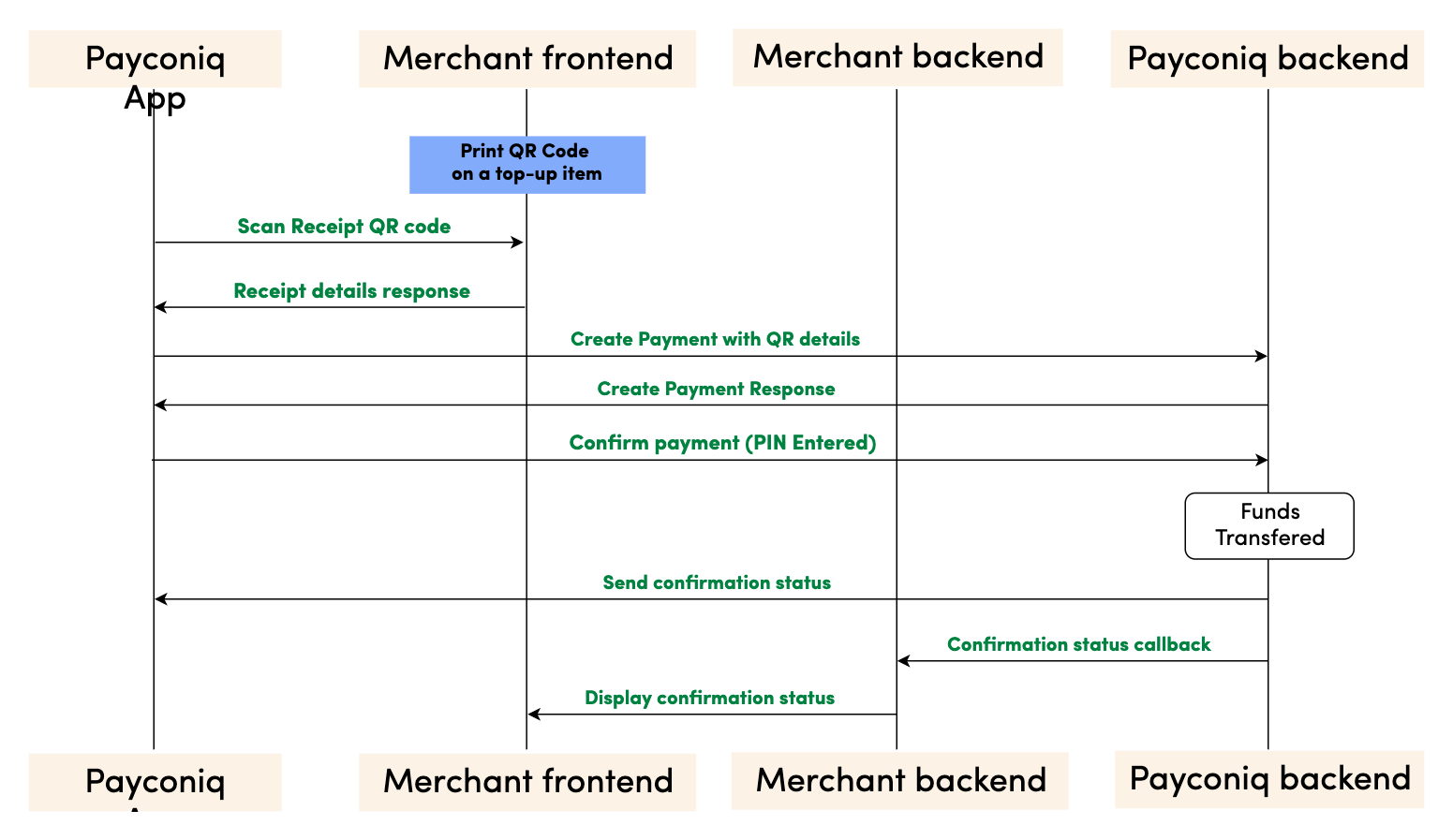
Step by step payment flow
- Merchant creates a QR code using the Payconiq QR URL schema. The URL will contain parameters which include an amount, description and a reference id.
- Merchant prints the Payconiq QR code on the top-up medium and presents it to the consumer for scanning.
- The consumer scans the Payconiq QR code using a Payconiq supported app which reads the details of the QR code and presents it for confirmation. The details would contain the amount to pay, the creditor name and a description.
- The consumer confirms the payment with his fingerprint, face ID or by entering his/her pin. A confirm payment request is sent to the Payconiq backend for authorization.
- Payconiq initiates a callback notification request to the merchant’s backend with the status of the payment via a callback url. The details of the notification will contain a payment id and status among other fields.
- The merchant backend acknowledges the callback notification by responding appropriately.
- The merchant frontend is notified of the status of the payment or the top-up medium is credited with a designated value.
- A payment response with the details is sent back to the Payconiq Supported App indicating a success or failure of the payment.
NB: The order of consumer and merchant notification is not sequential. One may arrive before the other depending on internet and network connections.
Prerequisites
- Merchant CallbackUrl – This URL will be called by Payconiq’s backend servers in order to send the status of the payment to the merchant.
- Payment Profile Id - This is a unique identifier of the payment product used by a merchant.
- Payconiq URL Scheme - The Payconiq template QR URL scheme.
- API Key (Optional) – This is used to secure the request between the merchant’s backend and Payconiq’s backend. Do not share your API keys in public areas such as online sites or client-side code.
Creating The Payconiq QR Code
The Payconiq QR code can be created using the Payconiq QR generation service. The following instructions have to be followed in order to successfully create the QR. Once created, the QR code can be printed on top-up medium.
QR Parameters
| Attribute | Description |
|---|---|
f [String :: Enum] Allowed Values: SVG, PNG |
Image format. If not provided, the default format is PNG. |
s [String :: Enum] Allowed Values: S, M, L, XL |
Image size of the QR code to generate. Small (S) = 180x180 Medium (M) = 250x250 Large (L) = 400x400 Extra Large (XL) = 800x800 The sizes only applies to PNG format. *If not provided, the default size is Small. |
cl [String :: Enum] Allowed Values: magenta, black |
The colour of the QR code. Default is magenta. |
c [String, required] |
The Payconiq UTF-8 URL encoded content. This is comprised of the template URL scheme. |
c.D [String, optional] Maximum Length: 35 chars |
UTF-8 URL encoded description of the payment |
c.A [String, optional] Minimum: 1 Maximum: 999999 |
UTF-8 URL encoded amount of the QR code in Euro cents. |
c.R [String, optional] Maximum Length: 35 chars |
UTF-8 URL encoded reference of the QR code. |
NB: The following link provides a tool to encode the URL as an example: https://www.urlencoder.org/
Generating the QR Code
| Activity | Comment |
|---|---|
| 1. Obtain the pre-requisite information needed to generate the Payconiq QR Code. | • Format of the Payconiq QR code. • Size of the Payconiq QR code. • Template URL scheme. • Payment profile id of the merchant. • Amount of the Payconiq QR code. • Description of the Payconiq QR code. • Reference of the Payconiq QR code. |
| 2. Build the Payconiq service URL using the optional parameters which include: • Image format (PNG or SVG) • Image size (S, M, L, XL). This only applies to PNG. |
Sample format: https://portal.payconiq.com/qrcode?f={imageFormat}&s={ImageSize}&c= Example Output URL (PNG): https://portal.payconiq.com/qrcode?f=PNG&s=L&c= Sample URL (SVG) https://portal.payconiq.com/qrcode?f=SVG&c= |
| 3. UTF-8 encode the Payconiq URL payload parameter values using UTF-8 as the destination character set. This means encoding the following: • Description • Amount • Reference. |
Payconiq unencoded URL payload parameters D=Invoice Payment A=1000 R=sd89sd91?sd9 Payconiq encoded URL payload parameters: D=Invoice%20Payment A=1000 R=sd89sd91%3Fsd9 |
| 4. Build the Payconiq URL payload using the following details. • Template URL scheme • Payment profile id of the merchant. • Amount of the Payconiq QR code. • Description of the Payconiq QR code. • Reference of the Payconiq QR code. |
Sample format:https://payconiq.com/t/1/{paymentProfileId?D={Enc_description}&A={Enc_amount}&R={Enc_reference} Sample URL payload: https://payconiq.com/t/1/5c18cbd1296e9a26d3278518?D=Invoice%20Payment&A=1000&R=sd89sd91%3Fsd9 |
| 5. UTF-8 encode the Payconiq URL Payload from step 4. | Payconiq URL Payload before Encoding:https://payconiq.com/t/1/5c18cbd1296e9a26d3278518?D=Invoice%20Payment&A=1000&R=sd89sd91%3Fsd9Payconiq URL Payload after Encoding: https%3A%2F%2Fpayconiq.com%2Ft%2F1%2F5c18cbd1296e9a26d3278518%3FD%3DInvoice%2520Payment%26A%3D1000%26R%3Dsd89sd91%253Fsd9 |
| 6. Build full URL by combining results from step 2 and step 5. Once completed, execute the resulting URL in a web view to obtain the Payconiq QR code. The Payconiq QR code can be saved a file and printed subsequently. |
Sample full URL:https://portal.payconiq.com/qrcode?f=PNG&s=XL&c=https%3A%2F%2Fpayconiq.com%2Ft%2F1%2F5c18cbd1296e9a26d3278518%3FD%3DInvoice%2520Payment%26A%3D1000%26R%3Dsd89sd91%253Fsd9 |
Sample formatted URL
Below is sample Payconiq QR code generated using the Payconiq QR Code generation service.
QR code properties:
Image Size: Medium
Image Format: PNG
QR code parameters:
Amount: 2.50 EUR
Description: Thanks for your money
Payment Profile Id: 61375fac093b130006690540
Reference: 1nF97PCaUy5gm9thum15
Formatted Url: Sample Top-up QR Code
Sample QR Code Image
The Payconiq Callback
Payconiq calls the merchant’s callbackUrl endpoint to send the status of a payment. This is only informational towards the merchant or partner. There is no impact on a payment if it is not processed successfully by the merchant or partner.
The merchant backend must verify that the notification message originated from Payconiq and was not altered or corrupted during transmission by validating the signature.
Type: REST
HTTP Verb: POST
EXT URL Definition: {callbackUrl}
PROD URL Definition: {callbackUrl}
Callback Request Header
The following parameters are included in the header of the callback request.
signature: eyJ0eXAiOiJKT1NFK0pTT04iLCJraWQiOiJ5ZXNPbmUiLCJhbGciOiJSUzI1NiIsImh0dHBzOi8vcGF5Y29uaXEuY29tL2lhdCI6IjIwMTktMDEtMTRUMTE6MTE6MTFaIiwiaHR0cHM6Ly9wYXljb25pcS5jb20vanRpIjoiR2l2ZU1lIiwiaHR0cHM6Ly9wYXljb25pcS5jb20vcGF0aCI6Ii90aGUvcm9hZC9sZXNzL3RyYXZlbGVkIiwiaHR0cHM6Ly9wYXljb25pcS5jb20vaXNzIjoiUGF5Y29uaXEiLCJjcml0IjpbImh0dHBzOi8vcGF5Y29uaXEuY29tL2lhdCIsImh0dHBzOi8vcGF5Y29uaXEuY29tL2p0aSIsImh0dHBzOi8vcGF5Y29uaXEuY29tL3BhdGgiLCJodHRwczovL3BheWNvbmlxLmNvbS9pc3MiXX0..LoBPG9T00c-0urv5FXrTWmumUJBTpTaqG5F0HciYHgi0Ck-bZrFxX8MLEgKbdv5YUMKKDnbLcFS0M4lNiGa17Qo8OOH4mCAjvuVEyoutHObd_TrZ4oUM0CX3uRNd88shemup9YPEMtRjmPZATXzStTBdQeRpq_f89bAqy2nCOxg_2BgqSnvC_R4JMA7I5SaRndvzbn80oeVHUEMkpmRFNnhRtVujeEUnfn3hBR_YIHh3vJKWArIYOV9eMkpDFb6nC_GoZoNGfPFunBUtOXU1y3gCDi6GOsa4eaDygNsBk-ZNj2v8cMRPBnHdw2oOaAjEs6K63An0bbkdKG7UzVojAw


content-type: application/json


user-agent: Payconiq Payments/v3
| Attribute | Comment/ Format |
|---|---|
signature [String, required] |
This represents a Payconiq digitally signed content using JSON data structures and base64url encoding. The signature is made up of JSON Web Signature (JWS) and a JSON Object Signing and Encryption (JOSE) header. |
content-type [String, required] application/json |
The Content-Type entity header is used to indicate the media type of the resource. |
user-agent [String, required] |
The User-Agent request header contains a characteristic string that allows the network protocol peers to identify the application type, operating system, software vendor or software version of the requesting software user agent. |
{
    "paymentId": "5ba37c3d0989e3000758b9d8",
    "transferAmount": 122,
    "tippingAmount": 0,
    "amount": 122,
    "totalAmount": 122,
    "description": "Sample description",
    "createdAt": "2019-11-26T15:26:19.363Z",
    "expireAt": "2019-11-26T15:29:19.363Z",
    "succeededAt": "2019-11-26T15:27:34.835Z",
    "status": "SUCCEEDED",
    "debtor": {
        "name": "John",
        "iban": "*************12636"
    },
    "currency": "EUR",
    "reference": "12346816AFV"
}
Callback Request Body
The following parameters are included in the body of the callback request.
| Attribute | Description |
|---|---|
paymentId [String, required] Fixed length: 24 chars |
The unique Payconiq payment id. |
amount [Integer, required] Minimum: 1 Maximum: 999999 |
Payment amount in Euro cents. |
transferAmount [Integer, required] Minimum: 1 Maximum: 999999 |
The amount the consumer will be charged in Euro cents |
tippingAmount [Integer, required] Minimum: 1 Maximum: 999999 |
The amount added as a tip by the consumer in Euro cents (currently not supported). |
totalAmount [Integer, required] Minimum: 1 Maximum: 999999 |
The amount the consumer pays in total in Euro cents. |
currency [String, optional] |
Payment currency code in ISO 4217 format. Only Euros supported at the moment. |
description [String, optional] |
Custom description of the payment. This will be shown to the consumer when making payments and will be present on the bank statement of the merchant and consumer for reconciliation purposes. Only the first 35 characters are used for the remittance information. |
reference [String, optional] |
Merchant’s payment reference used to reference the Payconiq payment in the merchant’s system. |
createdAt [String, required] Format: YYYY-MM-ddTHH:mm:ss.SSSZ |
The creation date and time of the Payconiq payment. |
expireAt [String, required] Format: YYYY-MM-ddTHH:mm:ss.SSSZ |
The date and time when a Payconiq payment expires. |
succeededAt [String, optional] Format: YYYY-MM-ddTHH:mm:ss.SSSZ |
The date and time when a Payconiq payment succeeded. |
status [String::enum, required] Allowed values: PENDING, IDENTIFIED, AUTHORIZED, AUTHORIZATION_FAILED, SUCCEEDED, FAILED, CANCELLED, EXPIRED. |
The status of the Payconiq Payment. |
debtor[JSON Object, required] |
The consumer account object that makes payments to the merchant |
debtor.name [String, optional] |
Debtor's first name. |
debtor.iban [String, optional] |
Debtor's IBAN masked. |
Callback Not Received or Signature Validation Fails
In the event where you don't receive the callback, you can initiate a Get Payments List call using your reference. The response will contain details of the payment.
If a callback is received but signature verification fails, merchants can Get the Payment Details using the payment id from the callback. This is another sure way to know the status in order to complete the payment.
Get Payment Details
Payment details of an existing payment may be obtained. A unique payment id is passed from a payment creation request and Payconiq will return the corresponding payment information.
Note: It is recommended to implement this as a fallback option to obtaining the response via the callback URL.
Type: REST
HTTP Verb: GET
EXT URL Definition: https://api.ext.payconiq.com/v3/payments/{paymentId}
PROD URL Definition: https://api.payconiq.com/v3/payments/{paymentId}
Get Payment Details Header
The following parameters are included in the header of the request.
| Attribute | Comment/ Format |
|---|---|
Authorization [String, required] |
Authorization field which contains the API Key. Bearer xxxxxxxx-xxxx-xxxx-xxxx-xxxxxxxxxxxx |
Content-type [String, required] application/json |
Content type of the data in the request body. |
Example Request:
curl -X GET
  https://api.ext.payconiq.com/v3/payments/5b976d11dd172a0007c4429d
  -H 'Authorization: Bearer xxxxxxxx-xxxx-xxxx-xxxx-xxxxxxxxxxxx'
  -H 'Content-Type: application/json'
Get Payment Details Request Path
The following parameters are included in the path of a get payment details request.
| Attribute | Description |
|---|---|
paymentId [String, required] |
The unique Payconiq identifier of a payment as provided by the create payment service. |
Get Payment Details Response Header
The following parameters are included in the header of the get payment details response.
| Attribute | Description |
|---|---|
Http Status Code [Integer] |
Status code of the HTTP POST response. 2xx – Indicates success 4xx – Indicates malformed client request 5xx – Indicates errors with Payconiq servers |
Content-type [String] application/json |
Content type of the data |
Example Response
HTTP/1.1 200 OK
Content-Type: application/json
{
    "paymentId": "5bdaf066b93d1c000bde9683",
    "createdAt": "2019-11-26T15:26:19.363Z",
    "expireAt": "2019-11-26T15:29:19.363Z",
    "succeededAt": "2019-11-26T15:27:34.835Z",
    "currency": "EUR",
    "status": "SUCCEEDED",
    "creditor": {
        "profileId": "5b71369f5832fd22658e0ef4",
        "merchantId": "5b71369f5832fd09188e0915",
        "name": "Merchant Name",
        "iban": "NL47FRBK0293409698",
        "callbackUrl": "https://www.testcallback.com/payconiq/payment"
    },
    "debtor": {
        "name": "John",
        "iban": "*************12636"
    },
    "amount": 10,
    "transferAmount": 10,
    "tippingAmount": 0,
    "totalAmount": 10,
    "description": "Otto's Payment Test",
    "bulkId": "centraal station pos-2",
    "_links": {
        "self": {
            "href": "https://api.ext.payconiq.com/v3/payments/5bdaf066b93d1c000bde9683"
        },
        "deeplink": {
            "href": "https://payconiq.com/pay/2/5bdaf066b93d1c000bde9683"
        },
        "qrcode": {
            "href": "https://portal.ext.payconiq.com/qrcode?c=https%3A%2F%2Fpayconiq.com%2Fpay%2F2%2F5bdaf066b93d1c000bde9683"
        },
        "refund": {
            "href": "https://api.ext.payconiq.com/v3/payments/5bdaf066b93d1c000bde9683/debtor/refundIban"
        }
    }
}
Get Payment Details Response Body
The following parameters are included in the body of the get payment details response.
| Attribute | Description |
|---|---|
paymentId [String, required] Fixed length: 24 chars |
The unique Payconiq payment id. |
createdAt [String, required] Format: YYYY-MM-ddTHH:mm:ss.SSSZ |
The creation date and time of the Payconiq payment. |
expireAt [String, required] Format: YYYY-MM-ddTHH:mm:ss.SSSZ |
The date and time when a Payconiq payment expires. |
succeededAt [String, optional] Format: YYYY-MM-ddTHH:mm:ss.SSSZ |
The date and time when a Payconiq payment succeeded. |
currency [String, required] |
Payment currency code in ISO 4217 format. Only Euros supported at the moment. |
status [String::enum, required] Allowed values: PENDING, IDENTIFIED, CANCELLED, AUTHORIZED, AUTHORIZATION_FAILED, EXPIRED, FAILED, SUCCEEDED |
The status of the Payconiq Payment. |
creditor [JSON Object, required] |
The merchant account object set to receive the Payconiq payment from a consumer. |
creditor.profileId [String, required] |
The unique payment product identifier of the merchant. |
creditor.merchantId [String, required] |
The unique identifier of a merchant. |
creditor.name [String, required] |
The merchant’s company name that will be shown to the consumer. |
creditor.iban [String, required] |
The bank account of the merchant where payments will be sent to. |
creditor.callbackUrl [String, optional] |
A URL to which the Merchant or Partner will be notified of a payment. Must be https for production. |
debtor[JSON Object, optional] |
The consumer account object that makes payments to the merchant |
debtor.name [String, optional] |
First name of Debtor. |
debtor.iban [String, optional] |
IBAN of Debtor masked. |
amount [Integer, required] |
Payment amount in Euro cents. |
transferAmount [Integer, required] Minimum: 1 Maximum: 999999 |
The amount the consumer will be charged in Euro cents |
tippingAmount [Integer, required] Minimum: 1 Maximum: 999999 |
The amount added as a tip by the consumer in Euro cents (currently not supported). |
totalAmount [Integer, required] Minimum: 1 Maximum: 999999 |
The amount the consumer pays in total in Euro cents. |
description [String, optional] |
Custom description of the payment. This will be shown to the consumer when making payments and will be present on the bank statement of the merchant and consumer for reconciliation purposes. Only the first 35 characters are used for the remittance information. |
message [String, optional] |
Custom message from the consumer. |
reference [String, optional] |
Merchant’s payment reference used to reference the Payconiq payment in the merchant’s system. |
bulkId [String, optional] Maximum Length: 35 chars |
A field set to reference a bulk batch payment. |
_links [Object, optional] |
Links object which contain urls to be used by merchants to load the QR codes, perform App2App linking, cancel a payment and get the payment details. |
_links.self [Object, optional] |
Hypermedia GET URL used to fetch payment details |
_links.self.href [String :: URI, optional] |
URL String. |
_links.deeplink [Object, optional] |
Hypermedia GET URL used to perform App2App linking |
_links.deeplink.href [String :: URI, optional] |
URL String. |
_links.qrcode [Object, optional] |
Hypermedia GET URL used to fetch QR code for display and scanning purposes (PNG/SVG) |
_links.qrcode.href [String :: URI, optional] |
URL String. |
_links.cancel [Object, optional] |
Hypermedia DELETE URL used to cancel a payment. |
_links.cancel.href [String :: URI, optional] |
URL String. |
_links.refund [Object, optional] |
Hypermedia GET Url used to fetch refund information for a payment. |
_links.refund.href [String :: URI, optional] |
URL String. |
HTTP/1.1 404 Not Found
{
    "traceId": "d7152b6b08caa620",
    "spanId": "556d68164b8e8ef6",
    "code": "PAYMENT_NOT_FOUND",
    "message": "Payment not found '5ba35a3d0989e3000758b9c2'"
}
Get Payment Details HTTP Status and Error Codes
Below are the status codes and descriptions returned as part of the API responses.
| Status Code | Error Codes |
|---|---|
401 [Integer] |
UNAUTHORIZED: The user not have an API Key or API Key is incorrect. |
403 [Integer] |
ACCESS_DENIED: The API key could not be verified or the API key does not contain the required authority to access the resource requested. |
404 [Integer] |
PAYMENT_NOT_FOUND: Payment could not be found for the corresponding payment id. |
429 [Integer] |
Too Many Requests |
500 [Integer] |
TECHNICAL_ERROR: Technical error in the Payconiq payment service. |
503 [Integer] |
Service Unavailable |
Get Payments List
This endpoint is use to retrieve a list of a Payconiq payments. The page and size parameters are used to specify how many records to return as well as filter the results for the total number of records returned per page. By default the latest 50 payments are returned per request and are sorted by creation date in descending order.
Type: REST
HTTP Verb: POST
EXT URL Definition: https://api.ext.payconiq.com/v3/payments/search?page={p}&size={s}
PROD URL Definition: https://api.payconiq.com/v3/payments/search?page={p}&size={s}
Get Payments List Request Header
| Attribute | Comment/ Format |
|---|---|
Authorization [String, required] |
Authorization field which contains the API Key. Bearer xxxxxxxx-xxxx-xxxx-xxxx-xxxxxxxxxxxx |
Content-type [String, required] application/json |
Content type of the data in the request body. |
Example Request:
curl -X POST
  'https://api.ext.payconiq.com/v3/payments/search?page=10&size=10'
  -H 'Authorization: Bearer xxxxxxxx-xxxx-xxxx-xxxx-xxxxxxxxxxxx'
  -H 'Cache-Control: no-cache'
  -H 'Content-Type: application/json'
  -d
  '{
        "from":"2018-08-01T00:10:10.000Z",
        "to":"2018-08-31T00:10:10.999Z",
        "paymentStatuses":["SUCCEEDED"],
        "reference":"1234568"
  }'
Get Payments List Request Path
| Attribute | Comment/ Format |
|---|---|
page [Integer, optional] |
Zero based page index in the list request. NB: The page defaults to 0 if not present in the request path. |
size [Integer, optional] |
The size of the page to be returned in the list. NB: The size defaults to 50 if not present in the request path. |
Get Payments List Request Body
| Attribute | Description |
|---|---|
from [String, required] Format: YYYY-MM-ddTHH:mm:ss.SSSZ |
The start date and time to filter the search results. Default: Current date and time minus one day. (Now - 1 day) |
to [String, optional] Format: YYYY-MM-ddTHH:mm:ss.SSSZ |
The end date and time to filter the search results.. Default: Current date and time. (Now) |
paymentStatuses [Array::String, Optional] |
An array of payment statuses to filter the search results on. |
reference [String, optional] Maximum Length: 36 chars |
External payment reference used to reference the Payconiq payment in the calling party's system. |
Get Payment List Response Header
The following parameters are included in the header of the get payment list response.
| Attribute | Description |
|---|---|
Http Status Code [Integer] |
Status code of the HTTP POST response. 2xx – Indicates success 4xx – Indicates malformed client request 5xx – Indicates errors with Payconiq servers |
Content-type [String] application/json |
Content type of the data |
HTTP/1.1 200 OK
{
    "size": 2,
    "totalPages": 7,
    "totalElements": 13,
    "number": 0,
    "details": [
        {
            "paymentId": "5bdaf066b93d1c000bde9683",
            "createdAt": "2019-11-26T15:26:19.363Z",
            "expireAt": "2019-11-26T15:29:19.363Z",
            "succeededAt": "2019-11-26T15:27:34.835Z",
            "currency": "EUR",
            "status": "SUCCEEDED",
            "creditor": {
                "profileId": "5b71369f5832fd22658e0ef4",
                "merchantId": "5b71369f5832fd09188e0915",
                "name": "Merchant Name",
                "iban": "NL47FRBK0293409698",
                "callbackUrl": "https://www.testcallback.com/payconiq/payment"
            },
            "debtor": {
                "name": "John",
                "iban": "*************12636"
            },
            "amount": 10,
            "transferAmount": 10,
            "tippingAmount": 0,
            "totalAmount": 10,
            "description": "Otto's Payment Test",
            "bulkId": "centraal station pos-2",
            "_links": {
                "self": {
                    "href": "https://api.ext.payconiq.com/v3/payments/5bdaf066b93d1c000bde9683"
                },
                "deeplink": {
                    "href": "https://payconiq.com/pay/2/5bdaf066b93d1c000bde9683"
                },
                "qrcode": {
                    "href": "https://portal.ext.payconiq.com/qrcode?c=https%3A%2F%2Fpayconiq.com%2Fpay%2F2%2F5bdaf066b93d1c000bde9683"
                },
                "refund": {
                    "href": "https://api.ext.payconiq.com/v3/payments/5bdaf066b93d1c000bde9683/debtor/refundIban"
                }
            }
        },
        {
            "paymentId": "5bdaf066b93d1c000bde9683",
            "createdAt": "2019-11-26T15:26:19.363Z",
            "expireAt": "2019-11-26T15:29:19.363Z",
            "succeededAt": "2019-11-26T15:27:34.835Z",
            "currency": "EUR",
            "status": "SUCCEEDED",
            "creditor": {
                "profileId": "5b71369f5832fd22658e0ef4",
                "merchantId": "5b71369f5832fd09188e0915",
                "name": "Merchant Name",
                "iban": "NL47FRBK0293409698",
                "callbackUrl": "https://www.testcallback.com/payconiq/payment"
            },
            "debtor": {
                "name": "John",
                "iban": "*************12636"
            },
            "amount": 10,
            "transferAmount": 10,
            "tippingAmount": 0,
            "totalAmount": 10,
            "description": "Otto's Payment Test",
            "bulkId": "centraal station pos-2",
            "_links": {
                "self": {
                    "href": "https://api.ext.payconiq.com/v3/payments/5bdaf066b93d1c000bde9683"
                },
                "deeplink": {
                    "href": "https://payconiq.com/pay/2/5bdaf066b93d1c000bde9683"
                },
                "qrcode": {
                    "href": "https://portal.ext.payconiq.com/qrcode?c=https%3A%2F%2Fpayconiq.com%2Fpay%2F2%2F5bdaf066b93d1c000bde9683"
                },
                "refund": {
                    "href": "https://api.ext.payconiq.com/v3/payments/5bdaf066b93d1c000bde9683/debtor/refundIban"
                }
            }
        }
    ]
}
Get Payments list Response Body
The following parameters are included in the body of the get payment details response.
| Attribute | Description |
|---|---|
size [Integer, required] |
The total size of elements returned in the current page. |
totalPages [Integer, required] |
Total number of pages that contain the list of results. |
totalElements [Integer, required] |
Total number of elements in the list requested. |
number [Integer, required] |
The current page number. |
details [JSON Object, required] |
An array of payment details returned for the search criteria. |
details.paymentId [String, required] Fixed length: 24 chars |
The unique Payconiq payment id. |
details.createdAt [String, required] Format: YYYY-MM-ddTHH:mm:ss.SSSZ |
The creation date and time of the Payconiq payment. |
details.expireAt [String, required] Format: YYYY-MM-ddTHH:mm:ss.SSSZ |
The date and time when a Payconiq payment expires. |
details.succeededAt [String, optional] Format: YYYY-MM-ddTHH:mm:ss.SSSZ |
The date and time when a Payconiq payment succeeded. |
details.currency [String, required] |
Payment currency code in ISO 4217 format. Only Euros supported at the moment. |
details.status [String::enum, required] Allowed values: PENDING, IDENTIFIED, CANCELLED, AUTHORIZED, AUTHORIZATION_FAILED, EXPIRED, FAILED, SUCCEEDED |
The status of the Payconiq Payment. |
details.creditor [JSON Object, required] |
The merchant account object set to receive the Payconiq payment from a consumer. |
details.creditor.profileId [String, required] |
The unique payment product identifier of the merchant. |
details.creditor.merchantId [String, required] |
The unique identifier of a merchant. |
details.creditor.name [String, required] |
The merchant’s company name that will be shown to the consumer. |
details.creditor.iban [String, required] |
The bank account of the merchant where payments will be sent to. |
details.creditor.callbackUrl [String, optional] |
A URL to which the Merchant or Partner will be notified of a payment. Must be https for production. |
details.debtor[JSON Object, required] |
The consumer account object that makes payments to the merchant |
details.debtor.name [String, optional] |
First name of Debtor. |
details.debtor.iban [String, optional] |
IBAN of Debtor masked. |
details.amount [Integer, required] |
Payment amount in Euro cents. |
details.transferAmount [Integer, required] Minimum: 1 Maximum: 999999 |
The amount the consumer will be charged in Euro cents |
details.tippingAmount [Integer, required] Minimum: 1 Maximum: 999999 |
The amount added as a tip by the consumer in Euro cents (currently not supported). |
details.totalAmount [Integer, required] Minimum: 1 Maximum: 999999 |
The amount the consumer pays in total in Euro cents. |
details.description [String, optional] |
Custom description of the payment. This will be shown to the consumer when making payments and will be present on the bank statement of the merchant and consumer for reconciliation purposes. Only the first 35 characters are used for the remittance information. |
details.message [String, optional] |
Custom message from the consumer. |
details.reference [String, optional] |
Merchant’s payment reference used to reference the Payconiq payment in the merchant’s system. |
details.bulkId [String, optional] Maximum Length: 35 chars |
A field set to reference a bulk batch payment. |
details._links [Object, optional] |
Links object which contain urls to be used by merchants to load the QR codes, perform App2App linking, cancel a payment and get the payment details. |
details._links.self [Object, optional] |
Hypermedia GET URL used to fetch payment details |
details._links.self.href [String :: URI, optional] |
URL String. |
details._links.deeplink [Object, optional] |
Hypermedia GET URL used to perform App2App linking |
details._links.deeplink.href [String :: URI, optional] |
URL String. |
details._links.qrcode [Object, optional] |
Hypermedia GET URL used to fetch QR code for display and scanning purposes (PNG/SVG) |
details._links.qrcode.href [String :: URI, optional] |
URL String. |
details._links.cancel [Object, optional] |
Hypermedia DELETE URL used to cancel a payment. |
details._links.cancel.href [String :: URI, optional] |
URL String. |
details._links.refund [Object, optional] |
Hypermedia GET Url used to fetch refund information for a payment. |
details._links.refund.href [String :: URI, optional] |
URL String. |
HTTP/1.1 401 Unauthorized
{
    "traceId": "d7152b6b08caa620",
    "spanId": "556d68164b8e8ef6",
    "code": "UNAUTHORIZED",
    "message": "Payment not found '5ba35a3d0989e3000758b9c2'"
}
Get Payments List HTTP Status and Error Codes
| Status Code | Error Codes |
|---|---|
401 [Integer] |
UNAUTHORIZED: The user not have an API Key or API Key is incorrect. |
403 [Integer] |
ACCESS_DENIED: The API key could not be verified or the API key does not contain the required authority to access the resource requested. |
429 [Integer] |
Too Many Requests |
500 [Integer] |
TECHNICAL_ERROR: Technical error in the Payconiq payment service. |
503 [Integer] |
Service Unavailable |
FAQs
Additional information
How can I confirm my test payment?
You can confirm your test payment by using our EXT Payconiq Test App. First off, you need to login using your payment profile ID and API key for QA environment. After this, you scan the QR code and confirm the transaction.
Multiple credentials for different environments.
We are planning on using multiple environments for test, development and QA. Do we need to use the same credentials for each environment?
No. We are happy to generate multiple test merchants in order to facilitate multiple environments. However, once you are ready for production, we will need to verify that the necessary contracts are in place before issuing any production keys.
Can I use the same email to set up an additional merchant account?
No. Your email address must be a unique identifier.
Can I use dummy email addresses to set up an environment?
No. You will receive various emails containing information necessary to access the Merchant Portal
How does my callback URL need to be structured?
Your callback URL needs to be https://
How long is a transaction/payment id valid for?
- A transaction/payment id is valid for twenty (20) minutes for online and two (2) minutes for instore payments before it times out.
What should I do if Payconiq callback signature validation fails?
If the callback signature validation continues to fail, you should GET the transaction details to know the status of the transaction. Please refer to the API implementation here to see how this can be done.
How can I redirect the Payconiq-supported app to my application after completing a payment in the Payconiq-supported app?
In order to redirect to your application from the Payconiq-supported app, your app needs to support universal links just as we have with the Payconiq-supported app.
Please see links for Android and iOS links that would provide some guidance on how to implement universal links. The universal links will be set as the “returnUrl” prior to calling the Payconiq-supported app.
Can I setup a dedicated VPN connection to the Payconiq Backend?
At this point Payconiq does not establish VPN’s between sites.
How can I reconcile Payconiq transactions on my bank statement?
For every successful Payconiq transaction, there is an endToEndId field when the transaction details for a transaction is retrieved by the merchant. The response contains the endToEndId field which matches a field similar to the "End-to-end reference" on the CAMT file of the bank statement of the merchant. This field can be used to reconcile transactions since it matches what is present on the bank statement.
If you have trouble finding the endToEndId on your bank statement or in the API call, you may contact Support.
Support
If you would like to get in touch with our support team, please send an email to [email protected]
Our privacy statement and terms & conditions are below